

lemlist is an email marketing platform with LinkedIn automation attached, not a LinkedIn-first tool built the other way around. This lemlist review checks what changed for September 2026: the Email plan, priced per workspace by monthly email volume as of 26 September 2026, runs $55 a month on annual billing ($69 monthly) for 50,000 emails and does not include LinkedIn at all, while LinkedIn only unlocks on the Multichannel plan, at $87 a user a month annual ($109 monthly). It suits a team whose pipeline runs on email and wants LinkedIn as a supporting touch, less so a team that wants LinkedIn to carry the outreach.
We read lemlist's pricing page, its plan feature lists and its credit system this month, then walked through the multichannel sequence builder before writing anything below. The rest of this lemlist review breaks down what lemlist actually does on each channel, what the Multichannel plan gates behind its price, and where a LinkedIn-first tool fits instead.
lemlist review: what is lemlist and who is it for?
lemlist is an outbound sales platform sold in two tiers, and the split matters more than the marketing suggests. The Email plan is a genuinely capable cold email tool: unlimited users and email senders, 50,000 emails a month on the entry tier and up to 1 million on higher ones, an email and phone finder, a 650M+ lead database by lemlist's own count, unlimited contacts, lemAgent AI agents, a lemlist MCP server, a unified inbox, a deliverability hub with warm-up, and CRM integrations plus an API. For a team whose whole motion is email, that is a lot of platform for $55 to $69 a month per workspace at 50,000 emails, since the price follows volume rather than headcount.
LinkedIn does not exist on that plan. It lives one tier up, on Multichannel, alongside SMS automation, a WhatsApp add-on and a built-in call dialer. That structure tells you who lemlist is built for: a sales team that already runs on email and wants to layer other channels on top of it, not a team shopping specifically for a LinkedIn tool. If LinkedIn is your primary channel and you want several senders rotating under one campaign, read the pricing and feature sections below closely before you commit a full year of billing to it.
How does lemlist's sequence builder handle email and LinkedIn together?
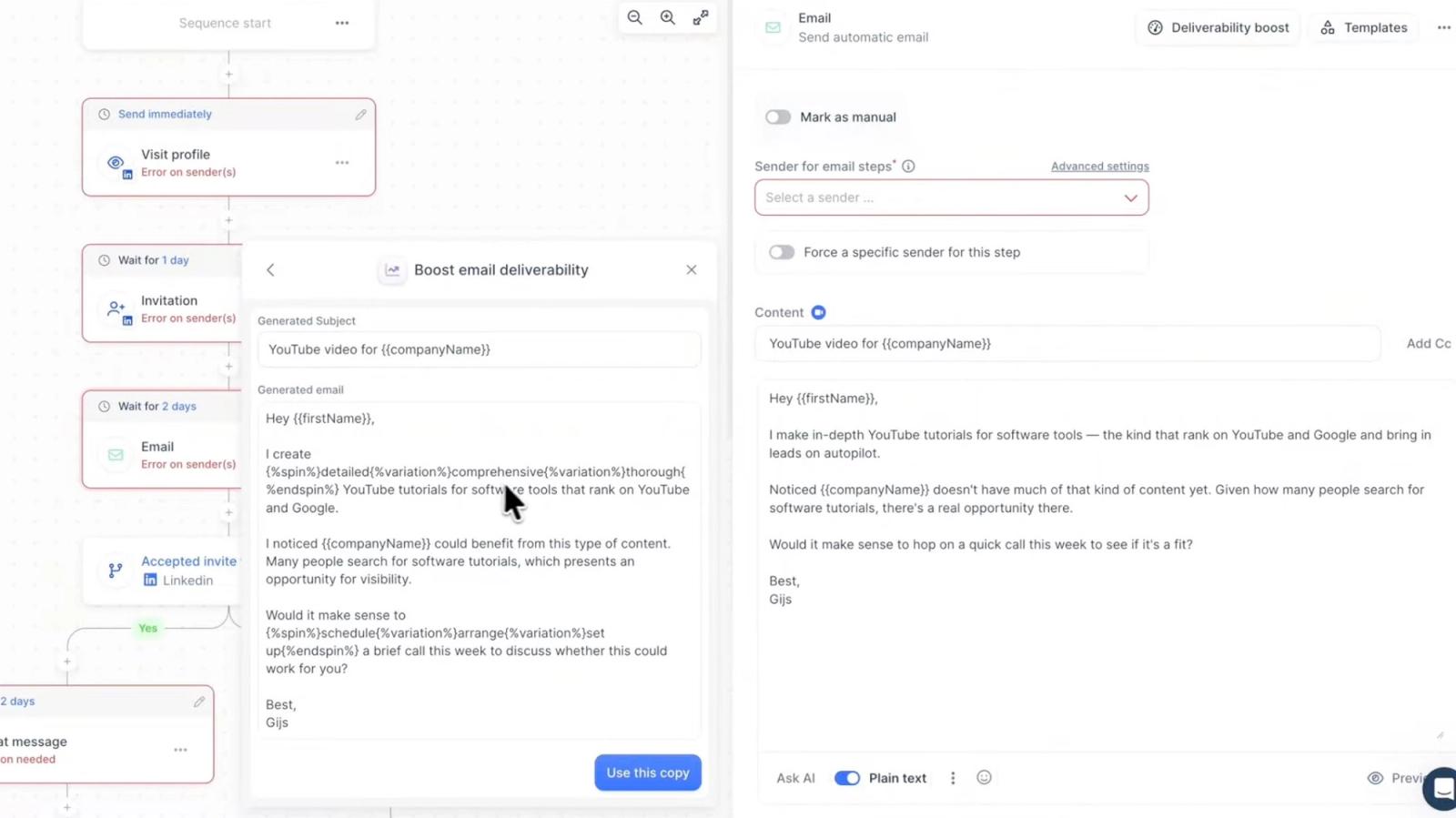
lemlist's sequence builder lets you chain email, LinkedIn and task steps into one campaign, and on Multichannel that chain can include profile visits, connection invitations, LinkedIn text and voice messages, likes and skill endorsements alongside your email steps. Multichannel adds one LinkedIn account and five sending mailboxes per seat ($9 a month for each extra mailbox, as listed on 26 September 2026), unlimited emails and messages once you are on that plan, SMS automation, a WhatsApp add-on, a built-in call dialer with VoIP integrations, task management, and the ability to work from Gmail or LinkedIn directly rather than only inside lemlist's own interface.
The builder itself is well designed for what it is: an email sequence tool that also understands LinkedIn steps, rather than a LinkedIn tool that happens to send email. Every step type carries its own sender configuration, which means a multichannel sequence is only as ready to launch as its least configured channel. That is not a flaw exactly, it is a consequence of building email-first and adding LinkedIn on top, and it shows up again in the feature list: the AI copywriting and deliverability tooling around email are more mature than anything on the LinkedIn side.
What LinkedIn steps can lemlist automate?
lemlist's Multichannel sequence builder ships seven distinct LinkedIn step types: Profile Visit, Invite, Chat Message, Voice Message, AI Voice Message, Like Last Post and Endorse Skill. lemlist's product page gates the whole set behind a plan: "You'll need the Multichannel or Enterprise plan to use LinkedIn steps in your outreach," though the steps are also open during the 14-day free trial. Every LinkedIn action works, on lemlist's own claim, with "a regular (free) LinkedIn account," so Sales Navigator is not a requirement to run any of these steps.
Two guardrails apply before a step ever fires. First, lemlist's help center documents a "Has LinkedIn URL" condition sequences need, so only leads with a known profile URL are routed into LinkedIn steps rather than dropped or skipped silently. Second, lemlist pairs email and LinkedIn with smart triggers that cross channels, for example sending a LinkedIn message when a lead does not respond to an email, the kind of cross-channel logic the email-first design was built around.
| Step | What it does | Constraint |
|---|---|---|
| Profile Visit | Visits a lead's LinkedIn profile automatically to signal interest | Runs on Multichannel, Enterprise or the free trial |
| Invite | Sends a connection request with a personal note | LinkedIn allows up to 200 characters in the invite note |
| Chat Message | Sends a standard LinkedIn message | 1st-degree connections only, after the invite is accepted; not InMail; no custom hyperlinks |
| Voice Message | Sends a manually recorded or uploaded audio note | Requires a connected LinkedIn account and a specific sender |
| AI Voice Message | Sends a cloned-voice audio note reading a personalized script | 5 credits per message, covered in the next section |
| Like Last Post | Likes a lead's most recent LinkedIn post | Feed engagement step |
| Endorse Skill | Endorses a skill on a lead's profile | Feed engagement step |
That table is the real shape of "LinkedIn automation" on lemlist: five outreach-style actions and two lightweight engagement actions, none of them InMail, and every one of them gated to Multichannel or Enterprise.
Run LinkedIn outreach across every sender with Cadency
Eight LinkedIn steps, including InMail and AI-drafted post comments you approve, in one campaign across every LinkedIn sender and mailbox, with one inbox for the replies.
From $89 a month with 2 LinkedIn senders included.
Is lemlist Multichannel good for LinkedIn automation?
lemlist Multichannel covers real LinkedIn ground: profile visits, connection invitations, text messages, voice messages, likes and skill endorsements, all inside the same sequence as your email steps. For a team that wants LinkedIn to warm up or follow through on an email-led sequence, that coverage is enough, and having it in the same builder as email means one campaign instead of two tools stitched together.
Where it shows its limits is scale and identity. Multichannel is priced and built per user, with one LinkedIn account per seat (the five senders listed per seat are sending mailboxes for email), which assumes each rep runs LinkedIn from one identity rather than a team rotating outreach across a shared pool of accounts. There is no multi-account rotation model of the kind a LinkedIn-first platform builds around, and per-account health monitoring is not part of the plan's feature list. If your LinkedIn motion is one rep per account, that is a non-issue. If you are running an agency book or a team that wants several senders sharing load on one campaign, it is the first place the email-first design shows.
How do lemlist's AI voice messages work, and what do they cost?
lemlist's AI Voice Message step works by cloning your own voice and using it to read a dynamic, personalized script for each lead, rather than sending the same recording to everyone. lemlist's help center describes the feature as "automatically generated audio recordings that mimic your voice (via voice cloning), read a dynamic script with personalized variables." Voice cloning itself is free, and so is previewing: you can generate up to 15 previews a day before you ever send one, which is enough to check tone and pacing across a handful of scripts without touching your credit balance. Sending is what costs money: "Sending an AI voice note to a lead costs 5 credits per message," and since lemlist prices 1 credit at $0.01, that puts a single AI voice note at 5 cents. One limitation worth flagging before you build a sequence around it: variables containing URLs are not supported inside the script, so a voice note cannot read out a personalized link, the same restriction lemlist places on its Chat Message step, which also does not support custom hyperlinks.
Put a real send volume against that rate and the cost is easy to plan for.
Scale that to a five-person team all sending the same volume and the credit line alone adds $75 a month, separate from the five Multichannel seats. The AI Voice Message step requires the Multichannel Expert or Enterprise plan, or the free trial, and needs a connected LinkedIn account with a specific sender assigned, the same requirement as the manual Voice Message step above it. If a personal-sounding voice note matters to your outreach but you would rather not manage cloning and credits, our guide to LinkedIn video messages covers the video alternative some LinkedIn-first tools use instead.
Can lemlist send InMails or comment on LinkedIn posts?
No. lemlist's own Multichannel feature list covers profile visits, connection invitations, LinkedIn text messages, voice messages, likes and skill endorsements, and InMail and automated post comments are not on that list. That is a real gap if your outreach depends on reaching second and third degree prospects before a connection exists, since InMail is the tool built for exactly that, and it is worth reading our guide to LinkedIn InMail if that channel matters to your motion. InMail itself runs on a credit system LinkedIn controls, not lemlist, and LinkedIn's own help page on InMail credits is the source to check before assuming any tool can send them without limit.
Voice messages are the one place lemlist goes further than a lot of tools in this category: recording a personal-sounding voice note inside a LinkedIn sequence is a genuinely useful touch for warming up a connection before the ask. The gap is what surrounds it. No InMail means no way to message a prospect who has not accepted your connection request yet, and no post comment automation means one of the more effective warm-up moves, engaging with a prospect's own content before you invite them, is not something the platform does for you.
What do lemAgent and the lemlist MCP add?
lemAgent adds an AI agent that builds a full campaign from a plain-language goal, and lemlist's product page claims most campaigns are ready in under 15 minutes. Describe your outreach goals and, in lemlist's words, "It finds the leads, builds the sequence, and writes the messages, all in one conversation," designing the full sequence with "steps, timing, and branching logic." Nothing ships automatically: "Nothing launches without your approval," and the result lands in the standard campaign builder for review rather than firing on its own. lemAgent also carries memory across a team: "Team memories and saved ICPs are shared across everyone," so an ICP one rep defines does not have to be rebuilt by the next. Unlike LinkedIn automation, lemAgent and the AI Agents feature are listed on the Email plan too, not gated to Multichannel.
The lemlist MCP server does a related job from outside lemlist's own interface: it exposes lemlist's data and actions to any MCP-compatible AI client. lemlist names "Claude Desktop, Cursor, and Windsurf" as the most popular clients, and the server ships "40+ tools" covering lead search, enrichment with verified emails and phone numbers, sequence creation across email, LinkedIn and calls, campaign launches, analytics pulls and optimizing underperforming steps. Setup is a one-time step: "You configure a JSON file once with your API key and server URL." Like lemAgent, the MCP server is listed on the Email plan, so a team never needs Multichannel just to connect an AI client. For a broader look at what an MCP server can and cannot do for outreach, our guide to the LinkedIn MCP server covers the pattern in more depth. For the REST API underneath and the full MCP tool count, see our lemlist API review.
One inconsistency worth flagging before you rely on the number: lemlist's own pages do not agree on database size. The lemlist MCP page describes searching "leads across 450M+ contacts," while the pricing page advertises a "650M+" lead database on both the Email and Multichannel tiers. We are not picking a winner here: both figures come from lemlist itself, verified September 2026, and the gap between them is large enough that it is worth asking lemlist directly which number applies to your plan before you size a list against it.
What does lemlist pricing look like in 2026?
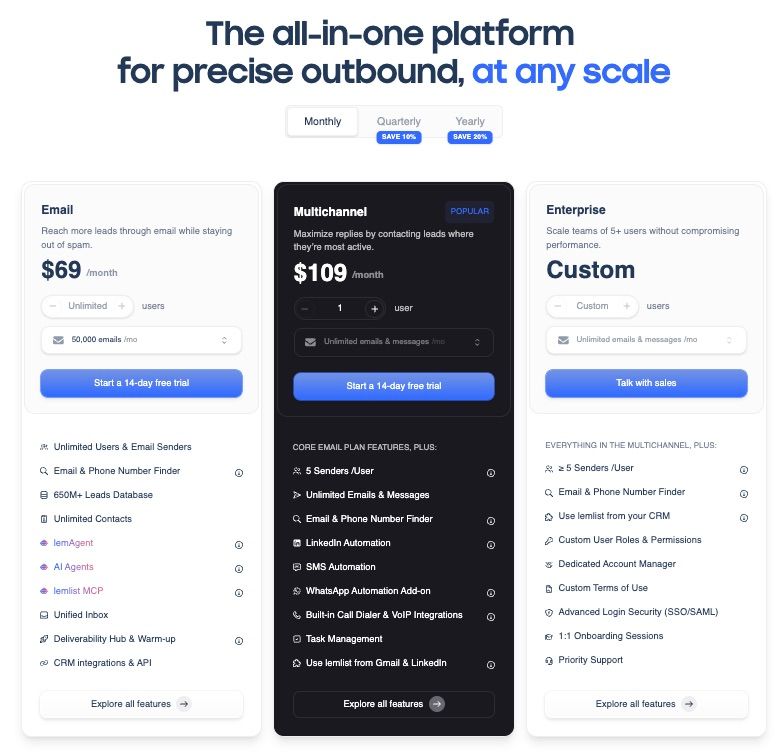
lemlist's Email plan costs $55 to $69 a month per workspace for 50,000 emails, rising with volume to $659 a month for 1 million, and Multichannel costs $87 to $109 per user a month, with the pricing page defaulting to yearly billing, so the number you see first is the discounted one; switch the toggle to check the monthly rate before you commit to anything. Verified on lemlist's own pricing page in September 2026, with the Email plan's volume tiers and the Multichannel seat allowances rechecked on 26 September 2026, here is what each tier costs and includes:
| Plan | Monthly billing | Annual billing (per month) | What it includes |
|---|---|---|---|
| $69 per workspace for 50,000 emails, $89 for 100,000, $159 for 200,000, $359 for 500,000, $659 for 1M | $55 per workspace at 50,000 emails | Unlimited users and email senders, price set by monthly email volume, email and phone finder, 650M+ lead database, lemAgent AI agents, lemlist MCP, unified inbox, deliverability hub with warm-up, CRM integrations and API | |
| Multichannel | $109 per user | $87 per user | Everything in Email, plus LinkedIn automation (profile visits, invites, text and voice messages, likes, skill endorsements) with one LinkedIn account per seat, 5 sending mailboxes per seat ($9 per extra), no monthly email cap, SMS automation, WhatsApp add-on, call dialer with VoIP integrations, task management |
| Enterprise | Custom | Custom | For teams of 5+ users, 5 or more senders per user, CRM-embedded use, roles and permissions, dedicated account manager, SSO and SAML, 1:1 onboarding, priority support |
The tier gating is the single most important line in that table: LinkedIn automation is a Multichannel feature only. An Email plan user cannot send a single LinkedIn connection request from inside lemlist, no matter how many email sends their unlimited-sender plan allows. Annual billing saves 20 percent on both paid tiers, and there is a 14-day free trial on the paid plans.
Scaling the Multichannel plan by headcount makes the per-user pricing concrete. A three-person team pays $87 a user on annual billing, or $261 a month, which comes to $3,132 for the year; the same three seats on monthly billing run $109 a user, or $327 a month, $3,924 across twelve months of month-to-month billing. That gap, $792 a year, is what you give up for the flexibility of paying monthly rather than committing upfront. At ten people the math changes shape rather than just size: lemlist's own tier structure puts a team that large into Enterprise territory, since Enterprise is built for teams of 5 or more users, and Enterprise pricing is custom rather than published. Extrapolating the list rate anyway, ten seats at $87 a user annual would be $870 a month, or $10,440 a year, which is the number worth having in hand before a custom quote comes back, since it tells you what you are negotiating against.
Beyond the subscription, lemlist runs a separate credit system for lead-finding and verification. One credit costs $0.01: a verified email costs 5 credits ($0.05), and a phone number costs 20 credits ($0.20). At the bundle rate, 1,000 credits ($10) buys 200 verified emails or 50 phone numbers. Intent signals are priced per signal too: a company web visit costs 20 credits, hiring and job-change signals start at 100 credits, fundraising signals cost 100 credits, and LinkedIn engagement signals start at 400 credits.
Put a number on a real list and the credit system stops being abstract. A 500-lead list verified entirely by email costs 2,500 credits, or $25, at 5 credits a record. Verify the same 500 leads by phone instead and the cost jumps to 10,000 credits, or $100, since phone verification runs 20 credits a record, four times the email rate. Layer in intent signals on top of either list and the bill moves again: a company web-visit signal on all 500 leads adds another 10,000 credits, or $100, at the 20-credit rate, while running hiring and job-change signals across the same list adds at least 50,000 credits, or $500, at the 100-credit floor. None of that is a criticism of the pricing, it is simply the part of lemlist's bill that scales with enrichment depth rather than seats, and it is worth budgeting before you commit to a workflow that leans on signals for every lead.
Here is what actually changes between the two paid tiers, feature by feature:
| Feature | Email plan | Multichannel plan |
|---|---|---|
| Email sending | Unlimited users and senders, 50,000 to 1,000,000 emails a month by volume tier | No monthly email cap, plus unlimited multichannel messages once active |
| LinkedIn automation | Not included | Profile visits, invites, text and voice messages, likes, skill endorsements |
| Senders per user | Unlimited email senders | One LinkedIn account and 5 sending mailboxes per user, $9 per extra mailbox |
| SMS and WhatsApp | Not included | SMS automation, WhatsApp add-on |
| Call dialer and VoIP | Not included | Included |
| lemAgent AI agents and MCP server | Included | Included |
| Deliverability hub and warm-up | Included | Included |
The upgrade buys three new channels, with one LinkedIn account per seat; it does not buy anything that widens what LinkedIn itself can do on the platform.
The decision rule is simpler than the feature lists make it look. Buy the Email plan if your outbound motion is entirely email-based and you need more than a couple of people sending: unlimited users and unlimited email senders on a price set per workspace by volume, $55 to $69 a month for 50,000 emails, means adding a fourth or fifth rep costs nothing extra in seats, and when 50,000 emails a month is not enough, published tiers climb to 1 million emails for $659 a month, as listed on 26 September 2026. Buy Multichannel the moment a LinkedIn step needs to exist anywhere in your sequence, even a single profile visit before the email lands, because there is no way to add LinkedIn actions to an Email-plan account. Multichannel does not raise the sender ceiling, though: each seat connects one LinkedIn account and comes with five sending mailboxes, $9 a month for each extra, against unlimited email senders on the Email plan, so a rep who runs a second LinkedIn identity needs a second seat.
lemlist at a glance
Pros
- Unlimited users and senders on the Email plan, at $55 to $69 a month per workspace
- Deliverability hub and warm-up genuinely help email land in the inbox
- LinkedIn, SMS, WhatsApp and calls in the same sequence builder as email
- lemAgent AI agents and an MCP server ship on every paid plan
- 14-day free trial on the paid plans
Cons
- LinkedIn automation does not exist on the cheaper Email plan
- No InMail or automated post comments on the Multichannel plan
- Priced per user with one LinkedIn account per seat, not built for multi-sender rotation
- Lead-finding and verification credits are a separate, stacking cost
How strong is lemlist on deliverability?
lemlist puts its core deliverability tooling on every paid seat rather than gating it to a higher tier: "Every lemlist seat includes built-in deliverability tools, including lemwarm, our automated warm-up and deliverability booster." Warm-up runs alongside inbox management features built for teams sending from more than one address: lemlist's inbox delivery page describes the platform working to "rotate across inboxes automatically," which spreads volume across multiple sending addresses rather than hammering one. On top of rotation, lemlist "spaces emails naturally, caps volume per inbox, and sends within your prospects' timezone," three separate levers working together to keep any single inbox from looking like a mail server.
Before a campaign goes out, lemlist runs a pre-send check: "Before you send, Deliverability Boost checks your copy, your technical setup, and your inbox placement signals." List verification runs before campaigns too, catching bad addresses before they hit a send and hurt sender reputation. What lemlist does not do is publish a number: there is no stated inbox placement rate, no open rate benchmark and no deliverability percentage anywhere on the pages we checked, so any figure attached to lemlist's name outside its own product pages is not one we can verify. The deliverability stack described here sits entirely on the email side, which is a genuine strength of the Email plan specifically, and one more reason the Email and Multichannel split matters: warm-up, rotation and pre-send checks do nothing for the LinkedIn steps covered earlier in this review.
Is lemlist safe for LinkedIn accounts?
lemlist's own product page addresses safety directly, describing the platform as designed to "automate LinkedIn actions with smart limits and human-like delays," though it does not publish what those limits actually are. The help center is more specific about the philosophy than the numbers: "Keep your daily LinkedIn activity conservative and increase gradually," with no numeric daily cap stated anywhere in that article. What you actually control lives in Settings > Sending limits, where daily caps for LinkedIn messages and voice messages are set by the user, not assigned automatically by lemlist based on account age or warm-up status.
lemlist does not publish a detailed breakdown of per-action LinkedIn safety limits on its pricing or feature pages, so we will not invent one. What we can say is general to any tool that automates LinkedIn actions: the account doing the sending is yours, LinkedIn enforces its own connection limits, and pushing volume past what a real person would send is the fastest way to see an account flagged or restricted. LinkedIn documents how invitation limits and account restrictions actually work on its own help page on invitations and restrictions, which is worth reading regardless of which tool you use. Our guide to whether LinkedIn automation is safe covers the mechanics in detail: what LinkedIn actually limits, how restrictions escalate, and what separates a tool that manages that risk from one that ignores it.
Because lemlist's LinkedIn steps assume one identity per user rather than a managed pool of senders, that user-set cap is effectively the whole safety system: the pages we read describe no per-sender dedicated proxy and no automated health check on the LinkedIn side. That is workable for a single rep running LinkedIn as a secondary channel, manually dialing in a conservative daily number and watching it. It is a heavier lift for a team running several accounts at once, which is the gap a platform with a dedicated proxy, a ceiling and pacing for every sender is built to close.
How does lemlist compare with Cadency?
If email genuinely carries your pipeline and LinkedIn is a supporting touch, lemlist is a strong choice and its Email plan is hard to beat on price. If LinkedIn is the channel doing the outreach, Cadency, our own outreach software built on Swarmhit, starts from the other end: the LinkedIn sender is the unit you pay for, and email runs in the same campaign instead of LinkedIn sitting on an add-on tier. For the wider field, see our lemlist competitors guide.
Cadency prices by plan rather than by user: Essential is $89 a month with 2 LinkedIn senders and 100k emails a month, Small Team is $199 a month with 5 LinkedIn senders included and 100k emails a month, Scale is $699 with 20 senders and 500k emails a month (1M for +$200, 2M for +$500), extra senders cost $39 per additional LinkedIn sender on Essential and Small Team and $25 on Scale, and annual billing takes 30 percent off, to $62, $139 and $489 a month. Every plan includes unlimited mailboxes, teammates and workspaces. One campaign runs across every LinkedIn sender and every mailbox, one sender per lead, with sender rotation under a ceiling for each sender, and replies land in one unified inbox with one thread per lead across LinkedIn and email, assignable and answered as any sender. The LinkedIn side covers eight steps: profile visit, connection request, message, InMail, a comment on the lead's last post (AI drafted, approved by you), voice note, like and follow, with conditions on connected, replied and email found, waits and A/B splits. Unlimited Google and Microsoft mailboxes with warm-up rotate inside the same campaign as LinkedIn, and every LinkedIn sender runs in the cloud on a dedicated proxy, with its own ceiling, pacing and checkpoint handling. A native people and company database with waterfall enrichment, paid per verified hit, sits beside CSV and Sales Navigator imports, and an API and webhooks come on every plan, which is also how any CRM connects: there is no native CRM sync. Essential starts with a free trial; Small Team and Scale are self-serve, without a trial.
Where lemlist wins instead: lemlist adds SMS, WhatsApp, a call dialer, lemAgent and native CRM integrations, with mature deliverability tooling around email and a 14-day trial that opens the Multichannel features. On price, one Multichannel seat at $109 costs more than Cadency's Essential plan, $89 with two LinkedIn senders. Cadency covers two channels, LinkedIn and email, connects any CRM through its API rather than a native sync, and offers a free trial on Essential while Small Team and Scale are self-serve, without a trial. If LinkedIn is the job and you want several senders, InMail, post comments and a safety model built per sender to run under it, that is what Cadency is built for. See the fuller Cadency versus lemlist comparison for the side-by-side, and our roundup of LinkedIn automation tools for the wider field, including where lemlist's other LinkedIn-first competitors land on price and coverage.
FAQ
Is lemlist worth it in 2026?
Yes, if email is your primary channel. The Email plan's unlimited users and senders, deliverability hub and 650M+ lead database are strong value at $55 to $69 a month per workspace for 50,000 emails, priced by volume rather than by user as of 26 September 2026. It is a harder yes if you are buying it specifically for LinkedIn, since that requires the pricier Multichannel plan and still leaves out InMail and post comments.
How good is lemlist LinkedIn automation compared to LinkedIn-first tools?
lemlist LinkedIn automation covers profile visits, invitations, text messages, voice messages, likes and skill endorsements, which is solid for a supporting channel. It does not cover InMail or automated post comments, and it is priced and built per user rather than around multiple senders rotating in one campaign, which is where LinkedIn-first platforms go further.
Is lemlist pricing per user or per sender?
Per user on Multichannel, and each seat connects one LinkedIn account, so a second LinkedIn account means a second seat; the five senders each seat includes are sending mailboxes for email, with $9 a month for each extra, as listed on 26 September 2026. The Email plan is priced per workspace by monthly email volume instead. A tool priced per sender charges only for the accounts actually sending, which changes the math once a team shares senders across reps.
How much does lemlist Multichannel cost for a three person team?
At the annual rate of $87 a user monthly, three users cost $261 a month. On monthly billing at $109 a user, the same team costs $327 a month. Lead-finding and verification credits are billed separately from either figure, so real monthly spend tends to land above the subscription price alone.
Does lemlist offer a free trial?
Yes, lemlist offers a 14-day free trial on its paid plans, which is enough time to build a real sequence and see how the email and LinkedIn steps behave together before committing to monthly or annual billing.
What is lemlist's G2 rating?
lemlist displays a 4.7 out of 5 rating based on 1,396 reviews as a G2 badge on its own pricing page, alongside a claim of 20,000-plus sales teams using the product. That is lemlist's own displayed figure, not an independent score we verified separately.
Is this lemlist review still accurate for 2026?
The pricing, feature lists and credit costs in this lemlist review were verified on lemlist's own pricing page in September 2026. Vendors change plans and pricing without notice, so treat any figure here older than a few months as worth rechecking against the live page before you buy.
Does lemlist support LinkedIn voice messages?
Yes, lemlist supports two kinds of LinkedIn voice messages on the Multichannel plan: a manually recorded or uploaded Voice Message step, and an AI Voice Message step that clones your voice to read a personalized script. The AI version costs 5 credits per message, or 5 cents at lemlist's $0.01-per-credit rate, though cloning your voice and generating up to 15 previews a day cost nothing.
Does lemlist include LinkedIn automation on the Email plan?
No, lemlist's Email plan does not include LinkedIn automation: lemlist's product page states plainly that "you'll need the Multichannel or Enterprise plan to use LinkedIn steps in your outreach." The Email plan, at $55 to $69 a month per workspace for 50,000 emails, covers email sending, lemAgent, the lemlist MCP server and the deliverability hub, but every LinkedIn step, from profile visits to AI voice notes, requires upgrading to Multichannel or Enterprise.
Conclusion
lemlist is what it says it is: a strong email platform that added LinkedIn as a premium layer rather than building around it. The Email plan is genuinely good value for a team whose pipeline runs on email, and the Multichannel plan's LinkedIn coverage is enough for profile visits, invitations, messages and voice notes layered around that email sequence.
Where it falls short is any team that wants LinkedIn to be the main channel. No InMail, no post comments, per-user pricing built around one identity per rep, and a separate credit system stacking on top of the subscription all point the same direction: pick lemlist for email with LinkedIn support, and look at a LinkedIn-first platform like Cadency if LinkedIn is the job the outreach actually needs to do.
Cadency runs one campaign across every LinkedIn sender and mailbox and is priced by plan rather than by seat, so a team's second to fifth LinkedIn accounts cost nothing extra on Small Team. It began as our internal test bed for the Swarmhit engine, it was never meant to be public, and we kept it running for the sales teams, recruiters and agencies who asked for it. Swarmhit itself is the API for developers who build their own outreach product.


