

The PhantomBuster API is a set of HTTPS endpoints that control your PhantomBuster account: you can launch and stop agents, read their console output and status, manage scripts, and get results back as JSON, all through one API key in a request header. There is no separate API pricing tier: every call spends the same automation slots and execution time as the plan you already pay for, from the free Trial through Scale.
This guide is for developers and technical founders wiring PhantomBuster into their own stack, whether that is a cron job, a workflow tool or an AI agent through PhantomBuster's own MCP server. We cover how the key and its header work, which endpoints matter, how launching and reading output actually plays out, where v1 and v2 disagree, how webhooks and the MCP server behave, what running the API actually costs, and where the reference stops short of a real LinkedIn messaging API.
What is the PhantomBuster API?
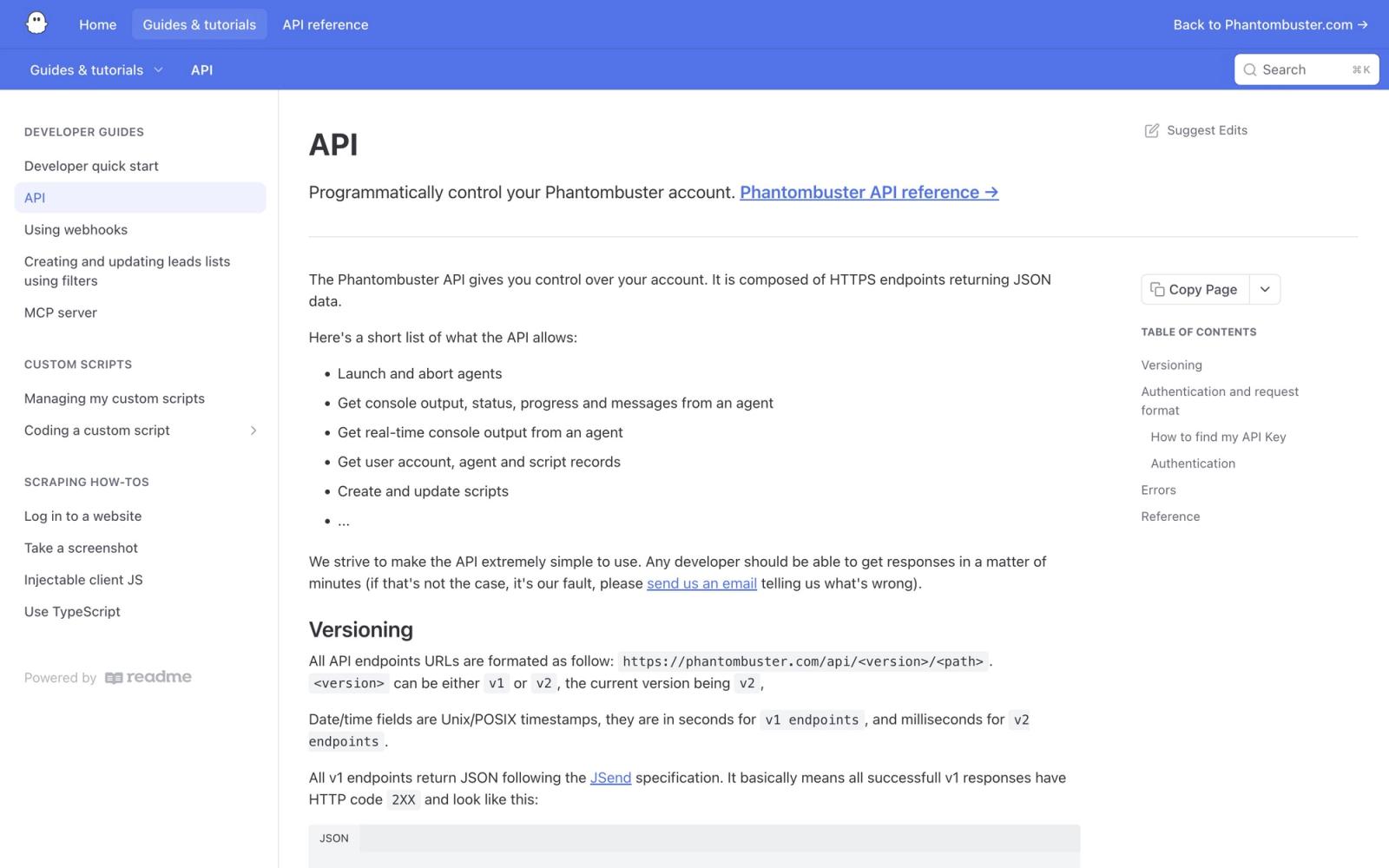
PhantomBuster describes its own API in one line, in its own API documentation: it "gives you control over your account" and "is composed of HTTPS endpoints returning JSON data." Concretely, the reference lists what that control covers: launching and aborting agents, pulling console output, status, progress and messages from a running agent in real time, reading back your account, agent and script records, and creating or updating scripts. Everything runs through the same account you already manage from the dashboard: the API is a second door into the same automations, called agents in the reference and Phantoms on the marketing pages, not a separate product with its own feature set.
For LinkedIn specifically, that means the API can start a Phantom that scrapes a search or sends a connection request, and it can tell you the Phantom finished and hand back the results. It does not expose a LinkedIn action as its own first-class endpoint. The only way to trigger one is to launch whichever agent already does that job, which is a meaningful difference from a purpose-built connector like the ones we cover in our linkedin scraper api guide, where the endpoint names describe the LinkedIn action directly instead of a generic agent you configured earlier in a browser.
How do you get a PhantomBuster API key?
Generate the key once, from your Workspace settings page, and save it immediately. PhantomBuster's own guide warns that "for security reasons, your key will only be shown once, on creation," so losing it means generating a fresh one rather than looking the old one up again. Treat it like any other credential: the docs put the risk plainly, "anyone who knows it can launch your agents."
Two ways exist to pass the key, and they are not quite consistent with each other. The API guide's own examples put it in an X-Phantombuster-Key-1 header. The v2 OpenAPI definition instead names the security scheme X-Phantombuster-Key, without the trailing 1, so check which header name your client or generated SDK actually sends before assuming a 401 means a bad key rather than a typo in the header name. The alternative is a key query string parameter, which the docs themselves discourage: "not recommended because your key might show up in log files or caches." Keep the key in a header, not in a URL you might log somewhere.
curl https://api.phantombuster.com/api/v2/agents/fetch-all \
  -H "X-Phantombuster-Key: YOUR_API_KEY"
That single request is a good first call to make with a fresh key. If it returns your agent records instead of a 401, authentication is wired correctly before you build anything that depends on it.
Building on a LinkedIn outreach API?
Swarmhit exposes campaigns, sender rotation, reply detection and safeguards behind one API with webhooks, on LinkedIn accounts your customers connect themselves.
Public pricing from $16.90 per sender. White-label available.
Which PhantomBuster endpoints matter most?
The reference groups its v2 endpoints by what they act on: agents, scripts, branches and, in beta, an org-storage layer for leads and companies. The table below lists the ones a typical integration touches first, with a one-line purpose for each.
| Endpoint | Purpose |
|---|---|
| POST /agents/launch | Adds an agent to the launch queue |
| POST /agents/stop | Stops a launched agent |
| GET /agents/fetch | Gets a single agent record |
| GET /agents/fetch-all | Gets all agent records on the account |
| GET /agents/fetch-output | Gets the output of the most recent container, built for incremental polling |
| POST /agents/save | Creates or updates an agent |
| POST /agents/delete | Deletes an agent |
| POST /agents/unschedule-all | Disables the automatic launch for all agents in the organization at once, not for a single agent |
| /scripts/* | Creates and updates scripts |
| /branches/* | Manages script branches |
| /org-storage/leads/save, /org-storage/leads/save-many and /org-storage/lists/* | Saves leads and manages lists (Beta) |
| /org-storage/leads-objects/search | Searches stored lead objects |
| /org-storage/companies-objects/* | Manages stored company objects |
| /identities/* | Manages identities |
Two details in that list are easy to miss. Saving a lead and every operation under lists (save, delete and both fetch calls) are marked Beta in the reference, worth flagging in your own integration notes since beta surfaces move; the other leads and leads-objects endpoints carry no such tag. And a separate endpoint, POST /agents/launch-sync, launches an agent and streams execution status in NDJSON as it happens, instead of you polling fetch-output in a loop, which matters if your integration needs to react the moment an agent finishes rather than a few seconds later.
The reference index also lists a handful of utility endpoints outside those groups: AI completion and advice endpoints, an hCaptcha and reCAPTCHA solving pair, and a Bright Data powered SERP search. They sit next to PhantomBuster's own SDK, an npm package that watches a local folder on your machine and uploads changed scripts to your account automatically, which is a tool for developing custom Phantoms in your own editor rather than a general-purpose client for calling the API from any language.
How do you launch a Phantom and fetch its output?
Launching and reading results back is a two-call pattern: POST to queue the agent, then GET to read what it produced.
curl -X POST https://api.phantombuster.com/api/v2/agents/launch \
  -H "X-Phantombuster-Key: YOUR_API_KEY" \
  -H "Content-Type: application/json" \
  -d '{"id": "AGENT_ID", "argument": {}}'
The launch endpoint "adds an agent to the launch queue" rather than confirming a run has actually started, which is as far as the reference documents that step. The body takes an id for the agent and an argument, which the reference lets you send either as a JSON string or as a JSON object, matching whatever the agent's own configuration expects.
curl "https://api.phantombuster.com/api/v2/agents/fetch-output?id=AGENT_ID" \
  -H "X-Phantombuster-Key: YOUR_API_KEY"
fetch-output is "designed so that it's easy to get incremental data": it returns the output of the most recent container rather than a full history, so a polling loop that calls it every few seconds gets the newest console lines without re-downloading everything that came before. The reference documents six status values: starting, running, finished, unknown, launch error, and never launched for an agent that has not run yet. Poll until you see finished, or one of the failure states, rather than assuming a fixed run time, since execution time varies with what the agent is actually doing on that call.
What is different between PhantomBuster v1 and v2?
Two versions of the API exist side by side. The general format the guide documents is https://phantombuster.com/api/<version>/<path>, with v1 and v2 both live and "the current version being v2," which is also the version every example in this article uses. The OpenAPI definition for v2 lists a slightly different server address, https://api.phantombuster.com/api/v2, with an api. subdomain in front, so do not be surprised if your own tooling generates that host instead of the guide's plain phantombuster.com form. Point at whichever host your client actually resolves and confirm with a real request rather than assuming.
The two versions also disagree on how they format time and success. Timestamps in v1 responses are in seconds, while v2 switches to milliseconds, which matters the moment you compare a launchDuration or a runDuration against a value you stored from the other version. v1 also wraps every response in the JSend convention, {"status":"success","data":{...}}, a shape that comes from the JSend specification rather than being specific to PhantomBuster.
The docs describe one error shape: a 4XX or 5XX status code with a body of {"status":"error","message":"..."}. In our own unauthenticated test call to the v2 API on September 21, 2026, the 401 response carried its text under an "error" key rather than "message", so read both fields. The docs name four causes worth handling explicitly: 400 for a missing or wrong parameter, 401 for a missing or wrong API key, 404 when the object you asked for does not exist, and 500 for a server error on PhantomBuster's side. A 401 on a request you are sure is authenticated is worth checking against the header name mismatch flagged earlier before you assume the key itself is wrong.
How do PhantomBuster webhooks work?
PhantomBuster's webhooks are an end-of-run notification, not a progress stream: "custom webhooks are called at the end of an agent's execution," configured per agent under its Advanced Notification Settings. That means a webhook tells you a run is over and what happened, not that it reached partway through a list; for anything in between, you are back to polling fetch-output.
| Field | What it tells you |
|---|---|
| agentId | ID of the agent that finished |
| agentName | Name of the agent |
| containerId | ID of the container that ran the execution |
| script | Script that ran |
| scriptOrg | Organization the script belongs to |
| branch | Branch that was used |
| launchDuration | Launch duration, in milliseconds |
| runDuration | Time the agent spent running, in milliseconds |
| exitCode | Process exit code |
| exitMessage | One of finished, killed, global timeout, org timeout, agent timeout, unknown |
| resultObject | Result data produced by the run |
One gap is worth planning around before you rely on the payload for anything security-sensitive: PhantomBuster's webhooks do not support custom request headers, so the docs suggest passing a secret as a query parameter on the webhook URL itself instead of in a header you control. That is a weaker guarantee than a signed header, and it means the secret sits in your webhook URL wherever that URL happens to get logged, which is worth remembering if your receiving endpoint writes request logs by default.
How do you use the PhantomBuster API in n8n or Make?
Both n8n and Make ship a native PhantomBuster connector, and both authenticate with the same API key from Workspace settings that every curl example in this guide uses, so there is no second credential to create. What differs is how much of the API each one wraps, and whether either can tell you a run has finished.
n8n's PhantomBuster node covers one resource, Agent, with five operations, as listed in n8n's node documentation: Delete, Get, Get Many, Get Output and Launch. They map one to one onto agents/delete, agents/fetch, agents/fetch-all, agents/fetch-output and agents/launch from the endpoint table above. There is no PhantomBuster trigger node. An n8n workflow launches a Phantom, then either polls Get Output on a schedule or waits on a Webhook node that PhantomBuster's end-of-run webhook calls, using the custom webhook URL described in the previous section. For anything outside those five operations, scripts, leads, containers, n8n's docs point to the HTTP Request node with the PhantomBuster credential selected as a predefined credential type, which is the same REST call with the header filled in for you.
Make's PhantomBuster app is a little wider. Its module list on Make's app directory has seven entries: Launch a Phantom, Get a Phantom, Get an Output, Download a Result, List Phantoms, a generic Make an API Call, and one trigger, Watch an Output, which Make describes as firing when a Phantom completes its task and generates its latest output data. Download a Result is the module n8n has no equivalent for: it pulls the JSON result file linked to a specific container rather than the console output of the most recent run, which is what a scenario needs when it wants the scraped rows and not the log.
| n8n PhantomBuster node | Make PhantomBuster app | |
|---|---|---|
| Authentication | API key credential | API key connection |
| Launch a Phantom | Launch | Launch a Phantom |
| Read results | Get Output (most recent container) | Get an Output, Download a Result (JSON file by container) |
| List or inspect agents | Get, Get Many | Get a Phantom, List Phantoms |
| Delete an agent | Delete | Not listed |
| Completion trigger | None, use a Webhook node or poll | Watch an Output |
| Any other endpoint | HTTP Request node with the predefined credential | Make an API Call |
Two things carry over from the rest of this guide regardless of which tool you pick. A launch from either connector only adds the agent to the launch queue, as the raw endpoint does, so a workflow that reads output immediately after launching will get the previous run's data or nothing. And every launch spends the same slots and execution time as a dashboard launch, so a scenario scheduled every few minutes drains the monthly budget as fast as a person clicking Launch that often. Neither connector exposes a LinkedIn action by name either: you are still launching a Phantom you configured in the browser first. We walk through that pattern end to end, with the LinkedIn-specific limits it runs into, in our n8n and LinkedIn guide.
What is the PhantomBuster MCP server?
PhantomBuster also ships an MCP server, hosted at mcp.phantombuster.com, so an AI agent can drive Phantoms directly instead of you writing a REST client for it. It authenticates through OAuth rather than the API key header, uses the Streamable HTTP transport, and is scoped to one workspace you choose when you connect it, so a single MCP connection cannot reach across every workspace on your account.
What it exposes is deliberately narrower than the full API. PhantomBuster describes it as "a curated subset of the PhantomBuster API," covering launching, checking, stopping and configuring Phantoms, retrieving results and logs, searching, saving and updating leads, building dynamic lists, and exploring agents, scripts and usage. That is enough for an agent to run and monitor existing automations and work with stored leads. It is not a wider surface than the REST API itself, since it is explicitly described as a subset of it. If you are comparing how different vendors expose LinkedIn access to an agent over MCP, our LinkedIn MCP server piece covers that ground.
The split is not only about which actions exist. The reference marks at least one endpoint, the one that updates the organization's own record, as callable only from a web or MCP session, so a request authenticated with the static API key header cannot make that particular change even though the same key reaches almost everything else in this article.
What does PhantomBuster API usage cost in 2026?
There is no separate API pricing line item. Every API launch consumes the same slots and execution time as a manual launch, so calling agents/launch through curl costs exactly what clicking Launch in the dashboard costs, measured against the same monthly budget.
| Plan | Monthly billing | Annual billing (per month) | Slots | Execution time a month |
|---|---|---|---|---|
| Trial | Free | Free | 5 | 2 hours |
| Start | 69 euros | 56 euros | 5 | 20 hours |
| Grow | 159 euros | 128 euros | 15 | 80 hours |
| Scale | 439 euros | 352 euros | 50 | 300 hours |
Every figure above is quoted exactly as PhantomBuster's own pricing page displayed it in September 2026; the page localizes currency by region, so treat these as what the vendor's page showed us rather than a converted rate. Whether the API itself is gated to specific plans is not stated on that page, so we will not claim it is restricted to any particular tier, and we would not trust a source that told you otherwise without pointing at the page itself.
20 hours
Execution time included on PhantomBuster's Start plan a month, spread across up to 5 slots, as displayed on its pricing page in September 2026
Run out of execution time, whether from manual launches, scheduled runs or API calls, and PhantomBuster's own rule is explicit: "Your automations will pause until your execution time resets or you upgrade your plan. No overage charges are applied automatically." That is worth designing around if a script calls agents/launch on a schedule. A paused agent will not error loudly, it will simply stop producing new output until the next monthly reset or a plan upgrade, so a periodic check of fetch-output's container status is cheap insurance against a silent pause going unnoticed for days.
What can the API not do?
The API controls PhantomBuster automations. It is not a LinkedIn messaging or inbox API: no endpoint in the reference sends a LinkedIn message, reads a LinkedIn inbox, or lists conversations as a first-class resource the way agents or scripts are. Those actions exist only as agents you configure and launch, with their output read back through fetch-output afterward, the same generic pattern as any other automation the API controls. If your product needs message threads and reply state as real objects with their own endpoints, that sits closer to what we describe in our linkedin messaging api guide than to anything in PhantomBuster's own reference.
The polling model is also a real constraint, not just a style choice. Progress comes from calling fetch-output yourself. The only push notification PhantomBuster sends is the end-of-run webhook covered above. And every launch, however triggered, draws from the same single execution-time meter, so a burst of API-triggered launches competes for the same monthly budget as anything started by hand in the dashboard.
None of this is unique to PhantomBuster. LinkedIn's own developer platform is closed by default. According to Microsoft's LinkedIn developer documentation, "most permissions and partner programs require explicit approval from LinkedIn. Open Permissions are the only permissions that are available to all developers without special approval." Reading another member's connections needs that approval too: LinkedIn's Connections API documentation states plainly, "the use of this API is restricted to those developers approved by LinkedIn," and even sending an invitation through the official Invitations API is "restricted to approved partners, subject to limitations via API agreement." Sales-specific access needs its own approval as a Sales Navigator Application Platform partner. Against that backdrop, PhantomBuster's account-based model, where an agent acts through an account you already connected rather than through a partner-approved OAuth scope, is one of several ways third-party tools work around a developer program that most teams will never be accepted into.
When do you need a LinkedIn outreach API instead of PhantomBuster?
PhantomBuster is the right answer when the job is scraping, enrichment or chaining automations across many platforms, LinkedIn included, and you are comfortable assembling the sequence yourself. It stops being the right answer the moment the job is running an actual LinkedIn outreach campaign. Sender rotation across several connected accounts, a shared inbox for replies, and reply detection that moves a lead out of a sequence automatically are not things the reference lists as first-class objects the way an agent or a script is. You can approximate parts of that behavior by chaining several agents together, but you are building the campaign layer yourself rather than calling an endpoint for it. We cover that broader toolbox-versus-sequencer trade-off in our phantombuster alternatives roundup.
If a campaign model already exists as a product, the decision usually comes down to three paths: build on that vendor's API, build the whole thing yourself against LinkedIn directly, or build on outreach infrastructure that hands you the sender and safety layer while you keep your own campaign model. Each vendor's API answers that question differently, including HeyReach's, which we cover separately in our HeyReach API guide: a REST API onto someone else's finished campaign engine inherits that vendor's model along with its speed. Building from scratch against LinkedIn directly means owning session management, proxy hygiene and pacing yourself, a path we walk through in how to build a LinkedIn outreach tool. Our own outreach api roundup compares that build-or-buy decision across several vendors side by side.
None of these paths, PhantomBuster included, run through LinkedIn's own partner program. They act through an account you or your customer already connected, which is a different footing than the approved OAuth scopes described above, and it puts that account inside the automated-access restrictions in LinkedIn's own User Agreement rather than inside a sanctioned integration. We cover what that risk looks like in practice, and what recovery involves, in is LinkedIn automation safe.
Swarmhit sits in that third category: outreach infrastructure rather than a general automation toolbox or a from-scratch build. Its sequencer, multi-sender campaigns with automatic rotation, a unified inbox with AI interest tags, and AI personalization pulled from a prospect's profile, posts and company news, is exposed through an API and webhooks, so a product built on top calls into an existing campaign model instead of assembling one out of task-runners. Senders are LinkedIn accounts the customer already owns and connects, each running on its own dedicated proxy with managed auto-warmup, health checks and smart caps, and 250+ safeguards monitored around the clock, on top of scraping caps of 2,500 profiles a day from Sales Navigator search and 1,000 a day from standard search that Swarmhit enforces on the accounts it runs, not limits LinkedIn itself publishes.
Teams that want the sequencer as a finished product rather than a base to build on can talk to the sales team at Cadency, the outreach app built on Swarmhit.
For teams building their own product on top instead, that same sequencer is the Swarmhit Smart API, priced publicly from $16.90 per sender a month.
PhantomBuster at a glance
Pros
- A REST API covers launching, stopping, fetching and configuring every agent and script
- An MCP server is listed on the free Trial plan, so an AI agent can drive Phantoms directly
- Webhooks fire automatically at the end of a run, so most integrations do not have to poll constantly
- Works from any language that can send an HTTPS request, with no SDK required
Cons
- No first-class LinkedIn messaging, inbox or conversation endpoints in the reference
- Authentication is a single static API key with no OAuth flow
- Whether API access itself is limited to certain plans is not stated on the pricing page
- Every API call shares the same execution-time and slot budget as manual launches, so a busy integration can pause mid-month
FAQ
What is the PhantomBuster API used for?
PhantomBuster's API controls a PhantomBuster account without opening the dashboard: launching and stopping agents, reading their console output, status and progress, managing scripts, and reading back account and agent records. It gives developers a programmatic way to run the same agents and Workflows PhantomBuster runs in the browser, wired into a cron job, a workflow tool or an AI agent instead of a person clicking Launch.
Where can you find PhantomBuster API documentation?
PhantomBuster's API documentation lives on its own hub, alongside a reference index listing every v2 endpoint by name. The docs page is where the authentication rules, the JSON response format and the list of what the API allows, launching and aborting agents, reading console output, and managing scripts, are all described in PhantomBuster's own words rather than a third party's summary of them.
Is the same key used for PhantomBuster's API and its MCP server?
No single key covers both. PhantomBuster's API authenticates with the static key generated once from Workspace settings, sent in an X-Phantombuster-Key header, while its MCP server authenticates through OAuth instead of that key, scoped to one workspace at connection time rather than tied to a long-lived secret you generate up front.
Is there separate PhantomBuster API pricing?
There is no separate PhantomBuster API pricing tier. Every API call spends the same automation slots and execution time as a manual launch from the dashboard, across the same four plans, Trial, Start, Grow and Scale, that price the rest of the account. If usage does run out, PhantomBuster pauses automations rather than billing overage, and whether API access itself is restricted to certain plans is not stated on its pricing page.
How does a PhantomBuster webhook work?
A PhantomBuster webhook fires once, at the end of an agent's execution, posting a payload with the agent, container and script identifiers, run duration in milliseconds, an exit code and an exit message such as finished or killed. It is configured per agent under Advanced Notification Settings and does not support custom headers, so PhantomBuster's own docs suggest a secret in the webhook URL's query string instead.
Does the PhantomBuster API work with n8n and Make?
Yes. Both ship a native PhantomBuster connector authenticated with the same Workspace API key the REST API uses. n8n's node covers five agent operations, Delete, Get, Get Many, Get Output and Launch, with no trigger node, so completion is handled by polling Get Output or by a Webhook node fed by PhantomBuster's end-of-run webhook. Make's app adds Download a Result, List Phantoms, a generic API call module and a Watch an Output trigger. Neither exposes a LinkedIn action by name: you still launch a Phantom configured in the dashboard first.
What is the PhantomBuster MCP server for?
The PhantomBuster MCP server lets an AI agent launch, check, stop and configure Phantoms, and search or update leads, through the Model Context Protocol instead of a hand-written REST client. It runs at its own hosted address, authenticates over OAuth rather than an API key, and exposes what PhantomBuster itself calls a curated subset of the full API, scoped to one workspace per connection.
What changed between PhantomBuster v1 and v2?
PhantomBuster's v1 and v2 differ mainly in timestamp precision and response shape: v1 reports timestamps in seconds and wraps responses in the JSend format, while v2 uses milliseconds and is the version PhantomBuster calls current. The two versions also resolve to slightly different hosts, since the v2 OpenAPI definition lists an api. subdomain as the server rather than the plain domain the general guide describes.
Can PhantomBuster send LinkedIn messages through its API?
The reference lists no endpoint for sending a LinkedIn message, reading a LinkedIn inbox or listing conversations as a first-class action. Any messaging happens inside an agent you configure and launch, with the result read back afterward through fetch-output, the same generic pattern used for every other kind of automation the API controls.
Is PhantomBuster's API official LinkedIn access?
PhantomBuster's API is not official LinkedIn access. It controls PhantomBuster's own automations, which act through an account you connect rather than through LinkedIn's approved developer program. LinkedIn's own documentation states that most permissions and partner programs require explicit approval, and that browsing another member's connections or sending an official invitation is restricted to developers LinkedIn has separately approved.
Do you need PhantomBuster's API or a dedicated LinkedIn outreach API?
Use PhantomBuster's API when the job is scraping, enrichment or chaining automations across several platforms and you are comfortable assembling the sequence yourself. Use a dedicated LinkedIn outreach API when the job is running an actual campaign with sender rotation, a shared inbox and reply detection as first-class objects, since none of those are things PhantomBuster's own reference exposes as a single endpoint.
Conclusion
The PhantomBuster API is exactly what its own docs say: HTTPS endpoints that hand you the same control over agents, scripts and output that the dashboard already gives a human, authenticated with one key and priced through the same slots and execution time as everything else on the account. For developers who want to trigger scraping, enrichment or cross-platform automation from their own code, a cron schedule or an AI agent through its MCP server, that is a complete, honestly documented surface with no separate fee attached to using it programmatically.
Where it stops is the campaign layer. There is no first-class messaging, inbox or sender-rotation object in the reference, because PhantomBuster was never built to be a sequencer, only a library of task-runners you can now also drive by API. If your product needs that campaign layer as something you call rather than something you assemble, that is a different job, and worth scoping against a vendor built for it before you wire together enough agents to approximate one yourself.


