

Waalaxy is a LinkedIn prospecting tool, fully cloud-based now that its Chrome extension is retired, built around a library of prebuilt campaign templates instead of a sequence builder. This Waalaxy review is for the reader deciding whether the low entry price is worth the trade-offs: Pro costs €39 a month for 300 invitations, or €19 a month billed yearly, and the ceiling shows up fast once you want logic the templates don't cover.
It's a solid on-ramp for a single rep sending a modest volume from one LinkedIn account, and a poor fit the moment a team needs more than one sender, a shared inbox, or campaign logic beyond invite-then-message. We looked at the tiers, the cloud setup and the paid inbox add-on to see exactly where that ceiling sits.
Waalaxy review 2026: what is it, and who is it for?
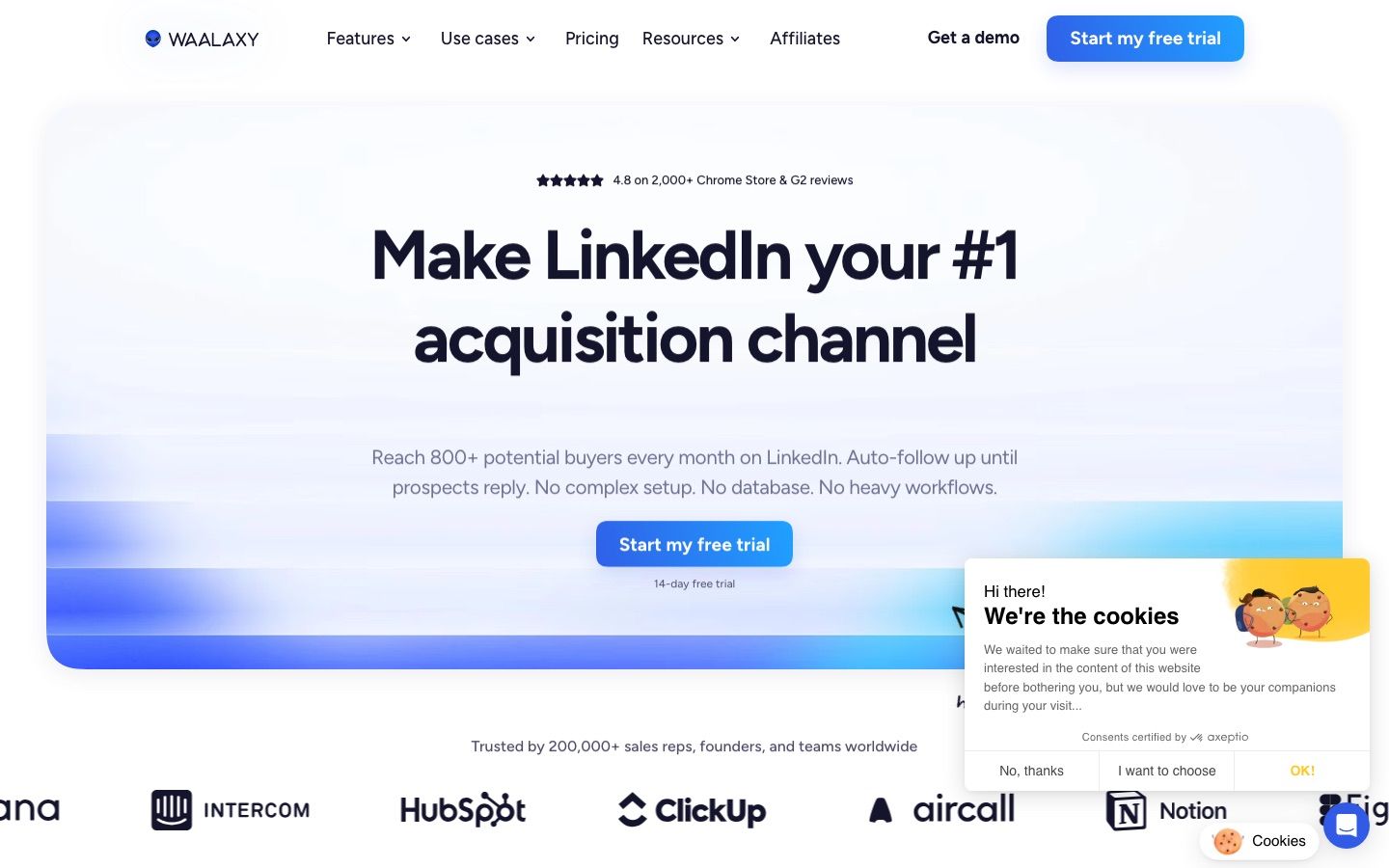
Waalaxy is a cloud tool that automates LinkedIn prospecting from its web app at app.waalaxy.com: connection invitations, follow-up messages and, on the top tier, email. Paid plans have sent from Waalaxy's own cloud since 2022, and by July 2026 Waalaxy had removed its Chrome extension from the Chrome Web Store and described the product as 100% cloud. It positions itself as the easy entry point into LinkedIn automation, and on its own site it claims over 200,000 users, a claim we can only attribute to Waalaxy rather than verify independently.
The product is built for one kind of buyer: a solo founder, freelancer or independent rep who wants a first LinkedIn campaign live in an afternoon, without configuring daily caps, IP settings or a sequence builder from scratch. You sign in with your LinkedIn account, pick a template, add a list, and Waalaxy runs the sequence in the background, with no need to keep LinkedIn or your browser open.
That simplicity is genuinely the product's strength. It also draws a hard line around who it's for. A team running outreach from three or five LinkedIn accounts, or an agency managing client profiles, will find Waalaxy's per-seat pricing and lack of sender rotation turn into an operational headache well before the invite quota does. For a single account sending a few hundred invitations a month, none of that friction shows up yet. Our wider LinkedIn automation tools roundup covers where Waalaxy sits against the rest of the category.
What can Waalaxy automate, and from which lead sources?
Waalaxy's pages name five automated LinkedIn actions (checked 30 September 2026): connection requests, messages, follows, profile visits and message requests to members of a group or event, all run from a library the homepage calls "99+ ready-to-use outreach sequences," with automatic follow-ups built in. InMail, post likes and comments are not offered, and voice messages are not listed either, so a workflow depending on any of those isn't covered.
Lead sourcing is more flexible than the automation itself. The prospecting page says you can "build targeted LinkedIn prospect lists directly from Search or Sales Navigator, or import existing lists via CSV, n8n, or Make," so a list built in a spreadsheet or assembled by another workflow tool feeds into a campaign the same way a live LinkedIn search does. Invitation volume stays capped by tier rather than by list size: the prospecting page states you can "send up to 800 new invitations per month," a ceiling tied to the Advanced and Business tiers, with Pro capped lower. The same page frames the pacing behind that cap as "smart sending intervals designed to stay within LinkedIn's safety limits," a phrase we revisit in the safety section below.
Here's what the page actually confirms, capability by capability.
| Capability | What Waalaxy's page says | Tier |
|---|---|---|
| Connection requests | Automated | Pro, Advanced, Business |
| Messages | Automated | Pro, Advanced, Business |
| Automatic follow-ups | Automated | Pro, Advanced, Business |
| Profile visits | Automated (checked 30 September 2026) | Not stated |
| Voice messages | Not listed as automated | Not stated |
| InMail | Not listed as automated | Not stated |
| Lead import from Search or Sales Navigator | Supported | Pro, Advanced, Business |
| List import via CSV, n8n or Make | Supported | CSV on all three tiers; n8n and Make from Advanced (checked 30 September 2026) |
| Up to 800 invitations a month | Stated cap | Advanced, Business |
Waalaxy's automated action list is narrow, but the lead sourcing that feeds it is not, and that gap is worth understanding before comparing Waalaxy to a tool that automates a longer list of actions natively.
What can you actually build inside a Waalaxy campaign?
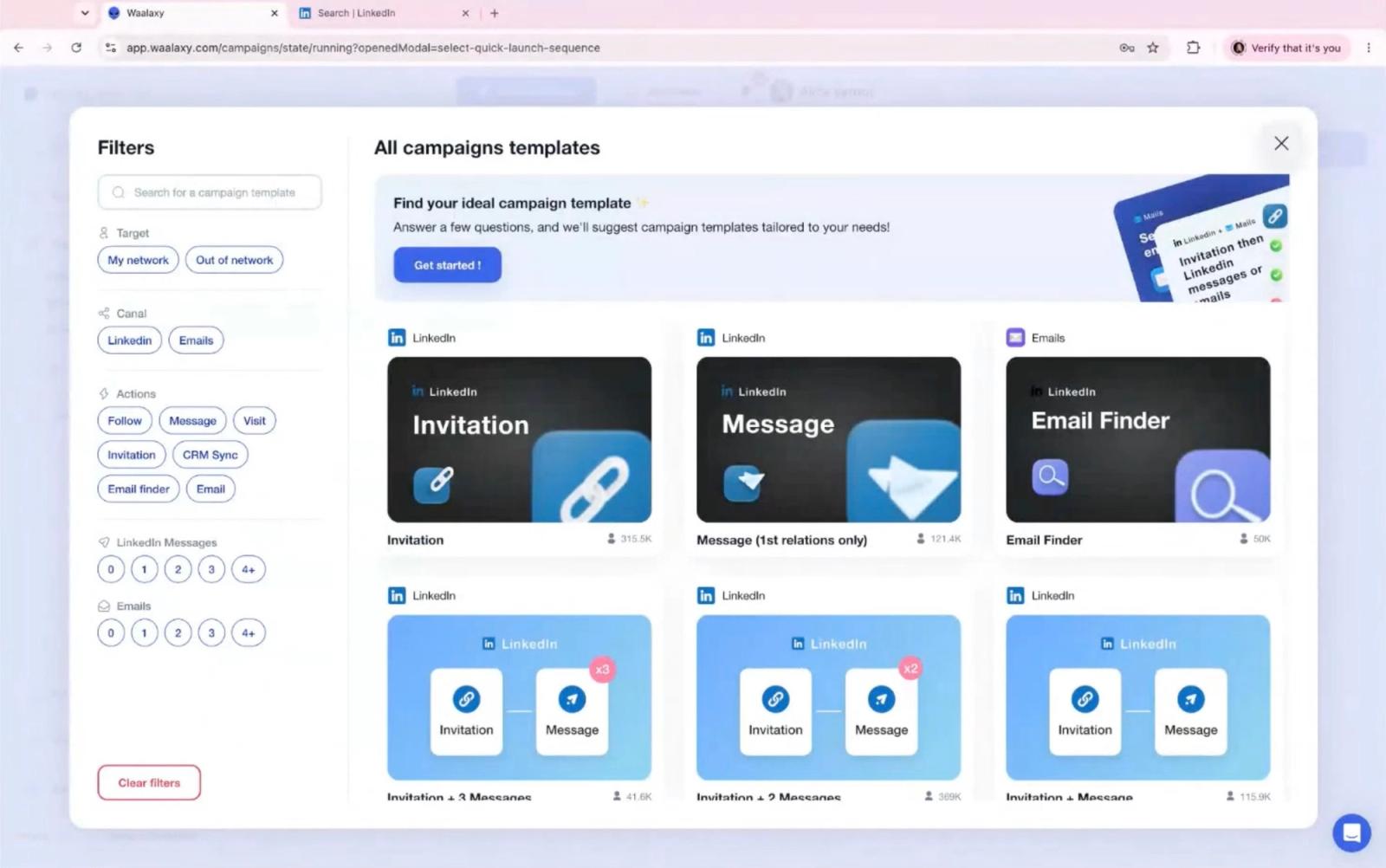
Campaign creation in Waalaxy means choosing from a list of prebuilt templates rather than drawing your own sequence. Ready-made options cover the classic flows: send an invitation, follow up with a message if it's accepted, find an email address, and so on. That library is the fastest route to a first live campaign in the category, and it is also the ceiling: if your outreach logic differs from the closest template, you're working around the tool rather than with it.
Invitation volume is metered by tier, not by account health. Pro allows 300 invitations a month, which works out to roughly 10 a day averaged across a month. Advanced and Business both raise that to 800 a month, closer to 26 a day. Pro also bundles unlimited campaigns, automatic follow-ups, CRM sync and a feature Waalaxy calls team prospecting. Advanced adds API access and modules for Make, Zapier and n8n, useful if you're already piping LinkedIn data into another workflow tool such as ours for n8n or Make. Business keeps the same 800-invitation cap as Advanced but adds cold email sequences and a larger monthly allotment of email finder credits.
Laid out side by side, the gap between what Advanced and Business actually unlock becomes clearer than the invitation count alone suggests.
| Feature | Pro | Advanced | Business |
|---|---|---|---|
| Invitations a month | 300 | 800 | 800 |
| API access | Not included | Included | Included |
| Make, Zapier, n8n modules | Not included | Included | Included |
| Cold email sequences | Not included | Not included | Included |
| Email finder credits a month | 25 (checked 30 September 2026) | 25 | 500 |
| Support response time | 48 hours | 4 hours | Priority |
That table is the clearest evidence that the jump from Advanced to Business isn't about sending more LinkedIn invitations at all; it's a bet on whether you also want cold email in the same tool.
Need logic the templates don't cover?
Cadency runs LinkedIn and email in one campaign across every sender and mailbox, with branches on connected, replied and email found, and one inbox for every reply.
From $89 a month with 2 LinkedIn senders included.
How do the cloud app, the inbox add-on and integrations work?
Waalaxy runs 100% in the cloud. Paid plans have sent from its cloud since 2022, and its help centre says the Chrome extension has now been removed: everything runs inside the app at app.waalaxy.com, and campaigns keep running in the background whatever is happening in your browser. Imports work by pasting a LinkedIn search URL into the app; an optional helper extension, Alien Copilot, only pre-fills that import from a LinkedIn search page. Setup stays simple, since there's no server or proxy to configure. On sending, Waalaxy says each user is assigned a fixed IP as close as possible to their location, a VPN IP shared by up to five users, so there is no dedicated IP per account, and it describes no automated warm-up.
Support response times scale with the tier you're on: 48 hours on Pro, 4 hours on Advanced, and priority handling on Business. The unified inbox itself runs as a separate paid add-on rather than a base-plan feature, and we cover exactly what it adds in the next section.
Email finder credits work the same way as a gate rather than a raw quota difference. Advanced includes 25 a month, which covers a handful of manual lookups on the leads that matter most; Business jumps to 500, which is closer to what you'd need to run email finding across an entire invitation list rather than a shortlist. If your outreach is LinkedIn-only and you don't plan to chase email addresses at volume, that 500-credit jump is not a reason to pay for Business on its own; the cold email sequences are the actual product you're buying at that tier.
Import options are one of the more useful parts of the setup: Waalaxy pulls lead lists from a standard LinkedIn search, from Sales Navigator, and from Recruiter Lite, so you're not limited to LinkedIn's free-tier search results if you already pay for Sales Navigator elsewhere. Integrations lean on the Make, Zapier and n8n modules available from Advanced up, plus the CRM sync that comes with the plan. Full plan details and the current toggle prices are on Waalaxy's own pricing page.
How does the Waalaxy LinkedIn Inbox work, and what does it add?
Waalaxy's Inbox page pitches "one shared inbox built for outreach teams" as the core value of the add-on, and it backs that framing with team features rather than a solo user's reply list. The page lists saved templates, the ability to "schedule message follow-ups automatically," and labels and lead lists to sort conversations as they come in. Message history stays "synchronized across your team," and the page states you "never message the same prospect twice," which matters once several seats prospect the same market. Roles, permissions and team dashboards round out the team-management side.
The bigger claim is positioning: Waalaxy says the Inbox can "turn your inbox into a lightweight CRM directly inside LinkedIn." It works inside LinkedIn's own interface rather than a separate app, so replies, tags and follow-ups happen without leaving the LinkedIn tab. The page also states it's "integrated with HubSpot and 2,000+ other apps through Zapier & Make," which matches the CRM sync with 2,000+ tools that the pricing page lists on every plan (checked 30 September 2026).
None of that comes bundled into the Pro, Advanced or Business price. The pricing page lists the Inbox as a paid add-on on top of whichever tier you're on, with 500 free conversations to test it first. For a solo seat, that free allowance is likely enough to judge whether tags and saved templates are worth paying for; for a team that needs the shared history and the "never message twice" guarantee, the add-on is closer to a requirement than an option.
Does Waalaxy have an API and integrations?
Yes. Waalaxy's developer docs describe an API secured with API-key Bearer authentication, and the documented endpoints cover the objects you'd expect from a prospecting tool: prospect lists, campaigns, and adding prospects from integrations. Those endpoints are enough to pull a list out of Waalaxy, check campaign status, or push in a new prospect without opening the app.
The docs don't state which plan the API requires or publish a rate limit, so we can't quote either figure here. What we can confirm is that the pricing page lists API access starting from the Advanced tier, matching the API-access row in our feature table above. The docs also confirm support for n8n, Zapier and Make, the same three tools the prospecting page names for importing lead lists, so the API and the no-code modules overlap rather than serve separate use cases.
Waalaxy's homepage also claims "2,000+ integrations," attributed to its HubSpot and Pipedrive connections routed through Zapier and Make, not a library of 2,000 native connectors. That figure describes reach through two automation platforms, worth knowing before you go looking for a Waalaxy entry in a specific app's own integrations directory.
What does Waalaxy pricing look like in 2026?
For this Waalaxy review, the pricing detail that matters most is how the tiers gate volume, not just the sticker price. Waalaxy runs three paid tiers, billed per user, after a 14-day free trial. Waalaxy prices by country, and its pricing page opens on yearly billing, so the first figures you see are the discounted ones. The table below is the euro grid, read on 8 October 2026; Waalaxy's help centre gives €139 a month as the standard Business price and adds that it may vary depending on your country. From outside the euro zone, the same page served us a separate, lower US dollar grid: Pro $19, Advanced $39 and Business $69 a month on monthly billing, or $16, $32 and $55 billed yearly, with no quarterly option.
| Tier | Monthly (EUR) | Quarterly (EUR, about 20 percent off) | Yearly (EUR, about 50 percent off) | Invitations a month |
|---|---|---|---|---|
| Pro | €39 | €31 | €19 | 300 |
| Advanced | €99 | €79 | €49 | 800 |
| Business | €139 | €109 | €69 | 800, plus cold email |
What do the quarterly and yearly discounts actually cost per tier?
The yearly discount is steep, cutting the monthly-equivalent price roughly in half compared with paying month to month. On Pro, quarterly billing brings the effective monthly rate from €39 down to €31, about a 20 percent cut, and yearly billing takes it down to €19, about half the monthly sticker price. Advanced follows the same pattern: €99 monthly becomes €79 on quarterly and €49 on yearly. Business runs €139 monthly, €109 on quarterly, and €69 on yearly. Because none of the three tiers change what they include based on billing cadence, the only real decision on the toggle is cash flow: pay quarterly or yearly if you're confident you'll stay on the tool, since the annual price effectively buys twelve months for the cost of six (checked 8 October 2026).
Run the invite quota against the sticker price and the unit economics get more interesting than the headline numbers suggest. On monthly billing, Pro's €39 for 300 invitations works out to about €0.13 per invitation sent. Advanced's €99 for 800 invitations lands at about €0.12, so the jump from Pro to Advanced barely changes the cost per invite; what you're actually paying for is API access and the automation modules. Business keeps the same 800-invitation cap as Advanced for €139, which pushes the cost per invitation up to roughly €0.17, since the extra €40 buys cold email and more email finder credits rather than more LinkedIn volume. Switch to yearly billing and the same math roughly halves: Pro's €19 a month for 300 invitations is about €0.063 per invite, Advanced's €49 for 800 is about €0.061, and Business's €69 for 800 is about €0.086. Annual billing is the single biggest lever on cost per invitation, well above whichever tier you pick.
Which Waalaxy tier fits which team size?
For exactly one LinkedIn account sending a modest, steady volume, Pro at €39 a month, or €19 billed yearly, is enough: 300 invitations a month covers roughly 10 a day, and the CRM sync and ready-made sequences handle the basics without paying for API access you won't use. Once you want to pipe leads or replies into another tool through Make, Zapier or n8n, or you're bumping against the 300-invitation ceiling, Advanced is the natural step up, still on one account. Business only earns its price if cold email is genuinely part of your outreach mix; if you're LinkedIn-only, the extra €40 a month over Advanced (€20 on yearly billing) buys email finder credits and a feature you won't touch.
Past one account, the tier ladder stops being the relevant question. Waalaxy is priced and built one LinkedIn account per seat with no rotation between them. A Team plan, available on any tier from 2 seats and discounted from 5, puts several accounts on one payment, and the paid Inbox add-on can centralize their conversations (checked 30 September 2026), but running outreach from three accounts still means three separate seats, three separate quotas and three copies of every campaign, rather than one campaign coordinating all of them. That's the point where the per-seat model, not the per-invitation price, becomes the real cost, and it's the threshold where a team typically starts pricing multi-sender platforms instead.
Waalaxy at a glance
Pros
- Low entry price among mainstream cloud LinkedIn tools: €19 a month billed yearly, €39 month to month
- Fastest route to a first live campaign, thanks to the prebuilt template library
- Steep quarterly and yearly discounts, annual billing halves the monthly rate
- Sales Navigator and Recruiter Lite list imports built in
Cons
- No custom sequence builder, only a choice of prebuilt templates
- Priced and built one LinkedIn account per seat, with no rotation across senders
- Unified inbox is a separate paid add-on, not included in the base price
- Cloud sending from a fixed VPN IP shared by up to five users, with no managed warm-up
Is Waalaxy safe?
Waalaxy caps you at 300 to 800 invitations a month by tier. Campaigns run in its cloud rather than in your browser, but Waalaxy says each user sends from a fixed VPN IP shared by up to five users rather than a dedicated one, and it describes no automated warm-up for new accounts, the kind of infrastructure some competitors build in, so "safe" still means something narrower here. What Waalaxy does publish is a set of daily ranges per plan in its help centre: on Advanced and Business, 80 to 100 invitations a day with a maximum of 200 a week, 120 to 150 messages, 80 to 100 follows and 120 to 150 profile visits, while Pro's 300 invitations a month come to around 11 a day. For accounts that have not been very active on LinkedIn, the same article recommends starting at 30 actions per type a day, which is warm-up advice you apply yourself rather than a managed ramp.
Beyond those ranges, Waalaxy describes two pacing mechanisms. Its help centre says a random daily quota is set between 80 and 100 percent of your maximum, and the LinkedIn prospecting page promises "smart sending intervals designed to stay within LinkedIn's safety limits," Waalaxy's own description of how sends get spaced out inside the quota. That's as specific as it gets: Waalaxy documents no dedicated IP per account, since up to five users share each fixed IP, and no managed warm-up (checked 8 October 2026).
No LinkedIn automation tool, Waalaxy included, can make automation entirely risk-free, because the detection question ultimately depends on LinkedIn's own enforcement rather than any vendor's claims. LinkedIn's own help center confirms it enforces invitation limits and can restrict accounts that send at a pace or pattern it flags as automated, without publishing the exact threshold. What differs between third-party tools is the depth of the safety layer sitting under the sequence: a shared sending IP and do-it-yourself warm-up give you less infrastructure control than a dedicated IP and managed warm-up per account. Our guide to is LinkedIn automation safe breaks down what actually drives restrictions, and our rundown of LinkedIn Chrome extensions covers how the extension architecture compares with cloud-based alternatives across the category. If you want the weekly invitation math behind the quota numbers, our guide to LinkedIn connection limits lays it out, and our piece on what happens when a LinkedIn account gets restricted covers the recovery side.
What is Waalaxy.ai, and is it the same product?
Waalaxy.ai is a separate product from the Pro, Advanced and Business tiers this review covers, priced at "$99/month" under what Waalaxy calls "a single plan for everything," currently in "early access." Where the main Waalaxy app automates connection requests, messages and follow-ups on lists you build or import, Waalaxy.ai describes an autonomous agent: it "sources prospects from the world's top databases," "writes personalized sequences," and, per Waalaxy's own copy, "the agent replies end to end and books the meeting" without a human handling the reply thread. The single plan includes "Unlimited Agents" and a "Unified inbox," language that echoes but does not map directly onto the Inbox add-on described above.
It's worth being precise about what Waalaxy.ai is not: it doesn't sit on the Pro, Advanced, Business ladder, doesn't share the 300-to-800 invitation quotas, and isn't included in any of the three subscriptions priced out above. Any response-rate or booked-meeting numbers Waalaxy markets around the agent are vendor claims on Waalaxy's own site, not figures we can verify, so we're not repeating them here. Treat Waalaxy.ai as its own purchase decision, separate from whichever of the three main tiers fits your team.
How does Waalaxy compare with Cadency?
Every honest Waalaxy review has to say it directly: Waalaxy and Cadency solve different problems. Waalaxy is priced and built for one person running one LinkedIn account through prebuilt templates; Cadency, built on Swarmhit, is outreach software for sales teams, recruiters and agencies that send volume on LinkedIn and email, and it is our top pick for teams running several senders. One campaign runs across every LinkedIn sender and every mailbox, with one sender per lead. Where Waalaxy sequences are picked from a template list, Cadency campaigns branch on connected, replied and email found, with waits and A/B tests, across eight LinkedIn steps: profile visit, connection request, message, InMail, a comment on the lead's last post (AI drafted, approved by you), voice note, like and follow. Where Waalaxy's inbox is a paid add-on, Cadency includes one unified inbox with a single thread per lead across LinkedIn and email, which you can assign to a teammate and answer as any sender. For the wider field, see our Waalaxy competitors guide.
On infrastructure, both run in the cloud, but where Waalaxy says up to five users share each fixed sending IP, Cadency isolates each sender: every LinkedIn sender gets a dedicated proxy, its own ceiling and pacing, and checkpoint handling, while sender rotation spreads each campaign across the pool, with ambassador accounts (vetted LinkedIn accounts operated for you) available on demand. Google and Microsoft mailboxes with warm-up rotate in the same campaign as LinkedIn, and mailboxes are unlimited. On data, Cadency includes a native people and company database and waterfall enrichment paid per verified hit, plus CSV and Sales Navigator imports. Any CRM or ATS connects through the API and webhooks included on every plan rather than a native CRM sync, which is worth knowing if you rely on Waalaxy's built-in CRM sync.
Cadency sells plans with a pool of LinkedIn senders rather than one seat per account: Essential is $89 a month with 2 LinkedIn senders and 100k emails a month, Small Team is $199 a month with 5 LinkedIn senders and 100k emails a month, and Scale is $699 a month with 20 senders and 500k emails a month, on monthly billing. Annual billing takes 30% off, to $62, $139 and $489 a month. Mailboxes, teammates and workspaces are unlimited on every plan, extra senders can be added to any plan, and Essential starts with a free trial, while Small Team and Scale can be bought self-serve, without a trial, on the Cadency site. Where Waalaxy still wins outright is entry price for exactly one account: if you're one person sending a couple hundred invitations a month, Waalaxy's Pro tier, €39 a month or €19 billed yearly, is cheaper and the templates are enough. For a side-by-side breakdown of both tools feature by feature, see our Cadency vs Waalaxy comparison, and for the wider field of tools that solve the same multi-sender problem, our Waalaxy competitors roundup covers eight more options at different price points.
FAQ
How much does Waalaxy cost in 2026?
Waalaxy runs a 14-day free trial, then three paid tiers billed per user. In euros, Pro is €39 a month, Advanced €99 and Business €139 on monthly billing; quarterly billing takes about 20 percent off and yearly billing about half, to €19, €49 and €69 a month (checked 8 October 2026). Prices vary by country: from outside the euro zone, Waalaxy's page showed us $19, $39 and $69 a month, or $16, $32 and $55 billed yearly. Invitation quotas run from 300 a month on Pro to 800 on Advanced and Business, and cold email only arrives on Business.
Is Waalaxy worth it in 2026?
It depends entirely on how many LinkedIn accounts you're running. For one person sending a modest, steady volume from a single account, Waalaxy's low entry price and prebuilt templates make it a reasonable first tool. For a team managing several senders or client accounts, the per-seat pricing, lack of rotation and add-on inbox tend to cost more in workaround time than the subscription saves, and a multi-sender platform becomes worth the higher price.
Is Waalaxy safe in 2026?
Waalaxy enforces monthly invitation quotas and daily ranges by plan and sends from its cloud, but it says up to five users share each fixed sending IP, and it describes no managed warm-up. No LinkedIn automation tool can guarantee an account will never be restricted, since that ultimately depends on LinkedIn's own enforcement, but the depth of the safety infrastructure under a tool varies a lot, and the per-account layer, a dedicated IP and managed warm-up, is where tools differ most.
Does Waalaxy have a free trial?
Yes, Waalaxy offers a 14-day free trial. It asks for a credit card and converts into a paid plan unless you cancel, and Waalaxy sends no reminder before the first charge; if you cancel, the account drops to the free Freemium mode, which keeps your data but runs no automation. The unified inbox is a separate item, with 500 free conversations offered so you can try it before deciding whether to add it to your subscription.
Can you build custom sequences in Waalaxy?
No, not in the sense of branching logic. Campaigns are assembled by picking the closest match from a library of prebuilt templates, such as an invitation followed by a conditional message. That covers the common flows quickly but doesn't let you design a sequence with your own if-then branches the way a dedicated sequence builder does.
Does Waalaxy support multiple LinkedIn accounts?
Yes, through separate seats. Each Waalaxy seat drives one LinkedIn account, with no automatic rotation of a single campaign across several senders. A Team plan, available on any tier from 2 seats and discounted from 5, puts several accounts on one payment, and the paid Inbox add-on can centralize their conversations (checked 30 September 2026), but each seat still runs its own campaigns and quota, rather than one campaign coordinating all of them.
Is the Waalaxy inbox included in the price?
Not by default, the unified LinkedIn inbox with reply templates, scheduled follow-ups, tags and CRM export is a paid add-on layered on top of the Pro, Advanced or Business subscription, though Waalaxy offers 500 free conversations so you can test it before paying for it.
Does Waalaxy have an API?
Yes, Waalaxy publishes API docs that use API-key Bearer authentication and cover prospect lists, campaigns and adding prospects from integrations, alongside support for n8n, Zapier and Make. The docs don't state a required plan or a rate limit, but Waalaxy's pricing page lists API access starting from the Advanced tier, which is the detail worth checking before you build against it.
What is Waalaxy.ai?
Waalaxy.ai is a separate product from the Pro, Advanced and Business plans covered in this review, priced at "$99/month" for what Waalaxy calls "a single plan for everything," currently in early access. Instead of running templates you configure, it positions itself as an autonomous agent that sources prospects, writes sequences and handles replies through to a booked meeting. Any performance numbers Waalaxy markets around it are vendor claims, not figures we've verified.
Conclusion
The short version of this Waalaxy review: it earns its reputation as the easiest, cheapest way into LinkedIn automation. Sign in, pick a template, launch a campaign the same afternoon, from €39 a month or €19 billed yearly. The trade-offs are the honest cost of that simplicity: invite quotas gated by tier rather than account health, no custom sequence logic, a paid inbox add-on, and a cloud setup in which up to five users share each sending IP, with no managed warm-up.
If you're one person testing LinkedIn outreach on a single account, that trade is worth making, and Waalaxy's own G2 badge shows a 4.5 rating, for what a vendor-displayed score is worth. If you're coordinating outreach across more than one sender, need a shared inbox, or want sequence logic the templates don't cover, that's the point to look at a platform built for multiple senders from the start rather than working around a per-seat ceiling.
If you've hit Waalaxy's per-seat ceiling, Cadency is where we would start: one campaign across every LinkedIn sender and every mailbox, one shared inbox, and no code to write. It began as our internal test bed for the Swarmhit engine and was never meant to be public, but we kept it running for the sales teams, recruiters and agencies who asked for it. Swarmhit itself is the API for developers who build their own outreach product.


