3 reasons to choose Swarmhit over Expandi
The same volume for a fraction of the bill
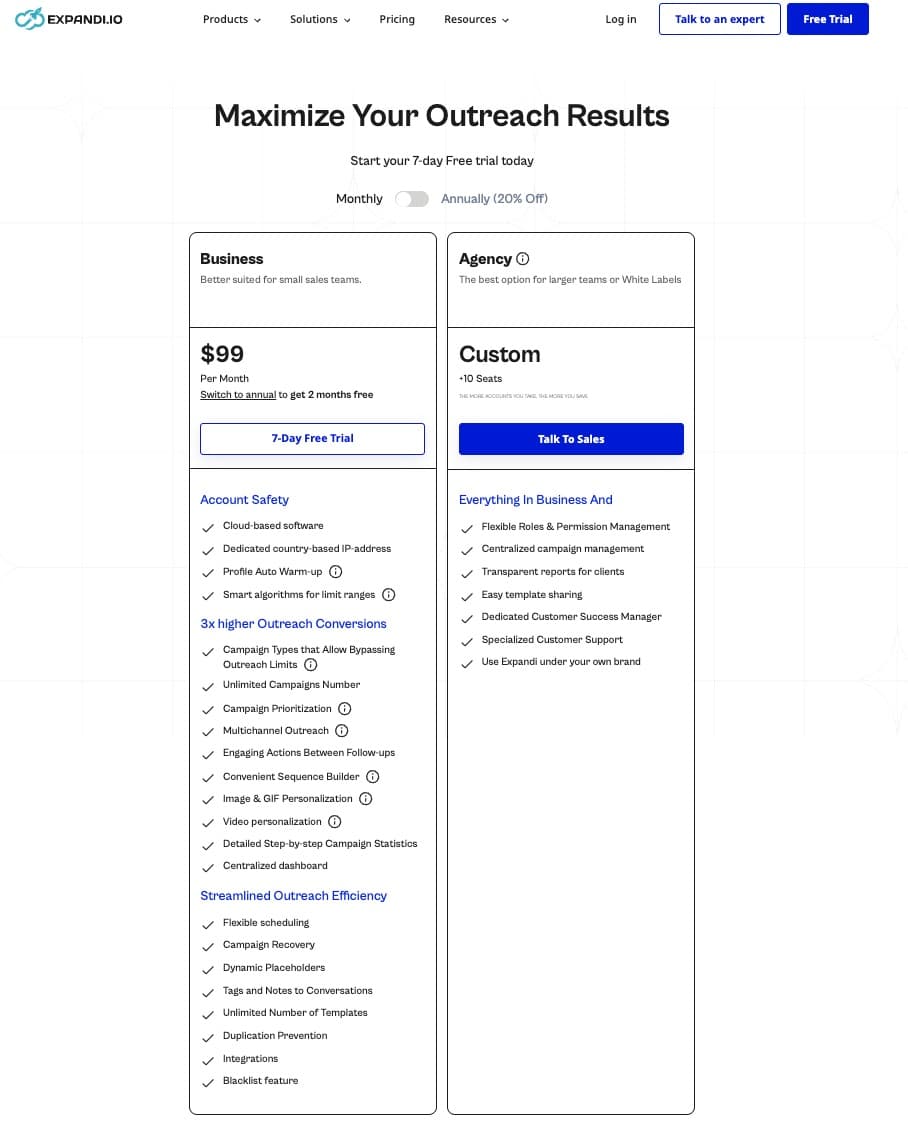
Expandi lists $99 per account per month, $79 on annual billing. Swarmhit is $39 per sender monthly and $29 on annual. At ten senders that gap is $600 a month for identical sending capacity.
Personalization the prospect can hear
Expandi built its reputation on personalized images and GIFs. Swarmhit sends AI voice notes: clone your voice once from a thirty second sample, and every lead hears their own name spoken in it, alongside openers written from their profile and recent posts. A handful of tools now send voice notes; speaking a script in your own cloned voice is the part that is hard to copy.
Account health you can actually watch
Every sender has a health center with its Social Selling Index, invites sent this week, pending invitations, and today's usage against per-action daily caps. Safety stops being a setting you trust and becomes a number you read.
| Software | Swarmhit | Expandi |
|---|---|---|
| Scale and economics | ||
| Pricing | $39 per sender per month, $29 on annual billing | $99 per account per month, $79 on annual billing |
| Multi-sender model | One campaign rotates across the whole sender pool, with deduplication | One seat per LinkedIn account |
| Ten senders | $390 monthly, $290 annual | $990 monthly, $790 annual |
| Unified inbox | Every sender in one inbox, with assignment and interest tags | Per-account inbox |
| Personalization | ||
| AI copy | Openers drafted from the prospect's profile, posts, and company news | Variables, plus personalized images and GIFs |
| AI voice notes | Clone your voice once, then AI voice note steps speak your scripts in it | Not documented on its public pages |
| LinkedIn actions | Invites, messages, InMail, voice notes, post likes, post comments, follows, profile visits | Invites, messages, InMail, profile visits |
| Safety and operations | ||
| Per-sender infrastructure | Dedicated proxy, managed warm-up, health checks, smart caps on every plan | Dedicated IP per seat, warm-up |
| Health visibility | Social Selling Index, weekly invite count, pending invitations, and daily caps per action type | Activity controls and sending windows |
| Prospect data | 1B+ contacts, 60M companies, refreshed weekly | Bring your own lists or Sales Navigator |
| Developer access | Open API, webhooks, and an MCP server | Webhooks and Zapier |
TL;DR verdict
Expandi is a clean, beginner-friendly drip tool built around one LinkedIn account per subscription. It wins on ease of learning and solo pricing. It strains the moment you add accounts: each one needs its own subscription, its own login, its own inbox, and there’s no sender rotation. Swarmhit is built for exactly that moment: campaigns that spread across a sender pool, a unified inbox with reply assignment, and per-sender pricing from $29/month. That, in one paragraph, is the case for an Expandi alternative.
Why teams look for an Expandi alternative
The trigger is almost always the invoice. Expandi prices per account, so ten LinkedIn accounts means ten subscriptions, ten logins, and ten separate inboxes. The search for an Expandi alternative usually starts the week a solo playbook becomes a team one, because that is when per-account pricing stops being a detail and becomes the biggest line in the outreach budget.
The second trigger is coordination. Once several senders work the same market, someone has to split lists, deduplicate prospects, and watch every inbox, and on per-account tools that someone is you. So judge any Expandi competitor on both counts: what it costs at your sender count, and whether rotation, deduplication, and a shared inbox come built in or stay your job.
What does Expandi get right?
Credit where due: Expandi is one of the easiest LinkedIn automation tools to learn. The interface is clean, the drip-campaign builder walks you through importing prospects (from a LinkedIn search URL or CSV) and sequencing actions with conditional splits, and you can be live within an hour. Sequences can be edited even after a campaign is running, leads can be tagged and filtered, and the analytics map your funnel stage by stage with acceptance and reply rates per campaign. The onboarding materials are among the best in the category. For one person automating one LinkedIn account, none of this is sarcasm: it’s a good tool.
The problems start when “one person, one account” stops describing you.
Where does Expandi hit its ceiling?
What does the price difference buy at scale?
At one account the gap is $60 a month and easy to ignore. At ten senders it is $600, at twenty it is $1,200, for the same sending volume. Expandi lists $99 per account per month with 20 percent off on annual terms; Swarmhit is $39 monthly and $29 annual per sender. The question is not which is cheaper per unit, it is what the spread funds: at ten senders it covers a new segment test, a data budget, or a second market every single month.
Is a personalized image better than a personalized voice?
Expandi is genuinely known for personalized images and GIFs, and they are memorable. The catch is that the message underneath is still a template with the prospect's name in it. Swarmhit takes a different route: record a thirty second sample once, and AI voice note steps speak your scripts in your cloned voice, with each lead hearing their own name. A voice note is harder to ignore than an image because it implies a person spent time. Voice notes themselves are no longer unique, lemlist, HeyReach and MeetAlfred all send them, but a cloned voice speaking a written script with each prospect's own name in it is a different thing entirely.
How is account safety different in practice?
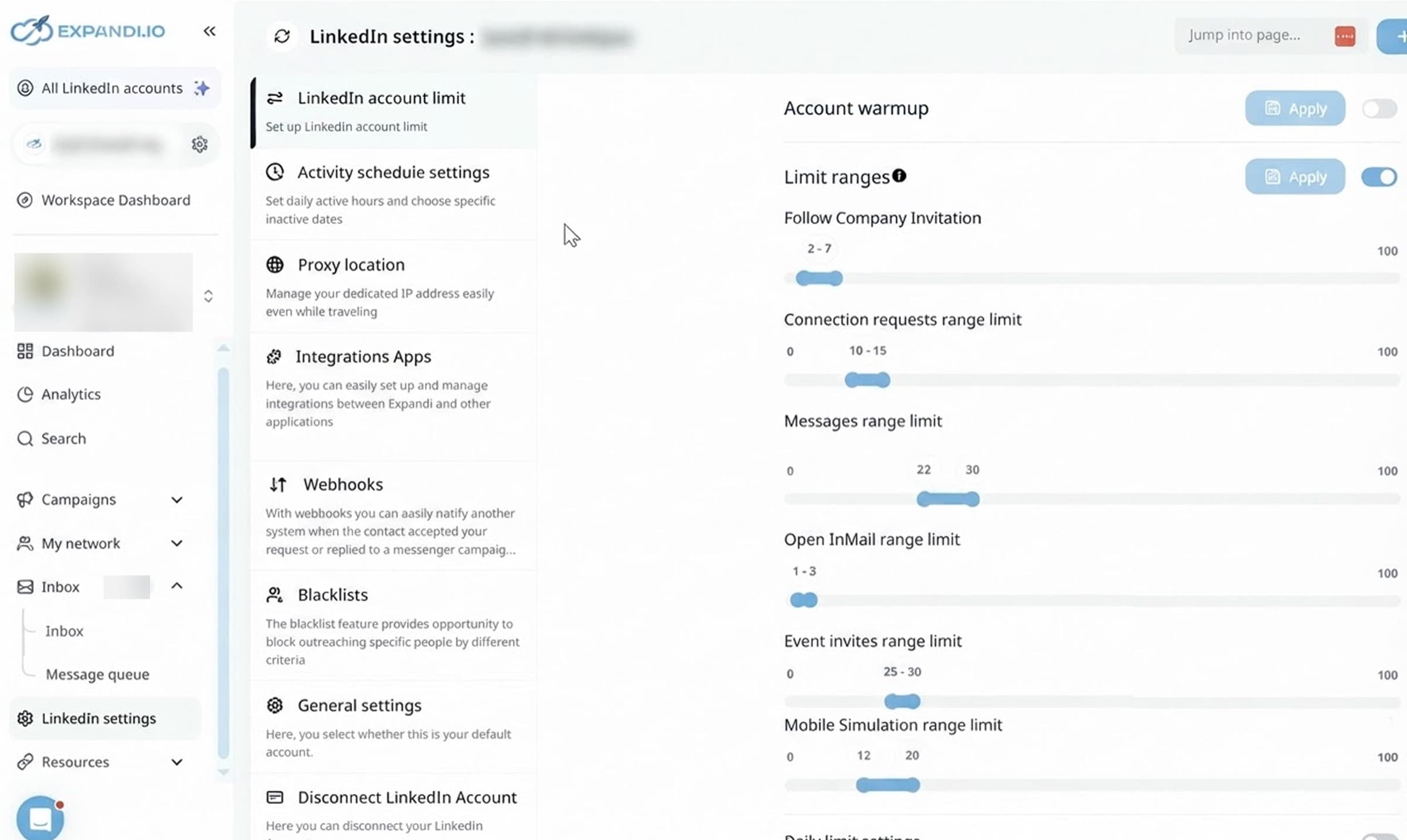
The fundamentals match: cloud sending, a dedicated IP per account, warm-up, sensible pacing. The difference is visibility and granularity. Expandi gives you the controls and expects you to set them: limit ranges per action, an account warmup toggle, and a proxy location, all configured by hand per account. Every Swarmhit sender instead exposes its own health center: Social Selling Index across LinkedIn's four dimensions, invites sent in the last seven days against a weekly ceiling, invitations still pending, and today's count against separate daily caps for connection requests, messages, InMails, profile views, follows, post likes, post comments, and search imports. LinkedIn publishes none of its thresholds, so no vendor can promise immunity. What you can have is a live read on every account and caps that pause an action rather than an account.
Which one fits an agency better?
Both target agencies, and the deciding factor is usually how the bill scales with client accounts. On per-account pricing, twenty client accounts is twenty subscriptions. Swarmhit prices per sender, includes white-label inbox and reports, and covers 50 senders on a flat $999 per month Agency plan. Expandi's edge is maturity: its support depth and its handling of edge cases come from years in the market, and that is worth something when a campaign misbehaves at 6pm on a Friday.
What does Swarmhit do differently?
AI voice notes in your own voice
Clone your voice from a thirty second sample, then drop AI voice note steps into any sequence. Each lead hears their own name spoken in your voice, which no template and no personalized image can imitate.
One campaign across every sender
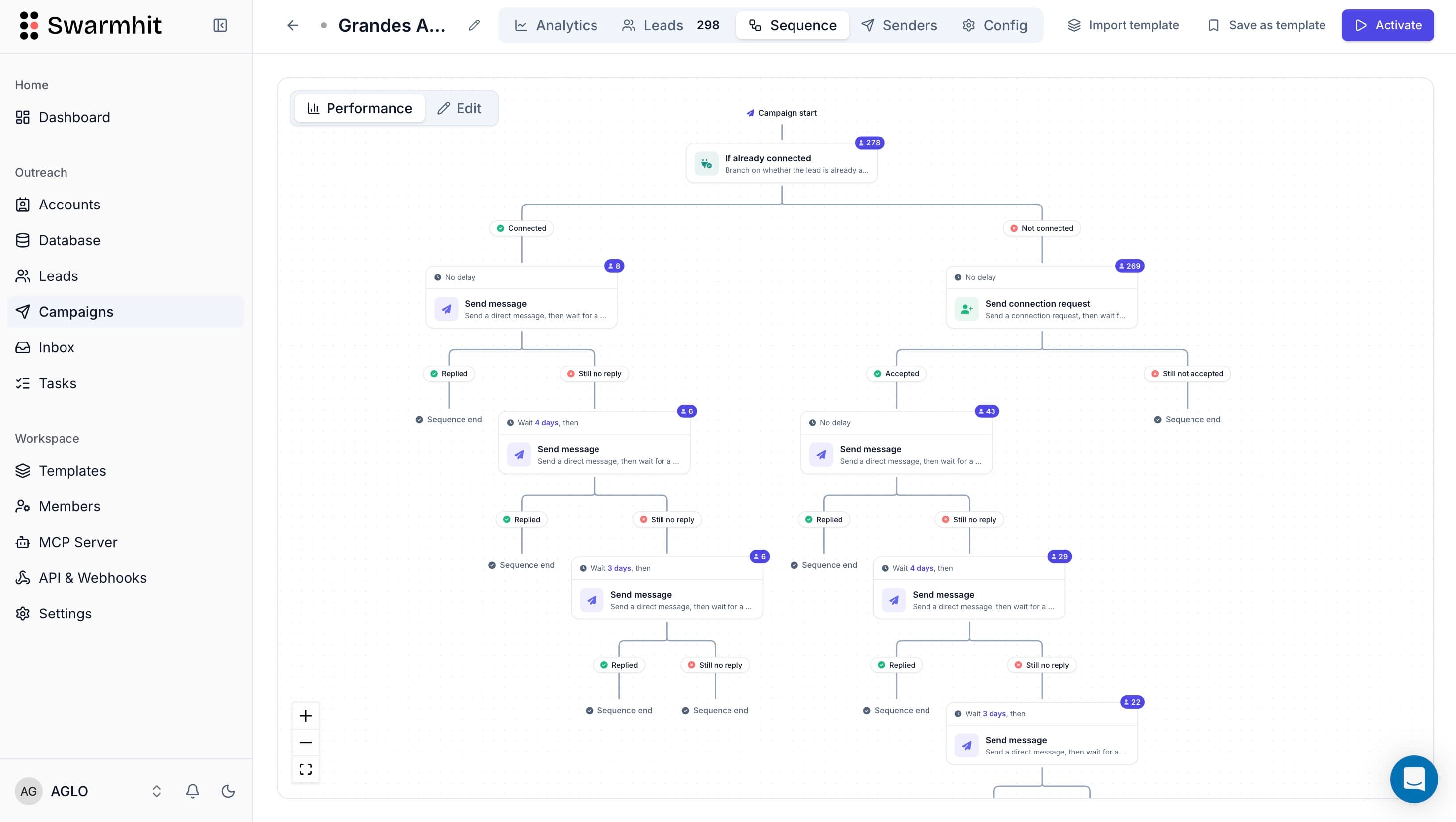
Build the sequence once and Swarmhit rotates it across your sender pool with per-account caps and deduplication, so two senders never touch the same prospect. Adding capacity means adding a sender, not another subscription.
A health center for every account
Social Selling Index, weekly invite usage, pending invitations, and today's activity against per-action daily caps, per sender. When a sender reaches a cap, its campaigns pause that action until the count resets, rather than pushing an account into a restriction.
Prospect data in the same platform
Search 1B+ contacts across 60M companies, refreshed weekly, or paste a Sales Navigator URL to import an audience straight into a campaign. Free credits monthly, pay as you go beyond them.
What does each tool cost as you grow?
| Senders | Swarmhit | Expandi |
|---|---|---|
| 1 | $29/mo | $79/mo |
| 3 | $87/mo | $237/mo, three subscriptions |
| 5 | $145/mo | $395/mo, five subscriptions |
| 10 | $290/mo | $790/mo, ten separate accounts |
Annual billing on both sides. Swarmhit runs $29 per sender per month on annual terms, $39 monthly. Expandi lists $99 per account per month, $79 on annual billing, and each LinkedIn account needs its own subscription rather than a sender slot in one workspace. Every Swarmhit feature ships on every plan.
Competitor pricing on this page was checked against the vendor’s own pricing page on 5 August 2026. Vendors change prices without notice, so treat anything older than a month as indicative.
When is Expandi the better fit?
If you’re one person automating one LinkedIn account with straightforward drip logic, Expandi’s simplicity is the feature. The interface is friendlier for a first-time user, the learning materials are excellent, and the 7-day trial makes it easy to test. Swarmhit starts paying for itself the day you add a second sender, share replies with a teammate, or get tired of exporting CSVs from one tool to feed another. Past that point, the math above makes Swarmhit the stronger Expandi alternative.
How hard is switching from Expandi to Swarmhit?
Minutes, not days, and it works as a straight Expandi replacement: export your leads as CSV and import them into Swarmhit, or skip the file entirely and rebuild your audience from Swarmhit’s database or a Sales Navigator search. Sequences translate directly: the same invite, delay, message, follow-up logic, plus actions Expandi doesn’t have (voice notes, post comments, InMail). Connected accounts go through managed warmup before ramping to full volume.
FAQ