3 reasons to choose Swarmhit over MeetAlfred
Depth on one channel beats breadth across three
MeetAlfred spreads across LinkedIn, email, and Twitter. Swarmhit puts everything into LinkedIn: InMail, post comments, follows, likes, and voice notes as native sequence steps, with pacing tuned per sender.
Voice notes your prospects can tell apart
MeetAlfred sends voice notes. Swarmhit clones your voice from a thirty second sample, then AI voice note steps speak your written scripts in it, with each lead hearing their own name.
Safety you can read, not just trust
Every sender exposes its Social Selling Index, invites sent this week, pending invitations, and today's usage against separate daily caps for each action type. When a cap is reached, that action pauses instead of the account getting restricted.
| Software | Swarmhit | MeetAlfred |
|---|---|---|
| Channel strategy | ||
| Focus | LinkedIn only, deliberately | LinkedIn, email, and Twitter (X) from one sequence |
| LinkedIn actions | Invites, messages, InMail, voice notes, AI voice notes, post likes, post comments, follows, profile visits | Invites, messages, InMail, profile visits, voice notes |
| AI voice notes | Clone your voice once, then steps speak your scripts in it | Voice notes you record yourself |
| AI personalization | Openers drafted from the prospect's profile, posts, and company news | AI personalization templates |
| Running a team | ||
| Pricing | $39 per sender per month, $29 on annual billing | From $59 per user per month, with annual discounts |
| Multi-sender model | One campaign rotates across the sender pool, with deduplication | Per user, with team collaboration features |
| Unified inbox | Every sender in one inbox, assignment and interest tags, reply as any sender | Smart Inbox |
| White-label | Inbox, reports, and booking page included | Available |
| Safety and data | ||
| Per-sender infrastructure | Dedicated proxy, managed warm-up, health checks on every plan | Cloud-based sending |
| Sending controls | Separate daily caps for connection requests, messages, InMails, profile views, follows, likes, comments and search imports, plus weekly ceilings | Activity limits and scheduling |
| Account health view | Social Selling Index, weekly invite usage, pending invitations, live capacity | Reporting and tracking |
| Prospect data | 1B+ contacts, 60M companies, refreshed weekly | Lead Finder |
TL;DR verdict
MeetAlfred is a clean, beginner-friendly drip tool built around one LinkedIn account per subscription. It wins on ease of learning and solo pricing. It strains the moment you add accounts: each one needs its own subscription, its own login, its own inbox, and there’s no sender rotation. Swarmhit is built for exactly that moment: campaigns that spread across a sender pool, a unified inbox with reply assignment, and per-sender pricing from $29/month. If breadth across channels has not paid for itself, that is the case for a MeetAlfred alternative.
Why teams look for a MeetAlfred alternative
MeetAlfred sells breadth: LinkedIn, email, and X from one tool. Teams start shopping for a MeetAlfred alternative when they notice where replies actually come from. If most booked meetings start on LinkedIn, two of the three channels are paying rent in complexity while the one that matters runs on a shallower feature set than a specialist would offer.
Safety visibility is the second driver. Sending across channels multiplies surface area, but the LinkedIn account is still the asset on the line, and it deserves more than a settings page you configure once and hope about. Compare any MeetAlfred competitor on what it shows you per account (live caps, pending invites, a health score you can read) before comparing feature grids.
What does MeetAlfred get right?
Credit where due: MeetAlfred is one of the easiest LinkedIn automation tools to learn. The interface is clean, the drip-campaign builder walks you through importing prospects (from a LinkedIn search URL or CSV) and sequencing actions with conditional splits, and you can be live within an hour. Sequences can be edited even after a campaign is running, leads can be tagged and filtered, and the analytics map your funnel stage by stage with acceptance and reply rates per campaign. The onboarding materials are among the best in the category. For one person automating one LinkedIn account, none of this is sarcasm: it’s a good tool.
The problems start when “one person, one account” stops describing you.
Where does MeetAlfred hit its ceiling?
Is multichannel an advantage or a distraction?
It depends entirely on where your replies come from. If email already carries your pipeline and LinkedIn is a second touch, a tool that runs both adequately is the simpler purchase, and MeetAlfred adds Twitter on top. If LinkedIn is where your pipeline actually comes from, the depth gap shows up fast. Post comments, InMail, follows, likes, and per-sender pacing are the features that move reply rates, and they only get built properly in tools organised around the channel rather than beside it.
Both send voice notes. What is actually different?
MeetAlfred lets you record and send a voice note, which already puts it ahead of most of the market. Swarmhit adds the part that scales: record a thirty second sample once, and AI voice note steps speak your written scripts in a clone of your voice, with each prospect hearing their own name. The difference is not the format, it is whether personalised audio survives contact with volume. Recording one note per prospect does not.
How granular is sending control on each?
This is where a LinkedIn-first architecture pays off. Swarmhit exposes a separate daily cap per action type on every sender: connection requests, messages, InMails, profile views, follows, post likes, post comments, and search imports, plus weekly ceilings for invitations and a limit on pending invitations. Reaching a cap pauses that one action across campaigns until the count resets at midnight UTC, rather than putting the account at risk. Multichannel suites generally offer activity limits and scheduling windows, which is a coarser instrument for the same job.
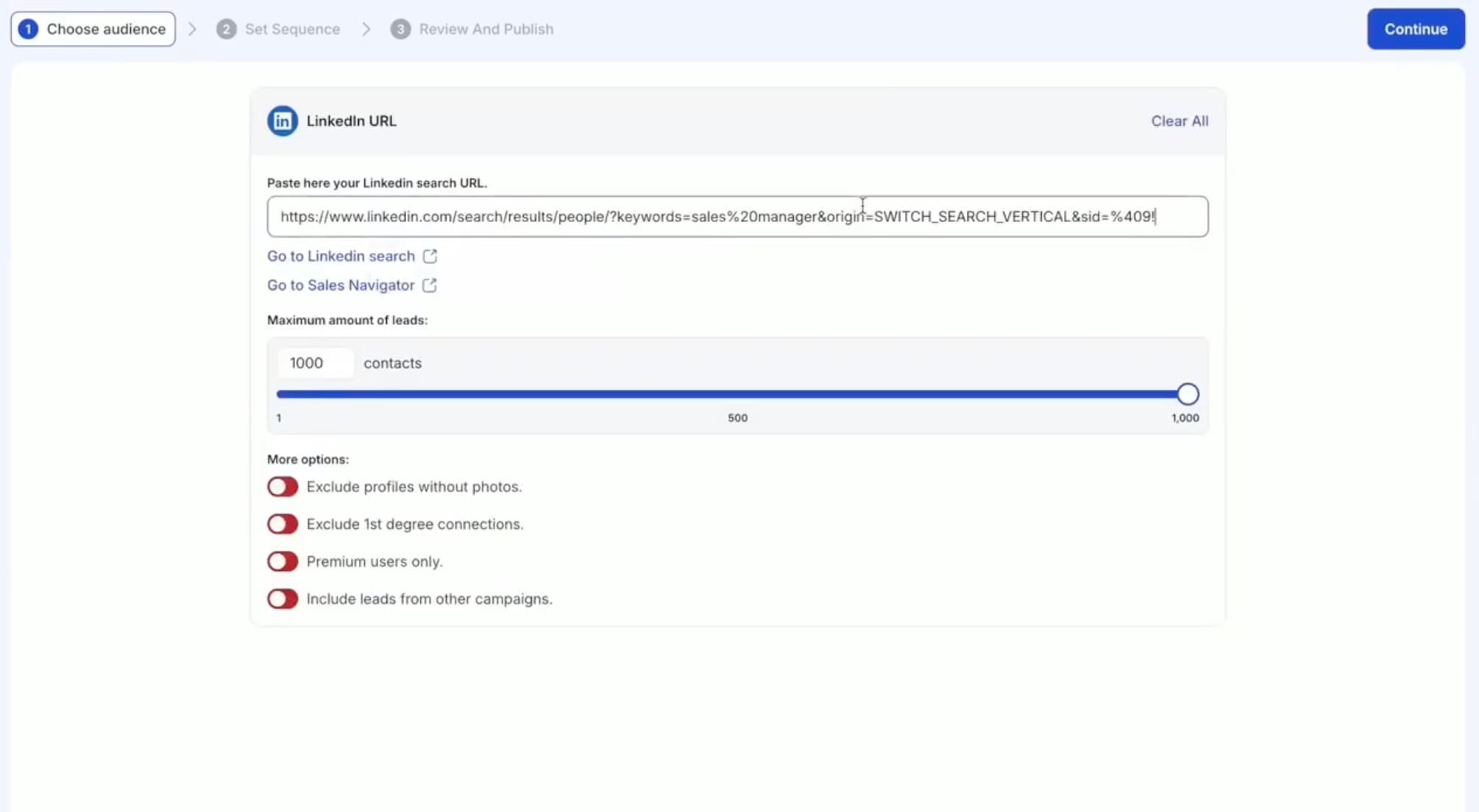
Who should stay on MeetAlfred?
Teams running genuinely balanced sequences where LinkedIn, email, and Twitter each carry real weight, and teams already invested in its campaign library and LinkedIn CRM. MeetAlfred has been in this market for years and that shows in the breadth. If your motion is LinkedIn-led and the other channels are follow-ups, the honest recommendation is a tool that treats LinkedIn as the product rather than one tab among three.
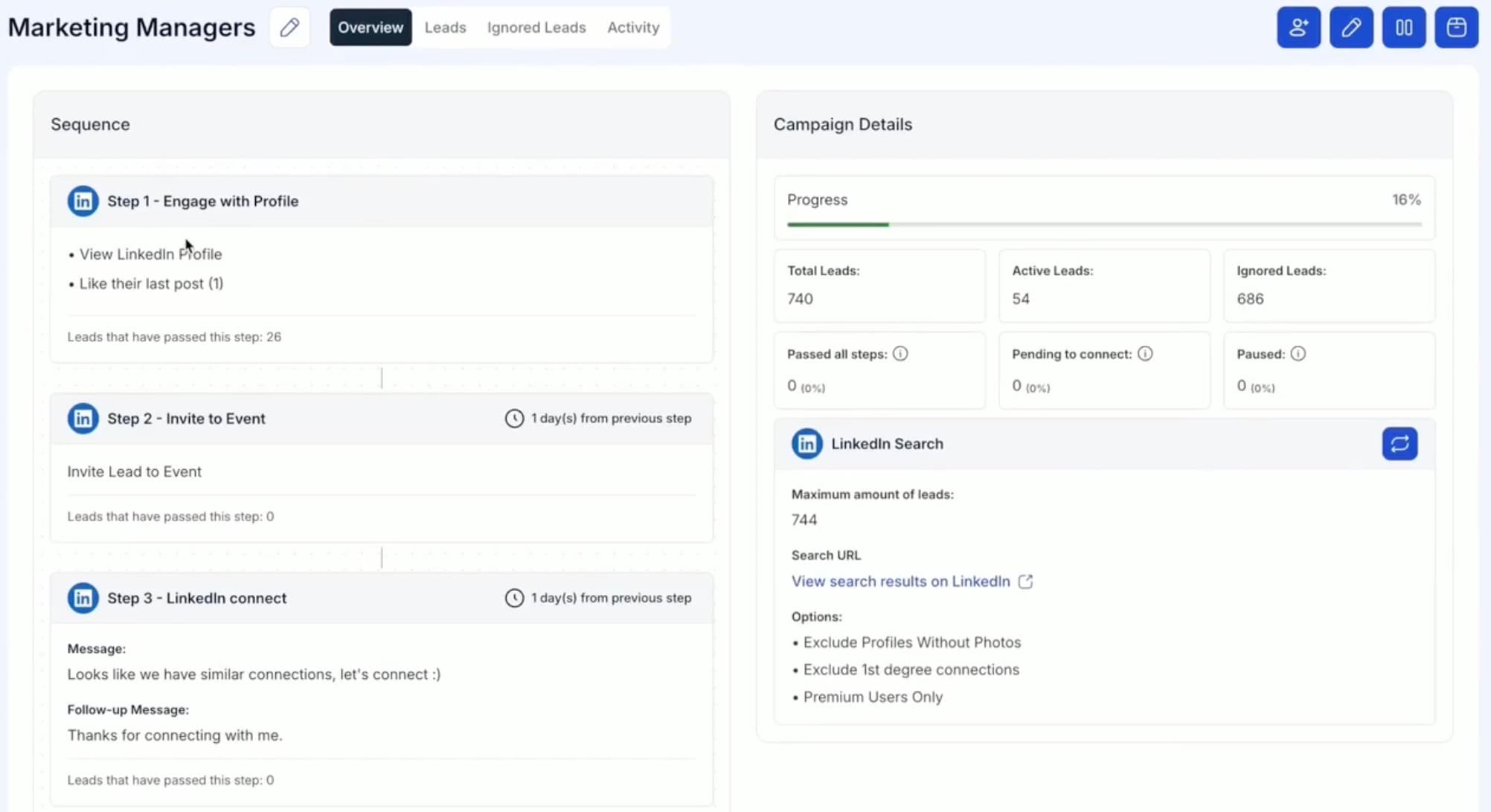
What does Swarmhit do differently?
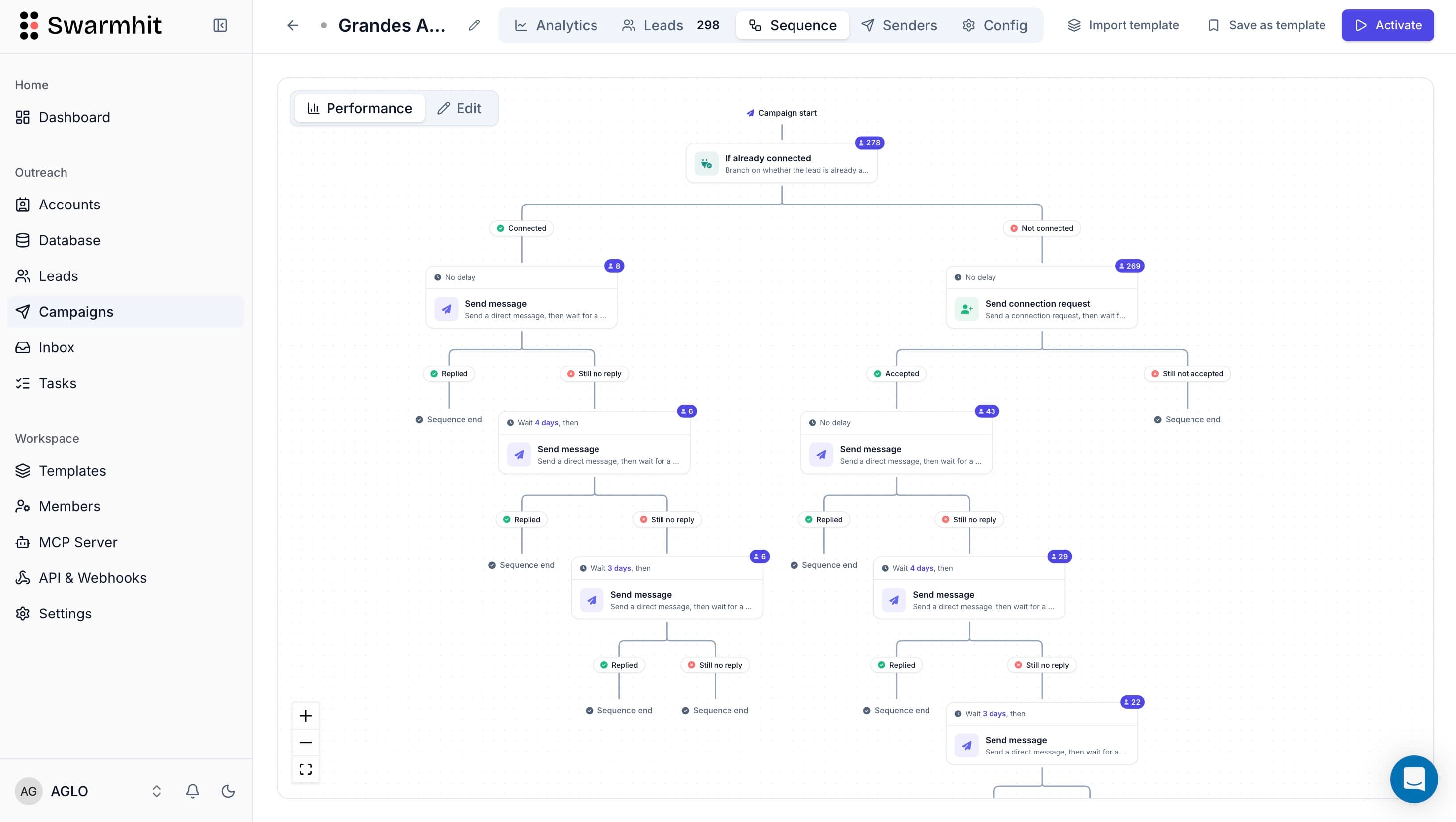
AI voice notes in your own voice
Clone your voice from a thirty second recording, then drop AI voice note steps into any sequence. Every lead hears their own name spoken in your voice, which is the one personalisation a template cannot fake.
A health center on every sender
Social Selling Index across LinkedIn's four dimensions, invites sent in the last seven days, invitations still pending, and today's activity against per-action caps. Safety becomes a number you read rather than a setting you hope is right.
One campaign across every sender
Build the sequence once and it rotates across your pool with per-account limits and deduplication, so two senders never contact the same prospect. Capacity grows by adding a sender, not a seat.
Prospect data in the same platform
Search 1B+ contacts across 60M companies, refreshed weekly, or import a Sales Navigator URL straight into a campaign, with free monthly credits and pay as you go beyond.
What does each tool cost as you grow?
| Senders | Swarmhit | MeetAlfred |
|---|---|---|
| 1 | $29/mo | From $49/mo on annual billing |
| 3 | $87/mo | From $147/mo, three user seats |
| 5 | $145/mo | From $245/mo, five user seats |
| 10 | $290/mo | From $490/mo, ten user seats |
Annual billing on both sides. Swarmhit runs $29 per sender per month on annual terms, $39 monthly. MeetAlfred prices per user from $59 per month, with its Pro tier at $99 and discounts on annual billing, so adding sending capacity means adding a seat. Every Swarmhit feature ships on every plan.
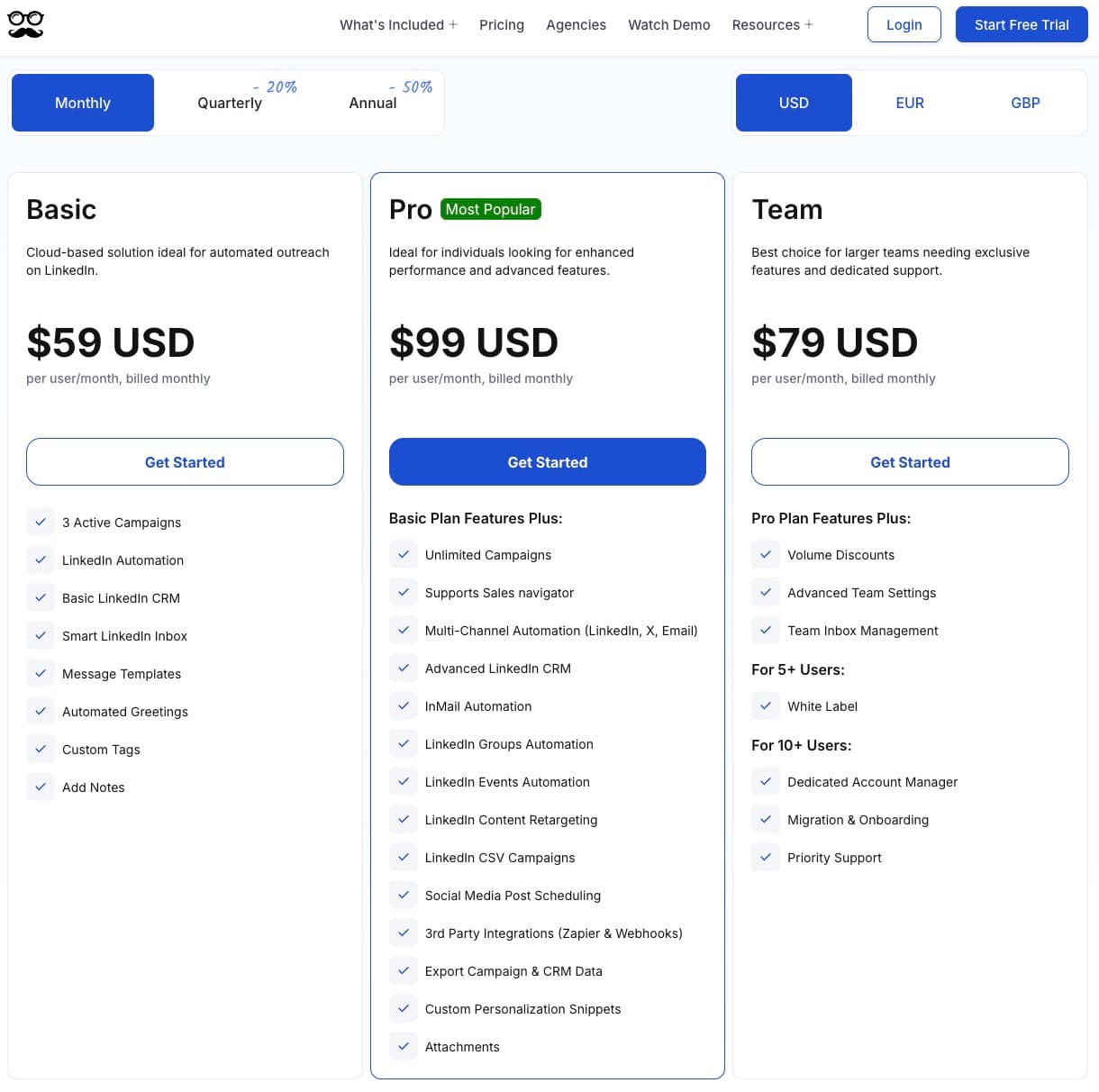
Competitor pricing on this page was checked against the vendor’s own pricing page on 5 August 2026, and the pricing screenshot was captured on 10 August 2026. Vendors change prices without notice, so treat anything older than a month as indicative.
When is MeetAlfred the better fit?
If you’re one person automating one LinkedIn account with straightforward drip logic, MeetAlfred’s simplicity is the feature. The interface is friendlier for a first-time user, the learning materials are excellent, and the 7-day trial makes it easy to test. Swarmhit starts paying for itself the day you add a second sender, share replies with a teammate, or get tired of exporting CSVs from one tool to feed another. When LinkedIn is the channel that books the meetings, Swarmhit is the stronger MeetAlfred alternative.
How hard is switching from MeetAlfred to Swarmhit?
Minutes, not days: for the LinkedIn side it is a clean MeetAlfred replacement. Export your leads as CSV and import them into Swarmhit, or skip the file entirely and rebuild your audience from Swarmhit’s database or a Sales Navigator search. Sequences translate directly: the same invite, delay, message, follow-up logic, plus actions MeetAlfred doesn’t have (voice notes, post comments, InMail). Connected accounts go through managed warmup before ramping to full volume.
FAQ