

HeyReach is a cloud-based LinkedIn automation platform built for agencies and teams running more than one sender: automatic rotation across a pool of accounts, one unified inbox for every reply, and an API, webhooks and an MCP server on every plan. In this HeyReach review, the short answer, as read on HeyReach's pricing page on 21 October 2026, is that Growth costs $79 per sender per month on monthly billing, the Agency plan flattens to $999 a month for 25 senders or $1,399 for 50, and Unlimited runs $2,999 a month with a 300-seat fair-use pool.
We read every figure below live on HeyReach's own pricing page in September 2026 and rechecked the plan prices on 26 September 2026, when the page also listed the per-sender rate from ten senders, $59 a month. We re-read the plans on 21 October 2026, when the 25 and 50 sender options were sold as one Agency plan. If you are choosing between HeyReach and a per-sender alternative, the comparison is sharpest between one and twenty five senders, which is where most agencies and multi-account teams actually sit.
HeyReach review 2026: what is it, and who is it for?
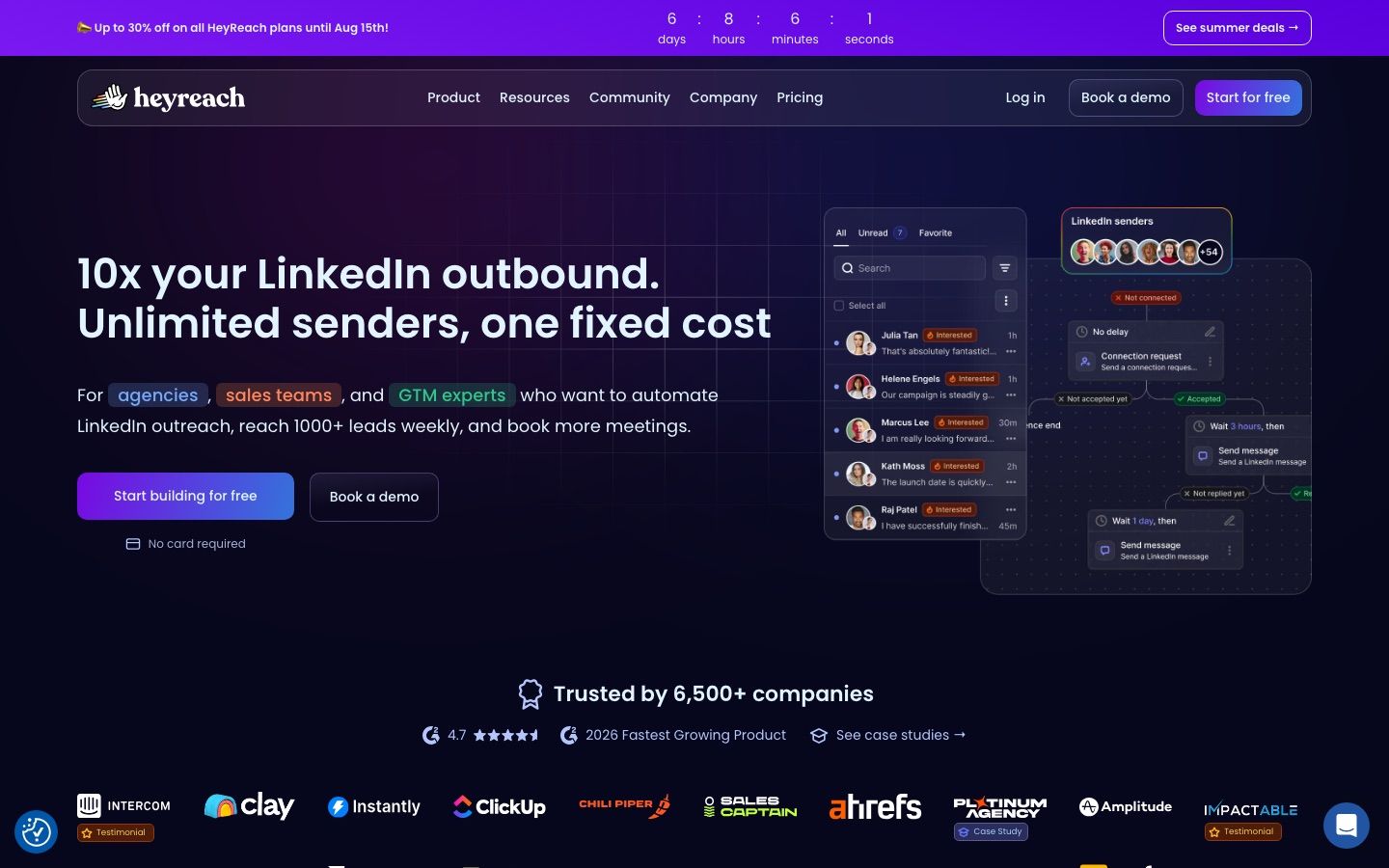
HeyReach is LinkedIn automation software built around one idea: many senders, one campaign, one inbox, priced per sender rather than per user. Every plan carries unlimited campaigns, the full set of LinkedIn actions, multichannel outreach, and integrations, so the plan you pick decides sender pricing and enrichment credits more than which features you can touch.
The product sits inside the broader field of LinkedIn automation tools, and what sets it apart there is that it charges by sender rather than by seat, so onboarding a teammate, a VA or a client login costs nothing extra as long as you are not adding another LinkedIn account. That model is why HeyReach shows up on so many agency shortlists: a five-person team running three senders pays for three senders, not five logins.
Who it suits is specific. An agency or in-house team already running several LinkedIn accounts, comfortable sourcing prospect lists from Sales Navigator or a data vendor, and wanting one inbox and one API to build reporting around, is the target buyer. A solo rep running a single account will pay $79 a month for infrastructure built to coordinate a fleet, which is a reasonable price for one sender only if the unified inbox and API matter more than the sticker.
How do HeyReach's multi-sender campaigns and unified inbox work?
A single HeyReach campaign rotates its sending volume across every connected sender in the pool, so no one account carries the full daily load, and every reply from every sender lands in one shared inbox rather than in separate logins. That is the core of the product, and every plan, including the $79 Growth tier, includes it.
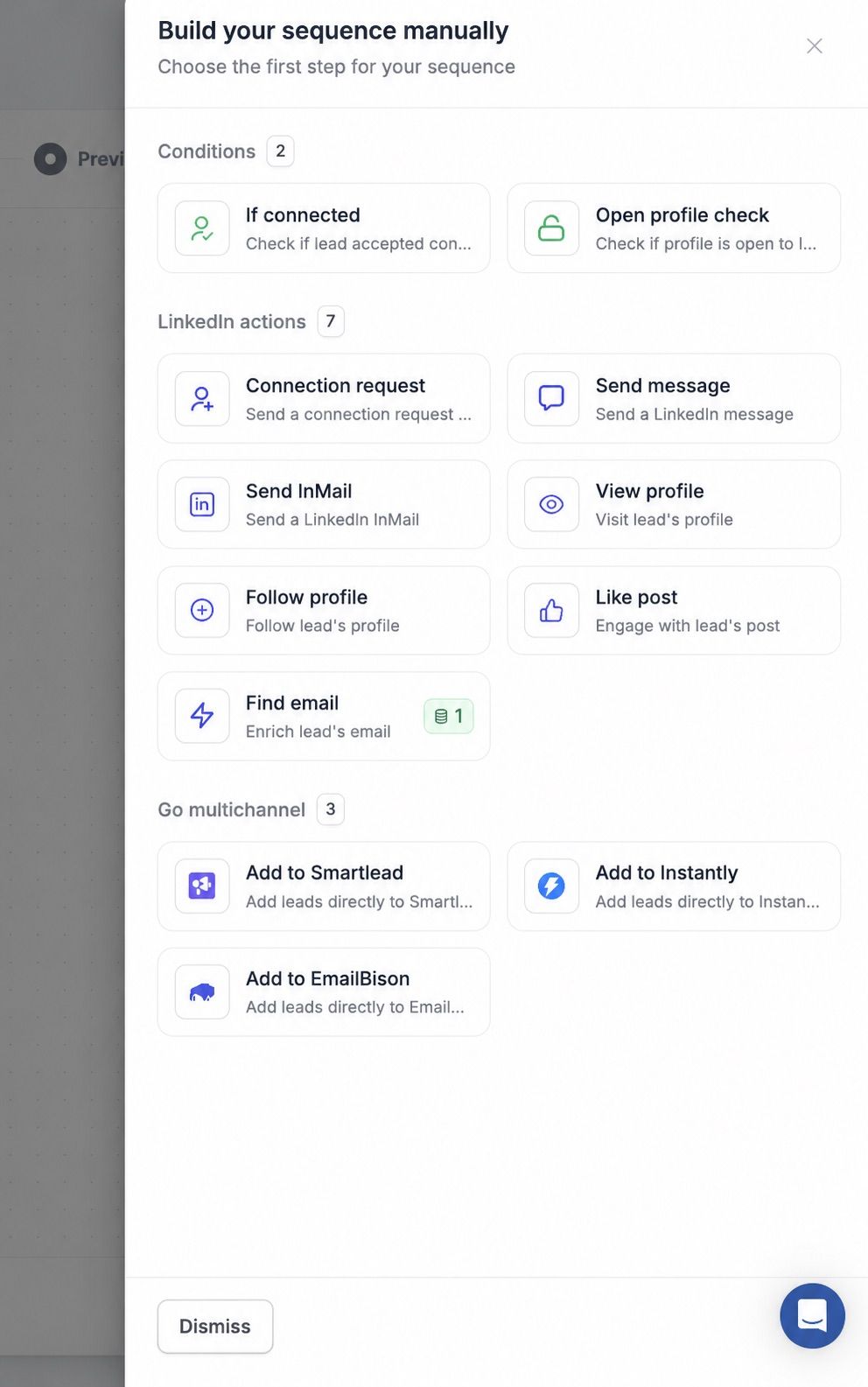
The sequence builder mixes native LinkedIn steps, connection requests, messages, InMail and finding a prospect's email, with conditional branching, and, as the screenshot above shows, blocks that hand a lead off to a separate email sending platform such as Smartlead, Instantly or EmailBison rather than sending email from inside HeyReach itself. That is the trade-off behind "multichannel outreach" on the plan list: LinkedIn is native, email is a handoff, so a true email and LinkedIn sequence needs a second subscription and a second inbox to reconcile against the first.
The unified inbox itself is the feature agencies mention most. Replies across every sender show up in one place, with the context an operator needs to respond without switching accounts, which matters once a campaign spans more senders than one person can log into in a day.
How does HeyReach work for agencies?
HeyReach's agencies page pitches the platform directly at that buyer: "connect as many LinkedIn accounts as you need and auto-rotate sending between them." It promises to "manage all replies in one inbox, while keeping your client's private messages private," with clients under one login as "isolated data, controlled access." Whitelabeling goes further than a logo swap: an agency can "rebrand HeyReach completely," down to its own domain and sign-in page. Automatable actions: connection requests, follow-ups, InMails, profile views and post likes.
Run your LinkedIn outreach on Cadency
One campaign across all your LinkedIn senders and mailboxes, one sender per lead, per-sender ceilings with a dedicated proxy each, and one inbox for every reply, with unlimited workspaces for client work.
From $89 a month with 2 LinkedIn senders included.
Does HeyReach connect through API, webhooks and MCP?
Yes, and this is one of the few places HeyReach does not gate by plan: an API, webhooks and an MCP server ship on Growth, the entry tier, not just on Agency or Unlimited.
That matters for a specific kind of buyer, an agency or RevOps team that wants campaign events, reply data and enrichment results flowing into a CRM or a reporting workspace automatically rather than through manual export. Our deeper walkthrough of HeyReach's API covers the endpoints and webhook events in more detail, and if you are evaluating how an MCP server fits into an AI-agent workflow rather than a traditional integration, our guide to LinkedIn MCP servers explains what that layer actually does.
Shipping API, webhooks and MCP on the cheapest plan, rather than reserving developer access for the top tier the way some competitors do, is a genuine point in HeyReach's favor, and one worth weighing against the per-sender price if programmatic access is part of your evaluation.
In practice, the three pieces cover different jobs. The API is for pulling and pushing data on demand, senders, campaigns, leads and enrichment results, which is what an agency uses to build a client-facing dashboard outside HeyReach's own interface. Webhooks push events the moment they happen, a reply, a connection accepted, an enrichment finishing, which is the piece that keeps a CRM or a Slack channel current without anyone checking HeyReach directly. The MCP server is the newest of the three and the one built for AI agents rather than human-built integrations: it lets an AI-agent LinkedIn outreach workflow read and act on HeyReach data through natural-language tool calls instead of custom API code. An agency running fifty client workspaces is the buyer who gets the most out of all three at once; a single operator running one or two senders will use the API rarely, if at all.
What do HeyReach's enrichment credits include?
HeyReach bundles enrichment credits by plan rather than a searchable prospect database: 100 credits per sender on Growth, 1,000 on Agency, and 3,000 on Unlimited.
Credits enrich records you already hold, for example filling in a verified email or extra firmographic detail on a lead already inside a campaign, rather than letting you search a database of new prospects from scratch. Every audience still starts outside HeyReach, in Sales Navigator or a data provider, and moves in as a list or a CSV import. For teams evaluating LinkedIn prospecting tools as a category, that distinction, enrichment credits versus a built-in database, is worth checking on every vendor's pricing page before assuming "credits" means "data included".
The allowance scales with the plan, not with how many leads you are actually enriching. On Growth, 100 credits per sender means a ten-sender workspace holds 1,000 credits total, the same headline number Agency lists as a flat allowance whether it covers 25 senders or 50. Unlimited's 3,000 credits look generous until you remember they are spread across a fair-use pool of up to 300 seats, as read on 26 September 2026, and the page describes every plan's credits as a one-time allocation to get you started, topped up when you need more, so a large Unlimited workspace can burn through them faster than a small one on Growth. None of this is a criticism of the model, credit-based enrichment is common across the category, but it is a line item worth estimating against your actual campaign volume before comparing sticker prices across plans.
How do HeyReach's sending limits and sender rotation actually work?
HeyReach's help center says daily limits apply per LinkedIn account, not per campaign, shared proportionally when a sender runs in more than one campaign. Its example: a sender with a 20-connection-request daily limit active in 3 campaigns splits that 20 proportionally across them, not 20 each. The same applies within one sequence: three Like Post steps sharing a 30-like cap divide into 10 per step, which is why the help center recommends operators "always start the sequence with an action step that has a higher daily limit," so a low-cap step does not exhaust the day before a higher-limit step runs.
Sender rotation is uncapped by plan: a campaign can assign unlimited LinkedIn senders, with proportional sharing keeping any one account from overloading. Two automatic freezes sit on top: "each of us gets around 100 connection requests to send per week," freezing any account nearing that ceiling, and "each of our LinkedIn accounts is allowed 200 actions per day," frozen until the next day once hit. Both are HeyReach's own operating assumptions, not LinkedIn's published numbers; LinkedIn states that a limit exists without publishing the figure, and operators report a wide range of sustained weekly volume on paid accounts, roughly 80 to 100 a week on a free account, 100 to 200 on Premium and 150 to 250 on Sales Navigator, with sources disagreeing on the top end, so HeyReach's "around 100 a week" freeze sits toward the conservative end of that range. Every account connected on Growth also gets a dedicated static residential proxy that never changes and is never shared; on Agency and Unlimited, the FAQ on HeyReach's pricing page says you bring your own proxies.
| Rule | What HeyReach's help center says | What it means for a 10-sender campaign |
|---|---|---|
| Daily action limits | Per LinkedIn account, shared proportionally across every campaign that account is active in | Each of the 10 senders keeps its own limit; adding a sender to a second campaign splits its existing limit rather than granting a second allowance |
| Connection request freeze | Automatic freeze around 100 connection requests per sender per week | All 10 senders can send in parallel, but each one pauses on connection requests individually as it nears its own weekly ceiling |
| Daily action freeze | Automatic freeze at 200 actions per sender per day | A sender that front-loads views, likes and messages can hit 200 actions and freeze before that day's connection requests or InMails even run |
| Proxy assignment | One dedicated static residential proxy per account on Growth, never shared; your own proxies on Agency and Unlimited | 10 senders on Growth means 10 separate proxies, not one IP rotated across the pool |
Does HeyReach send InMails, and what does it cost in credits?
Yes, but only on senders with a LinkedIn Sales Navigator subscription: HeyReach's help center states "InMail in HeyReach requires Sales Navigator," and Premium and Recruiter accounts cannot send InMails through the platform. Rotation follows the same rule: a mixed pool only runs InMail steps on senders that carry Sales Navigator.
Credit cost follows open-profile status: 0 credits for an open profile, 1 for a closed one, detected from the account's Sales Navigator data. A credit is refunded on reply, and replying itself is free. HeyReach also caps InMail volume at 40 a day per sender, since more "could impact your account's health," on top of whatever LinkedIn credit balance the plan still has that month.
Sales Navigator Core itself carries 50 InMail credits a month, credits expire after 90 days, and one returns when the recipient accepts, declines or responds within that window. First-degree connections, open profiles and job applicants never consume a credit on LinkedIn's side. See our guide to LinkedIn InMail for the full mechanics.
How does HeyReach handle multichannel and integrations?
HeyReach routes email through separate platforms rather than sending it directly: its page states "with native Instantly and Smartlead integrations, multichannel outreach finally works," an admission that LinkedIn messaging is native and email is not. The branching: "if accepted, LinkedIn message. If ignored, email follow-up via Instantly or Smartlead after X days." A lead who accepts stays in LinkedIn messaging; one who ignores it drops into email via a connected Instantly, Smartlead or EmailBison account, and a reply on either channel pauses or stops the other. Otherwise, HeyReach describes no native email, no voice notes and no SMS, so "multichannel" means LinkedIn plus a connected email tool.
Integrations beyond email are broad: Clay, HubSpot, Attio, Breakcold, Zapier, Make, n8n, Pabbly and Slack, plus RB2B and Persana, on top of a documented API and webhooks. Only HubSpot carries an explicit sync claim, letting a team "seamlessly sync and manage your prospects and deals."
MCP and CLI sit alongside that API and webhooks. The MCP page says it "seamlessly integrates with platforms like Cursor, Claude, or any other app that supports MCPs," and states its cost directly: "Nothing, you can use it straightaway." The CLI, "everything you'd do in the HeyReach dashboard, now scriptable," runs from a terminal or from inside a Claude chat.
HeyReach pricing in 2026: how much does it cost?
As read on 21 October 2026, HeyReach costs $79 per sender a month on Growth, $59 per sender from ten senders, a flat $999 a month for 25 senders or $1,399 a month for 50 on Agency, and $2,999 a month on Unlimited, which carries a 300-seat fair-use pool, plus a custom done-for-you service.
| Plan | Price | What's included |
|---|---|---|
| Growth | $79 per sender per month, monthly billing; $59 per sender from 10 senders | Unlimited campaigns, all LinkedIn actions, unified inbox, multichannel outreach, 100 enrichment credits per sender, integrations, API and webhooks, workspaces and permissions, MCP server |
| Agency | $999 per month for 25 senders, or $1,399 for 50 | Everything in Growth, plus 1,000 enrichment credits, whitelabel included, done-for-you onboarding, a dedicated Slack channel |
| Unlimited | $2,999 per month, 300-seat fair-use pool | Everything in Agency, plus 3,000 enrichment credits, multi-brand whitelabels as a paid add-on, done-for-you migration, priority support |
Prices above are read from heyreach.io/pricing in September 2026 and re-read on 21 October 2026. Quarterly billing takes 10 percent off, and yearly takes 20 percent off; on Unlimited the page spells out what that means in practice, $2,699 a month on quarterly and $2,399 a month on yearly. On the other plans the page's calculator applies those percentages and rounds up to the next dollar, so yearly billing shows $64 per sender on Growth rather than $63.20, $48 per sender from ten senders, $800 a month on Agency with 25 senders and $1,120 with 50, and quarterly billing shows $72 per sender on Growth, as read on 21 October 2026. At $1,399 for 50 senders, Agency works out to roughly $28 per sender. The done-for-you service itself is unpriced on the page and routed to a custom quote.
The number agencies actually need is what a fleet costs at a given sender count, since the per-sender rate on Growth and the flat Agency fee cross over somewhere in the middle:
| Senders | Growth, at the $79 list rate | Cheapest route we can verify |
|---|---|---|
| 1 | $79/mo | $79/mo on Growth |
| 5 | $395/mo | $395/mo on Growth |
| 10 | $790/mo | $590/mo on Growth at $59 per sender, the rate from ten senders as read on 26 September 2026 |
| 25 | $1,975/mo | $999/mo flat on Agency, which includes 25 senders |
Read plainly, the 25-sender Agency option pays for itself from around 17 senders, where $999 undercuts 17 senders at Growth's $59 rate as read on 26 September 2026; below that, Growth's per-sender rate is what you are actually billed, discounted rate or not. A team running three or four senders is paying the full $79 Growth price per sender, not the $59 volume rate that only starts at ten senders.
Is HeyReach worth the price? Pros and cons
HeyReach at a glance
Pros
- API, webhooks and an MCP server on every plan, including the entry Growth tier
- Unified inbox pulls every sender's replies into one place
- Automatic sender rotation spreads volume across the whole pool on one campaign
- Workspaces and permissions built in for managing multiple client accounts
- Flat Agency and Unlimited plans remove per-sender math once a fleet is large enough
Cons
- $79 per sender on Growth below ten senders is one of the pricier per-sender entry points we track
- No searchable prospect database; enrichment credits enhance records you already have, they do not source new ones
- Email steps hand off to a separate platform, Smartlead, Instantly or EmailBison, rather than sending natively
- The flat tiers require a real jump in sender count, or spend, to make financial sense
- Agency and Unlimited require you to bring your own proxies, while Growth includes one per sender
Is HeyReach safe to use on LinkedIn?
HeyReach's pricing page stays quiet on daily limits, but its help center does not: as covered above, HeyReach names around 100 connection requests a week and 200 actions a day as the thresholds it freezes a sender at, on top of a dedicated proxy per account on Growth.
That is not unusual among LinkedIn automation vendors, and it puts the responsibility for safe sending volume on the operator regardless of which tool is running the account. LinkedIn's own help center on account restrictions is the baseline every vendor's automation sits on top of, since it is LinkedIn, not HeyReach or any other tool, that decides what triggers a restriction and how long one lasts. Our broader guide to whether LinkedIn automation is safe walks through the general risk model behind any tool that sends connection requests and messages on your behalf, and it is worth reading before connecting a client's account to any platform, HeyReach included. If you want the specific behavior LinkedIn's own limits assume, our breakdown of LinkedIn's connection limits is a useful reference, and what actually triggers a LinkedIn account restriction covers the patterns worth avoiding regardless of the vendor.
None of this is specific to HeyReach, and that is the point. Multi-sender rotation across a pool of accounts, HeyReach's core design, is a mitigation, not a guarantee: it spreads volume so no single sender carries a full campaign's load, but LinkedIn evaluates each account on its own pattern, not the fleet's average. An agency signing a client onto HeyReach, or any per-sender platform, is taking on responsibility for that client's account standing, which is why the questions worth asking on a demo call are about pacing and recovery, not just price.
Two practical points apply here as much as anywhere else in this category. Multi-sender rotation, HeyReach's core design, spreads volume across accounts, which can reduce the load any single sender carries, but it does not change what LinkedIn itself tolerates per account. And an agency connecting client accounts to any automation platform should confirm what happens at a limit, a pause or a stop, before the first campaign goes live, not after.
How does HeyReach compare with Cadency?
The honest starting point for this HeyReach review is that HeyReach earned its agency following: per-sender pricing, a real unified inbox, and API, webhooks and an MCP server on every plan are a strong combination, and for a team already comfortable sourcing its own data, HeyReach is a legitimate choice. Our wider HeyReach alternatives roundup covers eight options if the fit still is not right after reading this.
Cadency, our own product built on Swarmhit, runs the same underlying model, one campaign rotating across a pool of LinkedIn senders with one sender per lead and a unified inbox, and differs on a specific set of points. Email is native rather than a handoff: unlimited Google and Microsoft mailboxes with warm-up rotate in the same campaign as the LinkedIn senders, and every reply, LinkedIn or email, lands in one thread per lead that can be assigned to a teammate and answered as any sender. Audiences can start inside the product, from a native people and company database with waterfall enrichment paid per verified hit, alongside CSV and Sales Navigator imports. LinkedIn coverage runs to eight steps: profile visit, connection request, message, InMail, a comment on the lead's last post (AI drafted, approved by you), voice note, like and follow, with branches on connected, replied and email found. Every sender runs in the cloud with its own ceilings and pacing, a dedicated proxy and checkpoint handling, and ambassador accounts, vetted LinkedIn accounts operated for you, are available on demand. CRM and ATS connectivity runs through the API and webhooks on every plan rather than a native CRM sync, the same developer-first approach HeyReach takes for everything except HubSpot. Essential is $89 a month with 2 LinkedIn senders and 100,000 emails a month included, Small Team is $199 with 5 LinkedIn senders, and Scale is $699 with 20 senders, $25 per additional sender and 500,000 emails a month; annual billing takes 30 percent off, to $62, $139 and $489 a month. Mailboxes, teammates and workspaces are unlimited on every plan, white label is scoped on a sales call, and Essential starts with a free trial while Small Team and Scale are self-serve, without a trial.
Compare the two side by side in the full Cadency vs HeyReach comparison. On LinkedIn sender price alone and monthly list prices, HeyReach is cheaper at one sender ($79 against $89) and again at 50, where its $1,399 Agency tier edges Cadency's $1,449, while Cadency costs less from two to 25 senders, $824 a month for 25 on Scale against HeyReach's $999 Agency plan for 25 senders as read on 21 October 2026. On annual billing both ends flip in Cadency's favor: $62 against $64 for one sender and $1,029 against $1,120 for 50, as HeyReach's page displays them. Neither tool is wrong for the job it is built around; the practical difference is whether you would rather bring your own prospect data and email tool and pay HeyReach's per-sender or flat-tier rate, or start inside a platform that has the prospect database and native email built in.
FAQ
How much does HeyReach cost in 2026?
HeyReach costs $79 per sender per month on the Growth plan, billed monthly, and $59 per sender from ten senders. The Agency plan is a flat $999 a month for 25 senders or $1,399 for 50, and Unlimited runs $2,999 a month with a 300-seat fair-use pool, all as read on 21 October 2026. Quarterly and yearly billing are discounted, so Unlimited drops to $2,699 on quarterly billing and $2,399 on yearly. A custom done-for-you service and a discounted early-stage program for companies under $250,000 ARR are also available, both without a published figure.
Is HeyReach worth it?
HeyReach is worth it for an agency or team already running enough senders that a flat Agency or Unlimited plan beats Growth's per-sender rate, $59 from ten senders as read on 26 September 2026, and that values API, webhooks and MCP access on every plan. It is a weaker deal for one or two senders, where $79 a month each is among the highest per-sender rates in the category, and where you are paying for multi-account infrastructure you are not yet using at scale.
Is HeyReach API access included on every plan?
Yes, HeyReach ships an API, webhooks and an MCP server on every plan, including the entry Growth tier, rather than reserving developer access for higher tiers. That makes it straightforward to push campaign events, replies and enrichment results into a CRM or a custom workflow without upgrading first, which is unusual in this category and genuinely useful for teams building their own reporting layer.
What is HeyReach's Agency plan?
HeyReach's Agency plan is a flat $999 a month for 25 senders or $1,399 a month for 50, with 20 percent off on yearly billing, as read on 21 October 2026; the page no longer lists a separate Micro Agency tier. Agency adds 1,000 enrichment credits, whitelabel branding, done-for-you onboarding and a dedicated Slack channel on top of everything in Growth, and the 25-sender option makes financial sense from around 17 senders, where $999 undercuts Growth's $59 per-sender rate; below that, Growth's per-sender pricing is what you are actually billed.
Does HeyReach come with a prospect database?
No, HeyReach bundles enrichment credits by plan instead of a database, 100 per sender on Growth up to 3,000 on Unlimited, which enhance records you already have rather than letting you search a database of new prospects. Every audience still starts in Sales Navigator or a separate data provider and moves into HeyReach as a list or CSV import, which is worth budgeting for separately from the subscription price.
Can HeyReach send email as well as LinkedIn messages?
Not natively. HeyReach's sequence builder includes handoff blocks to separate email sending platforms, specifically Smartlead, Instantly and EmailBison, so a true LinkedIn-and-email sequence runs through a second subscription and a second inbox rather than one tool. LinkedIn actions themselves, connection requests, messages, InMail and finding an email address, run natively inside HeyReach.
Is HeyReach cheaper than Cadency?
Not at most fleet sizes. On monthly billing, HeyReach is cheaper at one sender, since Growth is $79 a month against $89 for Cadency's Essential plan, but from two senders the order flips: two senders cost $158 on HeyReach against $89 on Essential, five cost $79 each, nearly twice Cadency's $199 for five on Small Team, and 20 run $999 on HeyReach's 25-sender Agency option against $699 on Cadency's Scale plan, with HeyReach prices as read on 21 October 2026. HeyReach is cheaper again at 50 senders on monthly billing, where its $1,399 Agency tier edges Cadency's $1,449; on annual billing Cadency is cheaper at every size from one sender ($62 against $64) to 50 ($1,029 against $1,120), and its price includes email sending that HeyReach hands off to a separate tool.
Is there a free trial for HeyReach?
Yes. The FAQ on HeyReach's pricing page and its signup page both give 14 days with no credit card, as read on 21 October 2026, and the FAQ adds that this trial covers 3 LinkedIn accounts, while a 30-day trial of the flat plans can be requested. Anyone testing it before a client campaign should confirm what happens to connected accounts and data once it ends, directly with HeyReach, before relying on it for a real launch.
Does HeyReach give each account its own proxy?
On Growth, yes: HeyReach's help center states that every connected LinkedIn account gets a dedicated static residential proxy, a real IP address that never changes, and that the proxy is never shared between two accounts. On Agency and Unlimited, the FAQ on HeyReach's pricing page says you bring your own proxies, and offers to work something out on a call if you have none. That matches the sender-isolation behind its rotation and freeze rules: each account keeps its own IP, its own daily limits and its own weekly connection-request ceiling.
Can HeyReach send InMails?
Yes, but only through senders with a LinkedIn Sales Navigator subscription; HeyReach's help center states that Premium and Recruiter accounts cannot send InMails through the platform. Open-profile InMails cost 0 credits, closed-profile InMails cost 1 credit refunded on reply, and HeyReach caps volume at 40 a day per sender to protect account health.
Conclusion
HeyReach built a genuinely coherent product around one idea, many senders, one campaign, one inbox, and shipped API, webhooks and MCP access on every plan including the cheapest one. The honest limits are the price: $79 per sender on Growth is steep below real scale, there is no searchable prospect database behind the enrichment credits, and email sequences hand off to a separate platform rather than sending natively.
Buy HeyReach if you are an agency or multi-account team whose sender count is close to the Agency or Unlimited thresholds, you already have a reliable source of prospect data, and API-level access matters to how you report and operate. Look at a per-sender alternative first if you are running fewer than ten senders, want prospecting data built into the platform, or want deeper account-safety controls than a pricing page alone can promise.
If you want email sending and prospect data in the same product as your LinkedIn senders rather than bolted on, Cadency is the multi-sender tool we would look at first: one campaign across every LinkedIn sender and mailbox, one sender per lead and one inbox for every reply. It began as our internal test bed for the Swarmhit engine and was never meant to be public, but we kept it running for the sales teams, recruiters and agencies who asked for it. Swarmhit itself is the API for developers who build their own outreach product.


