

Expandi is a cloud-based LinkedIn automation tool that sends from a dedicated, country-based IP address instead of a browser extension, and this Expandi review covers what that setup costs and who it actually fits. The Business plan is $99 per seat per month, dropping to $79 per seat on annual billing, and one seat is one LinkedIn account. Expandi suits a single operator or a small team running a handful of accounts with a fairly linear sequence, and the seat-based pricing is the number to plan around once a team grows past that.
We read Expandi's own pricing and feature pages in September 2026 rather than leaning on older screenshots, and we checked every number below against the other vendors in our dossier so the comparisons are apples to apples. The short version: a solid cloud platform, real control through if/action sequences, and a few paid add-ons, personalized images, GIFs and Sendspark video, that push the real cost above the $99 sticker price.
Expandi review: what is it and who is it for?
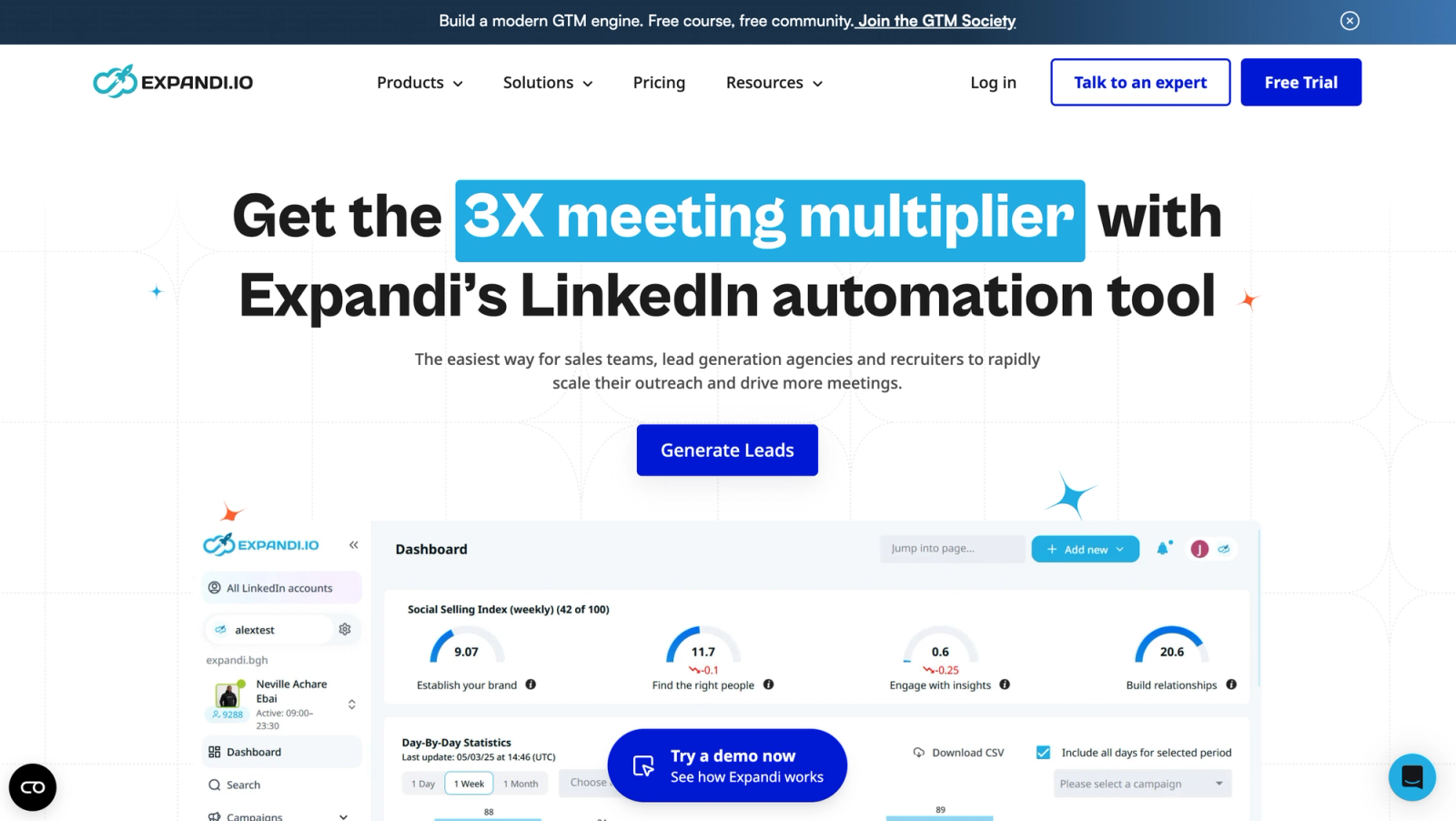
Expandi is a cloud-based LinkedIn automation platform: campaigns run on Expandi's own servers rather than through a browser extension, so closing a laptop doesn't pause a sequence. Each seat represents one LinkedIn account, and the Business plan is built for whoever owns that account, a solo seller, a founder doing their own outbound, or a single recruiter, who wants connection requests, messages and email follow-ups running on a set schedule. For the wider category this tool sits in, see our guide to LinkedIn automation tools.
Agencies and larger teams outgrow the Business plan's per-seat design fast, which is why Expandi routes anything at 10 or more seats, or any white-label request, to a custom Agency quote instead of a published price. That gap, a visible price for one account and a sales call for ten, is the detail anyone writing or reading an honest Expandi review runs into first: the sticker price answers the wrong question the moment more than one account is involved.
The clearest signal you're still inside Expandi's target buyer is a single person, or a small team, running a handful of accounts. Adding people is not what drives the bill: as of 30 September 2026, Workspaces come with every plan, and teammates and roles don't add seats, only connected LinkedIn accounts do. The moment the number of accounts climbs, the per-seat model starts working against the team instead of for it, and that's usually the point where the Agency quote or a different tool enters the conversation.
How does Expandi's cloud sending and warm-up work?
Every Expandi seat gets its own dedicated, country-based IP address, so the account's traffic looks like it's coming from one consistent location instead of jumping between an office network and home Wi-Fi. New or reconnected accounts go through profile auto warm-up: Expandi ramps activity gradually rather than starting a fresh account at full volume on day one.
That combination, a stable IP tied to geography plus a warm-up ramp, is the baseline most cloud LinkedIn tools now offer, and Expandi's version is mature. It has run this infrastructure for years, which tends to show up as fewer surprises when an account reconnects after a password change or a new device login, and as a smoother first week for a brand-new seat.
Run your LinkedIn outreach on Cadency
Cadency runs one campaign across every LinkedIn sender and mailbox, gives each sender a dedicated proxy, ceilings and pacing, and keeps every reply in one unified inbox.
From $89 a month with 2 LinkedIn senders included.
Which campaign types does Expandi offer?
Expandi's own guide to LinkedIn cold outreach names ten campaign types: Connector, Messenger, Mobile Simulation, Open InMail, Company Follow Invite, Group, Event Invite, Inbound, Recovery and Campaign Builder, while Expandi's homepage separately advertises "11 campaign types." We're listing what the guide says about each one rather than reconciling the count.
Connector is the default type, a standard connection-request sequence. Messenger targets people you're already connected to, no connection request needed. Mobile Simulation, labeled Mobile Connector inside the app, is the one to read closely: Expandi's guide describes it as a way to "send up to 100 additional connection requests per week," simulating mobile interactions rather than sending through the desktop cloud sender the rest of a campaign uses. Open InMail "send[s] messages to LinkedIn members who are not in your network," playing a similar role to LinkedIn's own InMail feature. Company Follow Invite targets company page followers. Group reaches people "without sending a connection request," for LinkedIn groups you already belong to. Event Invite automates "inviting up to 1,000 attendees." Inbound targets "leads who have clicked on your profile," turning visitors into a warm list. Recovery restarts a stalled or disconnected campaign. Campaign Builder is the open canvas for a fully custom sequence.
| Campaign type | What Expandi says it does | When to use it |
|---|---|---|
| Connector | Standard connection-request sequence | Default starting point for a new campaign |
| Messenger | Messages 1st-degree connections, no connection request | Warming up an existing network before a pitch |
| Mobile Simulation | Sends up to 100 additional connection requests a week via simulated mobile interactions | Only on accounts with weeks of clean, warmed-up history |
| Open InMail | Sends messages to LinkedIn members outside your network | Reaching prospects you're not connected to, with Sales Navigator or Recruiter |
| Company Follow Invite | Targets people who follow your company page | Converting page followers into direct conversations |
| Group | Reaches people without sending a connection request | Prospects who share a LinkedIn group with you |
| Event Invite | Automatically invites up to 1,000 attendees | Promoting a LinkedIn event to a large list at once |
| Inbound | Targets leads who have clicked on your profile | Following up on warm, self-identified interest |
| Recovery | Restarts a campaign that stalled or disconnected | Getting a paused sequence running again without rebuilding it |
| Campaign Builder | A custom sequence built from scratch | Anything the named templates don't already cover |
Mobile Simulation is the campaign type behind the Mobile Connector bypass covered next: LinkedIn doesn't publish a limit for the mobile interactions it simulates, so treat the 100-a-week figure as a vendor number to plan around, not a ceiling anyone outside Expandi has confirmed. See LinkedIn's own help center for the platform's general guidance on invitation limits.
What are Expandi's smart limits and the Mobile Connector bypass?
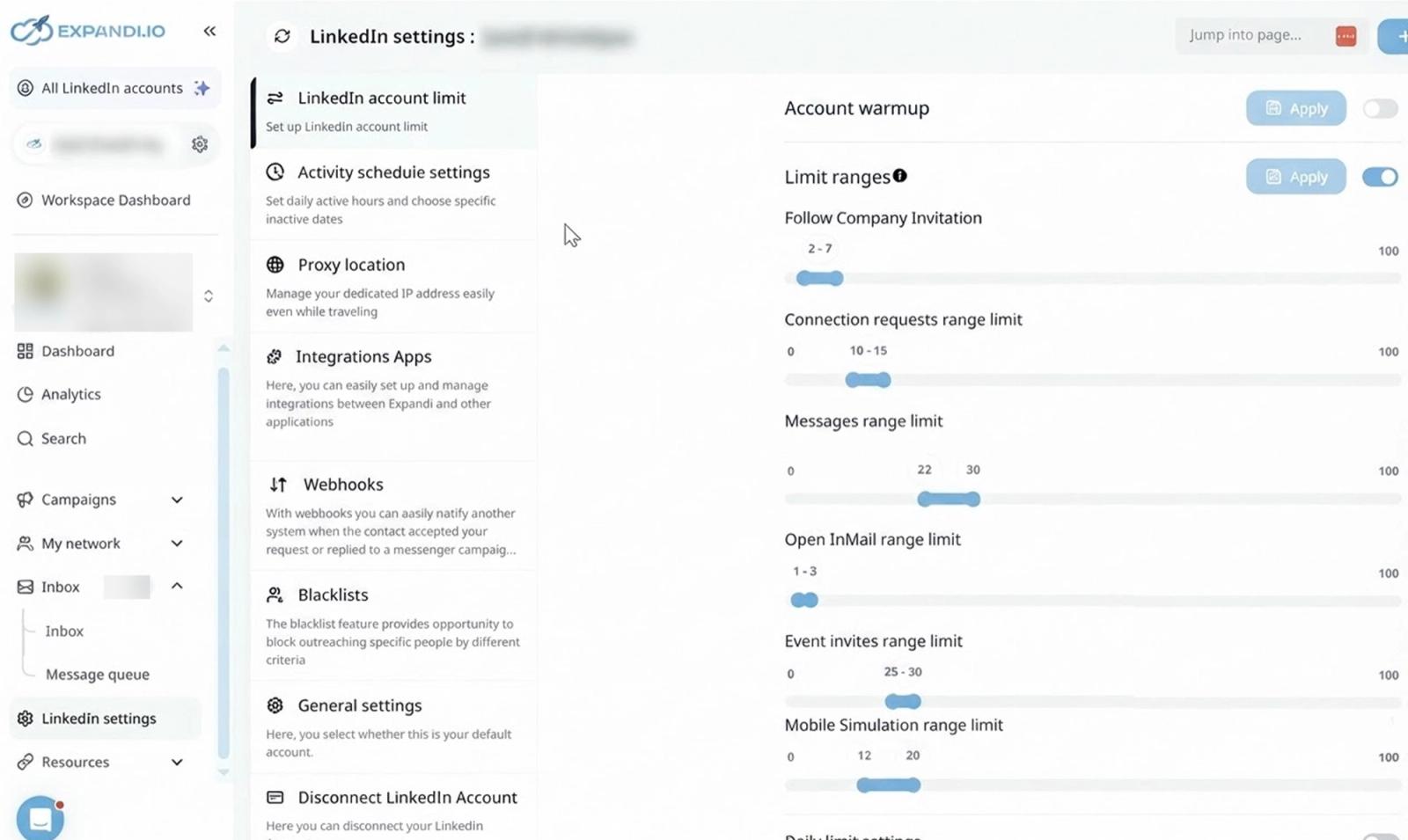
Expandi's smart limits let you set a range, not a fixed number, for each action type: connection requests, messages, Open InMail, event invites. The algorithm varies the daily count inside that range so an account's activity doesn't look identical every day, and it won't exceed the ceiling you set. That range setting is the main lever for pacing an account, and it sits on one settings screen next to the warm-up toggle. For a fuller picture of what LinkedIn accounts can typically sustain week over week, see our guide to LinkedIn connection limits.
Expandi also sells campaign types built to add volume outside those ranges. The Mobile Connector campaign is the clearest example: it adds up to 100 connection requests a week, routed through the mobile app rather than the desktop cloud sender. Framed as extra reach, in practice it's extra volume that bypasses the exact limit ranges you configured to keep the account inside a plausible pattern, on a channel you're not watching through the same dashboard.
If an account has already been flagged or restricted once, the safer call is to leave the Mobile Connector off until the account has run weeks of clean, warmed-up activity again. Adding volume outside the limit ranges you can actually see is exactly the kind of change that draws a second look from LinkedIn's own systems.
How do Expandi's smart sequences and conditions work?
Expandi's sequence builder uses if/action branching: each step can check a condition, did the prospect accept, reply, or view a profile, and route to a different next action. In practice that is the difference between a linear tool and a routed one: a linear sequence sends every prospect the same next step on the same delay, while Expandi's builder can send an accepted connection down a messaging path, keep nudging a prospect who never answered with the engaging actions it lists between follow-ups, profile visits and post likes, and stop or reroute a cold thread instead of pushing a fourth message at it. For an agency that runs the same playbook across many client accounts, that routing is where most of the reply-rate difference between tools comes from, and it is also the part that takes longest to rebuild if you leave. That lets one campaign handle an accepted connection, a declined one and a non-response with three separate message paths instead of a single generic follow-up for everyone.
Multichannel sequences combine connection requests, LinkedIn messages and email follow-ups in one flow, so a prospect who stays quiet on LinkedIn can still get a follow-up email without building a second campaign from scratch. Expandi also supports engaging actions, profile visits and likes, between messaging steps, a way to put a small signal in front of a prospect before the next direct message lands. None of this is unique to Expandi, but the branching logic is deep enough that agencies managing several client playbooks tend to rebuild the same sequence architecture whichever tool they land on next.
Expandi names the specific conditions available inside that branching on its Smart Campaigns page: If connected, If followed by you, If visited your profile, If email opened, If Open InMail and If post liked. Each one can route to a different next action, and the delay between steps is flexible rather than fixed, so a step can wait a day, a week, or however long fits the sequence instead of firing on a rigid clock. Every step also tracks its own statistics, so a slow step three surfaces before it drags down the whole campaign's numbers, and Expandi automatically prevents sending duplicates so the same prospect already in one campaign doesn't get pulled into a second one by mistake.
Before any of those conditions fire on a cold message, Expandi builds in what it calls "warm-up" actions, lighter touches like a profile visit or a post like that put a signal in front of a prospect before a direct pitch lands. Replies collect from every one of those touch points, a connection note, a message, an email follow-up, in one place, so a team isn't checking three separate views to see who actually responded.
One detail worth flagging for anyone comparing builders on spec sheets: Expandi's own pages don't agree on how big this one is, giving different totals for actions and conditions, so we list the actions rather than count them. As read on 30 September 2026, they are connection request, message, InMail and Open InMail, profile visit, follow, like a post, skill endorsement, event invite, invite to follow company, group message and engage with recent post, plus email steps. Whichever total is accurate, the six conditions named above are the ones Expandi documents by name.
The $99 seat, or $79 on annual billing, already bundles the operational layer around those sequences: unlimited campaigns, campaign prioritization, a centralized dashboard, flexible scheduling, campaign recovery if a step fails, dynamic placeholders, tags and notes on each lead, unlimited templates, duplication prevention so the same prospect doesn't get hit twice across campaigns, standard integrations and a blacklist for excluding certain profiles or companies. The two things that base price doesn't cover are personalized imagery and video, which is why those two add-ons feel like the exception rather than the rule.
How does Expandi personalize messages, and what costs extra?
Expandi personalizes messages with dynamic fields, first name and beyond, dropped into a template, then layers on personalized images and GIFs. Its personalization page also lists dynamic image layers for building a generated image, the option to upload your own GIFs and images instead of using Expandi's library, and a Hyperise sync for teams already on Hyperise, which Expandi's own page notes "(subscription is required)" for that sync specifically. Expandi also supports A/B testing of full campaigns and of individual icebreakers, so a team can run two openers against the same audience and keep whichever gets more replies.
Two of Expandi's most talked-about features are paid add-ons on top of the $99 seat price. Image and GIF personalization, dropping a prospect's name or photo into a generated image, is listed as an additional cost rather than bundled into Business. Video personalization works through a Sendspark integration, also a paid add-on, so a campaign built around personalized video needs to budget for Sendspark separately from the Expandi subscription itself. If video outreach is the goal regardless of vendor, our guide to LinkedIn video messages covers the format more broadly.
Neither add-on is priced on Expandi's public pricing page, which makes the real monthly cost of an image- or video-heavy campaign hard to estimate before setup. If personalized imagery is the reason you're evaluating Expandi, get current add-on pricing from sales before committing, since it changes the actual per-seat number, not just the $99 or $79 baseline. Get that quote before signing the annual plan rather than after, since a discount that looks good against $99 alone can look different once image or video credits are added on top. That gap runs across Expandi's own site: the pricing page lists image and GIF personalization as an additional cost and Sendspark video as a paid add-on, and the personalization page, where those features are actually described in detail, never states a price either.
What does Expandi pricing look like in 2026?
Expandi's Business plan costs $99 per seat per month on monthly billing. Expandi's pricing page lists a 20 percent discount for switching to annual billing, which computes to $79.20 per seat per month; we round that to $79 in the tables below for readability. Expandi also frames the same discount as two months free. One seat covers exactly one LinkedIn account, so the subscription count rises one for one with the number of accounts a team runs, and there's a 7-day free trial before committing to either.
Agency pricing is custom, aimed at teams with 10 or more seats or anyone who needs white-label branding for clients. Expandi's own language is that the more accounts you take on, the more you save, but the page gives no published number, so an agency has to talk to sales to learn its real per-seat rate at scale.
| Plan | Monthly | Annual (20% off) | Best for |
|---|---|---|---|
| Business | $99 per seat | $79 per seat | One LinkedIn account per seat, solo operators and small teams |
| Agency | Custom, 10+ seats | Custom | Agencies and white-label buyers, scoped on a sales call |
The seat-based model means the bill scales in a straight line with the number of connected LinkedIn accounts, with no volume discount until a team is large enough to negotiate an Agency quote. Here's what that looks like at a few common fleet sizes, using the published Business rate:
| Seats | Monthly billing | Annual billing |
|---|---|---|
| 1 | $99 | $79 |
| 5 | $495 | $395 |
| 10 | $990 | $790 |
| 20 | $1,980 | $1,580 |
At one seat the annual discount saves $20 a month, or $240 a year, easy to overlook. At five seats that's $1,200 saved a year just by switching billing cycles, and at 20 seats the annual discount is $400 a month, with the total bill landing at $1,580 on annual billing against $1,980 on monthly. That's the number an agency or a growing SDR team should model before comparing Expandi to anything else, because a single-seat quote understates what running a real fleet actually costs.
Expandi isn't the only per-seat or per-sender LinkedIn tool in the market. Here's how its published Business rate compares to the other vendors in our dossier, using each vendor's own pricing page as of September 2026:
| Tool | Price | Billing detail |
|---|---|---|
| Expandi | $99 per seat monthly, $79 annual | Business plan, one seat per LinkedIn account |
| HeyReach | $79 per sender monthly (Growth) | Agency plan is $999 monthly for 25 senders or $1,399 for 50, as of 21 October 2026 |
| Dripify | $99 per user monthly, $79 annual (Advanced) | Advanced is the tier built for account safety |
| Waalaxy | 99 euros per user monthly, 49 annual (Advanced) | Local currency pricing, plus API and automation modules |
| Cadency | $89 a month for 2 LinkedIn senders, $62 annual (Essential) | Small Team is $199 for 5 senders and Scale $699 for 20; unlimited mailboxes and teammates on every plan |
For a deeper look at how HeyReach's flat per-sender fee plays out at higher volume, see our HeyReach alternatives guide, and for Dripify's tiered per-user pricing, see our Dripify alternatives guide.
Expandi at a glance
Pros
- Dedicated, country-based IP and automatic warm-up on every seat
- If/action branching gives real control over how a sequence responds to a reply or a view
- Multichannel sequences combine connection requests, messages and email follow-ups
- Years in the market, with mature documentation and support
Cons
- Pricing is per seat, so cost rises one for one with every account added
- Image, GIF and Sendspark video personalization are paid add-ons, not included in the base price
- The Mobile Connector adds volume outside your own limit ranges instead of reducing risk
- Agency pricing at 10+ seats is quote-only, with no published rate to plan against
How do Expandi Workspaces and the agency offer work?
Expandi Workspaces let a team manage multiple LinkedIn accounts under one login, and Expandi's own workspaces page is explicit that adding people to that login costs nothing extra: "Invite teammates or customers to your Workspace at no additional cost." Inside a Workspace, an admin assigns users predefined system roles or builds custom ones, and Expandi says it has "100+ permission settings that can be customized to your needs," enough granularity to give a client a view of their own reports without touching another client's accounts in the same Workspace. White label rides on the same structure: Expandi's agency page frames it as the ability to "sell your services under your own branding" rather than a separate product to buy.
Where the agency page gets more specific, and starts to pull against the pricing page, is the discount structure. It advertises "up to 70% off per account with published volume pricing, no quote required," and says whichever rate an agency starts on is "locked in for 12 months," plus a standing offer for smaller shops: "Under 15 accounts? Buy one, get one free." None of that squares with the pricing page, which routes any agency at 10 or more seats, or anyone who wants white label, straight to a custom quote and a sales call instead of a published rate. Read literally, the agency page promises a rate card and the pricing page promises a phone call; we're reporting both rather than reconciling a gap Expandi hasn't closed on its own site.
Workspaces also ship with dashboard analytics covering campaign performance and profile health, so an agency can see which client accounts are running clean without opening each one individually. Expandi lists native HubSpot, Pipedrive and Salesforce integrations as of 30 September 2026, and webhooks and Zapier cover other tools, "no coding skills required" according to Expandi's own agency page.
Is Expandi safe?
Safety is the question this Expandi review gets asked most often. Expandi is as safe as any cloud LinkedIn automation tool can be: a dedicated IP, a warm-up ramp and configurable limit ranges reduce obvious risk signals, but no vendor, including Expandi, can promise an account will never be restricted, because LinkedIn doesn't publish its own automation thresholds. What Expandi controls, and what's worth checking before running a campaign, are the settings that keep an account's activity inside a plausible daily pattern: the limit ranges per action type, the warm-up toggle, and whether a campaign type like Mobile Connector is quietly adding volume outside those ranges.
LinkedIn's help center guidance on invitation limits lays out how invitation limits and restrictions work on its platform, and it's worth reading directly rather than trusting any single vendor's framing. Our guide to whether LinkedIn automation is safe covers the broader risk picture, and our piece on what happens when a LinkedIn account gets restricted walks through the recovery process if a campaign does trip a limit. The short version for Expandi specifically: use the smart limit ranges as your real ceiling, treat the Mobile Connector as added risk rather than a safe workaround, and warm up every new or reconnected account before running it at volume.
How does Expandi compare with Cadency?
The comparison most Expandi review content skips is Cadency, our top pick for teams running several LinkedIn senders and for anyone whose bill is growing one seat at a time. Cadency, built on Swarmhit, is outreach software for sales teams, recruiters and go-to-market agencies that send volume on LinkedIn and email, and it prices a pool of LinkedIn senders instead of one subscription per account, a sender being one connected LinkedIn account. Essential is $89 a month with 2 senders included, Small Team is $199 with 5 and Scale is $699 a month with 20, and annual billing takes 30% off, to $62, $139 and $489 a month. Every sender still gets its own ceilings and pacing, a dedicated proxy and checkpoint handling, all running in the cloud, the same category of infrastructure Expandi runs, priced to scale with a fleet instead of a single account. For the wider field, see our Expandi alternatives guide.
Both tools can run one campaign across several LinkedIn accounts: as read on 30 September 2026, Expandi's Shared Campaigns batch leads every 24 hours by each account's daily limit, and its Global Inbox gathers the conversations of every account in a Workspace. In Cadency, one campaign runs across every LinkedIn sender and every mailbox, one sender per lead, with sender rotation under per-sender ceilings, and the unified inbox keeps one thread per lead across LinkedIn and email, assignable to a teammate, with replies sent as any sender; only conversations started from Cadency are tracked. Its eight LinkedIn steps include a voice note and a comment on the lead's last post, drafted by AI and approved by you, alongside profile visits, connection requests, messages, InMail, likes and follows, while Expandi lists no voice note and we found no comment-on-post action on its pages.
On sourcing, Cadency has a native people and company database with waterfall enrichment paid per verified hit, alongside CSV and Sales Navigator imports. Both tools send email natively: Cadency connects Google and Microsoft mailboxes with warm-up and rotates unlimited mailboxes inside the same campaign as the LinkedIn steps, with 100k emails a month on Essential and Small Team and 500k on Scale, while we found no email warm-up or volume tier on Expandi's pages on 30 September 2026. Those voice notes and post comments are a different answer to the same problem Expandi's image and GIF add-ons are solving. Any CRM or ATS connects to Cadency through the API and webhooks included on every plan, rather than through a native sync.
Anyone running one account with a simple sequence may still find Expandi's simplicity the better fit; the moment a second or third account enters the picture, the per-sender model is worth comparing directly. Our full breakdown of Expandi alternatives covers the rest of the field, from HeyReach's flat per-sender fee to Dripify's guided single-seller product, and our side-by-side comparison lays out the sender-by-sender cost difference in detail.
FAQ
How much does Expandi cost in 2026?
Expandi's Business plan costs $99 per seat per month on monthly billing, or $79 per seat on annual billing, which Expandi's own page also frames as two months free. One seat covers one LinkedIn account, so a five-seat team pays $495 monthly or $395 annual. Agency pricing starts at 10 seats and is custom, scoped through a sales call rather than published on the pricing page.
Is Expandi worth it?
Expandi is worth it for a single operator or a small team running a handful of LinkedIn accounts who wants mature cloud infrastructure and deep if/action sequence control. It gets harder to justify once a team scales past a few seats, because the per-seat price multiplies with no built-in volume discount until an Agency quote kicks in at 10 seats, and personalized images, GIFs and video are paid extras on top of the base price.
Is Expandi safe?
Expandi is as safe as any cloud LinkedIn automation tool: a dedicated country-based IP, automatic warm-up and configurable limit ranges reduce obvious risk signals, but no vendor can guarantee an account will never be restricted, since LinkedIn doesn't publish its own thresholds. Campaign types like Mobile Connector, which adds connection requests outside your set limit ranges, increase exposure rather than reduce it. Read LinkedIn's own help center on invitation limits before configuring a campaign.
Does Expandi have a free trial?
Yes, Expandi offers a 7-day free trial on the Business plan, long enough to test the sequence builder, warm-up flow and smart limit ranges on one account before committing to a monthly or annual seat. Agency pricing, being quote-only, is evaluated through a sales conversation rather than a trial you can start immediately.
What is the Expandi Mobile Connector?
The Mobile Connector is a campaign type that routes up to 100 additional connection requests a week through the mobile app rather than Expandi's desktop cloud sender. It's marketed as extra reach, but it operates outside the smart limit ranges you configure for the account, so it adds volume you aren't tracking through the same dashboard, not a safer way to scale.
What campaign types does Expandi have?
Expandi's own guide to LinkedIn cold outreach names ten campaign types: Connector, Messenger, Mobile Simulation, Open InMail, Company Follow Invite, Group, Event Invite, Inbound, Recovery and Campaign Builder, while Expandi's homepage separately advertises "11 campaign types." Mobile Simulation is the one worth watching closely: it adds up to 100 connection requests a week outside the limit ranges set elsewhere in the account.
What is the Expandi Agency plan?
Expandi's Agency plan is custom pricing for teams running 10 or more seats or anyone who needs white-label branding for clients. It adds roles and permissions, centralized campaign management, client reports, template sharing and a dedicated CSM on top of the Business plan's features. There's no published rate: agencies get a quote scoped to their seat count and client volume through a sales call.
Does Expandi offer white label for agencies?
Yes, white label is part of Expandi's Agency offer, which the agency page describes as the ability to sell services under your own branding rather than a separate product. Agencies also get Workspaces with 100+ permission settings, predefined or custom roles, dashboard analytics and profile health reporting, though Workspaces are not Agency-only: as of 30 September 2026 they come with every plan. CRM connectivity is native for HubSpot, Pipedrive and Salesforce, with webhooks and Zapier for other tools. Pricing for Agency stays quote-only at 10 or more seats, even though the agency page advertises published volume discounts up to 70% off.
Is Expandi better than HeyReach or Dripify?
Expandi's $99 per seat sits above HeyReach's Growth plan at $79 per sender monthly and roughly matches Dripify's Advanced tier at $99 monthly or $79 annual per user, so the answer depends on what you are optimizing for. None of the three is categorically better; compare the feature set and the add-on costs at your actual seat count.
What add-ons cost extra with Expandi?
Expandi lists two features as paid add-ons on top of the $99, or $79 annual, seat price: image and GIF personalization, and Sendspark video personalization. Neither is priced on Expandi's public pricing page, so a campaign built around personalized imagery or video needs a sales quote to know the real all-in monthly cost per seat.
Conclusion
The short version of this Expandi review is a mature, well-built cloud tool for running one LinkedIn account, or a handful, with real control over sequence logic and dependable warm-up infrastructure. The $99 seat price, or $79 on annual billing, is straightforward to evaluate at one account and gets expensive fast once a team adds more, especially with image, GIF and Sendspark video personalization priced as separate add-ons rather than bundled in.
Buy Expandi if you're a solo operator or a small team that wants a proven, well-documented product and doesn't mind paying a seat for every connected LinkedIn account. Look elsewhere, at a pooled-sender model like Cadency, at HeyReach's flat fee, or at Dripify's guided single-seller experience, once the number of accounts you're running makes per-seat pricing the biggest line item in the outreach budget.
Cadency began as our internal test bed for the Swarmhit engine; it was never meant to be public, and we kept it running for the sales teams, recruiters and agencies who asked for it. It fits the situation this review keeps returning to, a team whose Expandi seats are adding up: several LinkedIn senders, one campaign, one inbox. Swarmhit itself is the API for developers who build their own outreach product.


