

A LinkedIn API key is not a separate credential you copy from a settings page: it is the Client ID that LinkedIn generates the moment you register an application in the Developer Portal, paired with a Client Secret you keep private. Both are free to create. On their own, they unlock nothing beyond LinkedIn's Open Permissions, the handful of scopes every developer gets without review; everything past that, from Sales Navigator data to sending a message, needs a Product or Partner Program that LinkedIn has to approve first.
This guide walks through where the key comes from, how LinkedIn's OAuth 2.0 flows actually work once you have it, what a fresh app can do the day it is created, and what still needs LinkedIn's sign-off. It closes with what teams reach for once they hit the ceiling the official API sets around messaging and connection requests.
What is a LinkedIn API key?
A LinkedIn API key is what LinkedIn's own developer documentation calls the Client ID: "Each application is assigned a unique Client ID (Consumer key/API key) and Client Secret," as LinkedIn's OAuth documentation puts it. What that key is then allowed to do is set out in Microsoft Learn's LinkedIn developer docs on getting access. So when a tutorial tells you to "get your API key," it means the Client ID value your app receives on creation, not a standalone secret you request separately.
The Client ID identifies your application in every OAuth request you send, from the authorization redirect to the final token exchange. The Client Secret sits next to it and proves the app is really yours when you exchange a code or request an application-only token; LinkedIn's docs are explicit that this value has to stay private. Neither one does anything by itself. An API key alone grants nothing beyond the products enabled on the app: no messaging, no connection requests, no search, and no profile lookup of other members under Open Permissions. The key identifies the app; the app's approved Products decide what it is allowed to touch.
How do you get a LinkedIn API key step by step?
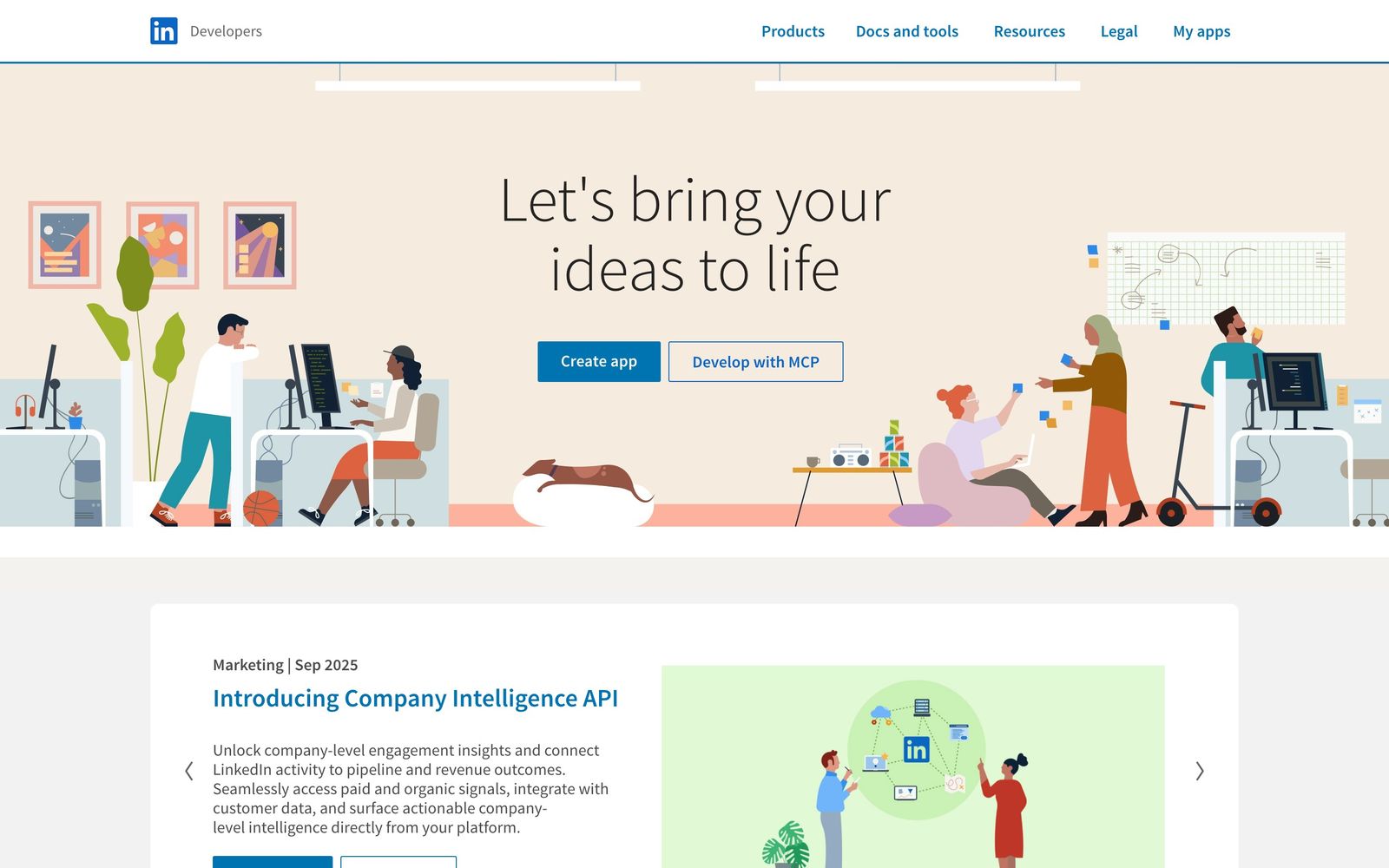
Getting the key takes four steps, all inside the LinkedIn Developer Portal (developer.linkedin.com).
- Create an app. Sign in and select "Create app" from the Developer Portal homepage.
- Open the Auth tab. This is where the Client ID (the API key) and Client Secret appear once the app is created, under "My apps" in the Portal.
- Add Products. Open Permissions, Sign in with LinkedIn and Share on LinkedIn, are added self-service under the app's Products tab. Anything past those two waits on a LinkedIn review before the corresponding scopes show up on the Auth tab.
- Set a redirect URL. Before you can run the authorization flow, the app needs at least one callback URL configured, since LinkedIn will only send an authenticated member back to a URL the app has registered.
None of these steps costs money. The Client ID and Client Secret exist the moment step one finishes; steps two through four determine what the app is actually allowed to do with them.
Build LinkedIn outreach on one API
Campaigns, sender rotation, reply detection and safeguards behind one API with webhooks, on LinkedIn accounts your customers already connect.
Public pricing from $16.90 per sender. White-label available.
How does LinkedIn OAuth 2.0 work?
LinkedIn's own docs put it plainly: "The LinkedIn API uses OAuth 2.0 for user authorization and API authentication." There are two flows, and which one you need depends on whether the API call acts on behalf of a specific member or just on behalf of your application.
The member-facing flow, LinkedIn's 3-legged OAuth, starts by sending the member's browser to an authorization URL carrying your Client ID, your redirect URL, a state value and the scopes you are requesting.
GET https://www.linkedin.com/oauth/v2/authorization
  ?response_type=code
  &client_id={your_client_id}
  &redirect_uri={your_callback_url}
  &state={csrf_token}
  &scope=openid%20profile%20email%20w_member_social
Not every member sees a consent screen on that redirect. If the member has already granted your app this exact set of scopes before, LinkedIn skips the prompt: on an existing grant, "the authorization screen is bypassed and the member is immediately redirected to the URL provided in the redirect_uri query parameter." Only a first-time request, a timed-out permission, or a manually revoked grant sends the member through the full consent window again.
Two details here matter more than they look. First, "the authorization code has a 30-minute lifespan and must be used immediately," so an app that queues the code for later processing will simply lose it. Second, the state value is not optional in practice: your application should check that the state value it gets back matches what it sent, because a mismatch is treated as a possible CSRF attempt and, per LinkedIn's own guidance, "your application should return a 401 Unauthorized error code" in that case.
Once the member approves, you exchange the code for an access token at the same endpoint LinkedIn documents for this step.
POST https://www.linkedin.com/oauth/v2/accessToken
Content-Type: application/x-www-form-urlencoded

grant_type=authorization_code
code={authorization_code}
client_id={your_client_id}
client_secret={your_client_secret}
redirect_uri={your_callback_url}
60 days
LinkedIn OAuth access token lifespan, verified September 2026
The response carries the access token itself. "Currently, all access tokens are issued with a 60-day lifespan," which LinkedIn's docs express as an expires_in value of 5,184,000 seconds. A refresh token can come back in the same response too, where LinkedIn issues one, letting the app renew access without sending the member through authorization again. LinkedIn is specific about who actually gets one. "Programmatic refresh tokens are available for a limited set of partners," so do not design a renewal flow around a refresh token until you have confirmed your app's Products include it.
What is the 2-legged client credentials flow, and what are its limits?
The 2-legged flow, LinkedIn's client credentials grant, is for calls that do not act on behalf of any specific member, only on behalf of your application itself. It swaps grant_type=authorization_code for grant_type=client_credentials and drops the member-specific parameters entirely.
POST https://www.linkedin.com/oauth/v2/accessToken
Content-Type: application/x-www-form-urlencoded

grant_type=client_credentials
client_id={your_client_id}
client_secret={your_client_secret}
The limits are stated as plainly as the mechanics. "Your application cannot access these APIs by default," meaning client credentials access, like everything else, depends on which Products LinkedIn has approved for the app. And it is scoped out entirely from one whole category: "2-legged OAuth authentication is not available for Marketing APIs." If you would rather not build the request by hand while testing, the Developer Portal also ships a manual token generator for both flows.
A successful request here comes back on a much shorter clock than the member flow. LinkedIn's own sample response for this grant shows an expires_in of 1,800, a 30-minute lifespan, against the 60 days a 3-legged access token gets. The documented response for this flow lists only access_token and expires_in, no refresh token field, and the guidance is simple: once the 30 minutes run out, request a new token with the same Client ID and Client Secret.
Both OAuth flows fail with specific, documented errors rather than a generic failure. On the member flow, a redirect_uri or client_id that does not match what is registered on the app returns a 401 before the member ever reaches the consent screen, and a missing grant_type, code, client_id, client_secret or redirect_uri on the token exchange returns a 400 naming that exact parameter. The 2-legged flow adds one error specific to itself: an app whose Products do not cover client credentials access gets a 401 telling it plainly that the application is not allowed to create application tokens, which is a Products gap to fix in the Portal, not a malformed request to debug.
| OAuth flow | Grant type | Who it is for | Key limit |
|---|---|---|---|
| 3-legged (Authorization Code) | authorization_code | Acting on behalf of a specific LinkedIn member | Authorization code expires in 30 minutes; access token lasts 60 days |
| 2-legged (Client Credentials) | client_credentials | App-level access not tied to a member | Access token lasts 30 minutes; not available for Marketing APIs; no default access until Products are approved |
What can you do with the key on day one?
A fresh key unlocks exactly two things without any review: signing a member in and posting on their behalf, because "Open Permissions are the only permissions that are available to all developers without special approval." Everything else on this page's own permission list needs LinkedIn to say yes first.
| Permission | Scope | What it lets your app do |
|---|---|---|
| Sign in with LinkedIn (OpenID Connect) | profile | Read the member's name, headline and photo |
| Sign in with LinkedIn (OpenID Connect) | Read the member's primary email address | |
| Share on LinkedIn | w_member_social | Post, comment and like on behalf of the authenticated member |
That is the entire day-one surface, plus the openid scope itself, which LinkedIn's Sign In with LinkedIn documentation describes as "Required to indicate the application wants to use OIDC to authenticate the member" and which must be requested to receive an ID token. There is no open-permission path to reading someone else's profile beyond the authenticated member, no open path to search, and no open path to messaging. Our guide to the LinkedIn Profile API covers what a Product approval actually adds once you go looking for profile data beyond your own authenticated member.
What requires LinkedIn approval?
Nearly everything past Open Permissions runs through a LinkedIn approval path, and LinkedIn's own docs describe the split by business line rather than by individual scope: Learning, Marketing, Sales, Talent and Compliance each sit behind their own review.
| Category | What it covers | Approval path |
|---|---|---|
| Learning | Learning-related API integrations | Apply through the Request API Access page in the LinkedIn Learning API space |
| Marketing | Advertising API | Requires LinkedIn approval |
| Sales | Sales Navigator analytics, display, validation and profile data via r_sales_nav_analytics, r_sales_nav_display, r_sales_nav_validation, r_sales_nav_profiles | Approved Sales Navigator Application Platform (SNAP) partner |
| Talent | Recruiter System Connect, Apply Connect, Apply with LinkedIn, Premium Job Posting | LinkedIn Talent partner programs |
| Compliance | r_compliance, w_compliance | Closed: LinkedIn states access "is closed and may not be requested" |
Compliance is the one row worth reading twice: it is not a slow approval, it is a door that does not open. LinkedIn's docs describe it as closed rather than merely restricted, which puts it in a different category from Sales or Talent, where an accepted partner program is at least a route that exists. Our piece on the Sales Navigator API goes further into what a SNAP partnership actually unlocks once approved, since the permission names alone do not tell you what the resulting data looks like.
Why can an API key not send messages or connection requests?
An API key cannot send a connection request or a first message on its own because both actions sit behind LinkedIn's most restricted APIs, gated to approved partners rather than Open Permissions. The Connections API makes the restriction explicit: "The use of this API is restricted to those developers approved by LinkedIn."
Even once approved, the Connections API only returns what the authenticated member can already see. "The Connections API returns a list of 1st-degree connections for a user who has granted access to their account via OAuth," and, in LinkedIn's own words, "You cannot 'browse connections.'" Only the authenticating member's own first-degree connections come back; second-degree connections "are not available from LinkedIn" through this API at all, and every result still respects each member's own privacy settings.
GET https://api.linkedin.com/v2/connections?q=viewer&start=0&count=50
Authorization: Bearer {access_token}
That call needs the r_1st_connections permission, or r_compliance, and LinkedIn notes that the "Recommended max limit of pagination count is 50" per request. The same endpoint can return just the total instead of the list: requesting the paging field alone, with projection=(paging), comes back with a total count under the same permissions, no separate product or permission required.
LinkedIn documents a second, separate way to reach that same number: the Connections Size API. It sits on its own page and is gated the same way as everything else in this section: "To access the Connections Size API, you must apply and be accepted to one of LinkedIn's Partner Programs." It runs on the r_1st_connections_size permission, described as "READ access to the number of 1st-degree connections within the authenticated member's network," and it only ever returns the count for the currently authenticated member, never for anyone else. The request needs a Person ID first, fetched with GET https://api.linkedin.com/v2/me?projection=(id) under r_liteprofile, then appended to GET https://api.linkedin.com/v2/connections/urn:li:person:{Person ID}. Both mechanisms return the same kind of number, one as a paging.total field on the Connections API, one from a dedicated endpoint and permission, so which you reach for comes down to which permission your app already carries.
Sending an invitation runs into the same wall from a different direction. The Invitations API states plainly that "Usage of this API is restricted to approved partners, subject to limitations via API agreement." Even once approved, the same page is direct about the limit: "You can only send invites on behalf of the authenticated user," never on behalf of anyone else. Our guide to the LinkedIn Messaging API breaks down what an approved partner can and cannot do once messaging permissions are actually granted, and where account-based tools fill the gap Open Permissions leaves behind.
How do you keep your Client Secret safe?
LinkedIn states the rule for the Client Secret in one direct warning: "Do not share your Client Secret value with anyone, and do not pass it in the URL when making API calls." Treat that as the floor, not the ceiling, of what "keep it safe" means in practice.
In practice that means storing the Client Secret only on a server your team controls, never in a mobile app binary, a browser bundle, or a public repository, since any of those puts it somewhere a Client ID alone can be paired with. It also means never logging the full value, even in debug output, and treating a leaked Client Secret as a full compromise of the app's identity rather than a minor incident, since anyone holding both the Client ID and the Client Secret can request access tokens exactly as your application would.
What do teams use when the official API does not cover outreach?
Most teams building outbound LinkedIn workflows hit the same wall this guide has been describing: Open Permissions cover sign-in and posting, but connection requests, first messages and search all sit behind partner programs LinkedIn approves case by case, on its own timeline. A few different approaches have grown up around that gap, and they are not interchangeable.
Providers such as Unipile, Linked API and Edges act through a LinkedIn account a customer already owns and connects, rather than through LinkedIn's own partner approval process. That is a fundamentally different path from the official API described in this guide: it sits outside LinkedIn's own program, and it is governed by the LinkedIn User Agreement's provisions on automated access rather than a Partner Program agreement. Anyone evaluating this route should read our guide to whether LinkedIn automation is safe before choosing an account, a rate, or a workflow, since the account-safety controls a provider builds in matter as much as the endpoints it exposes. Our outreach API roundup compares several of these providers side by side.
Where Swarmhit fits
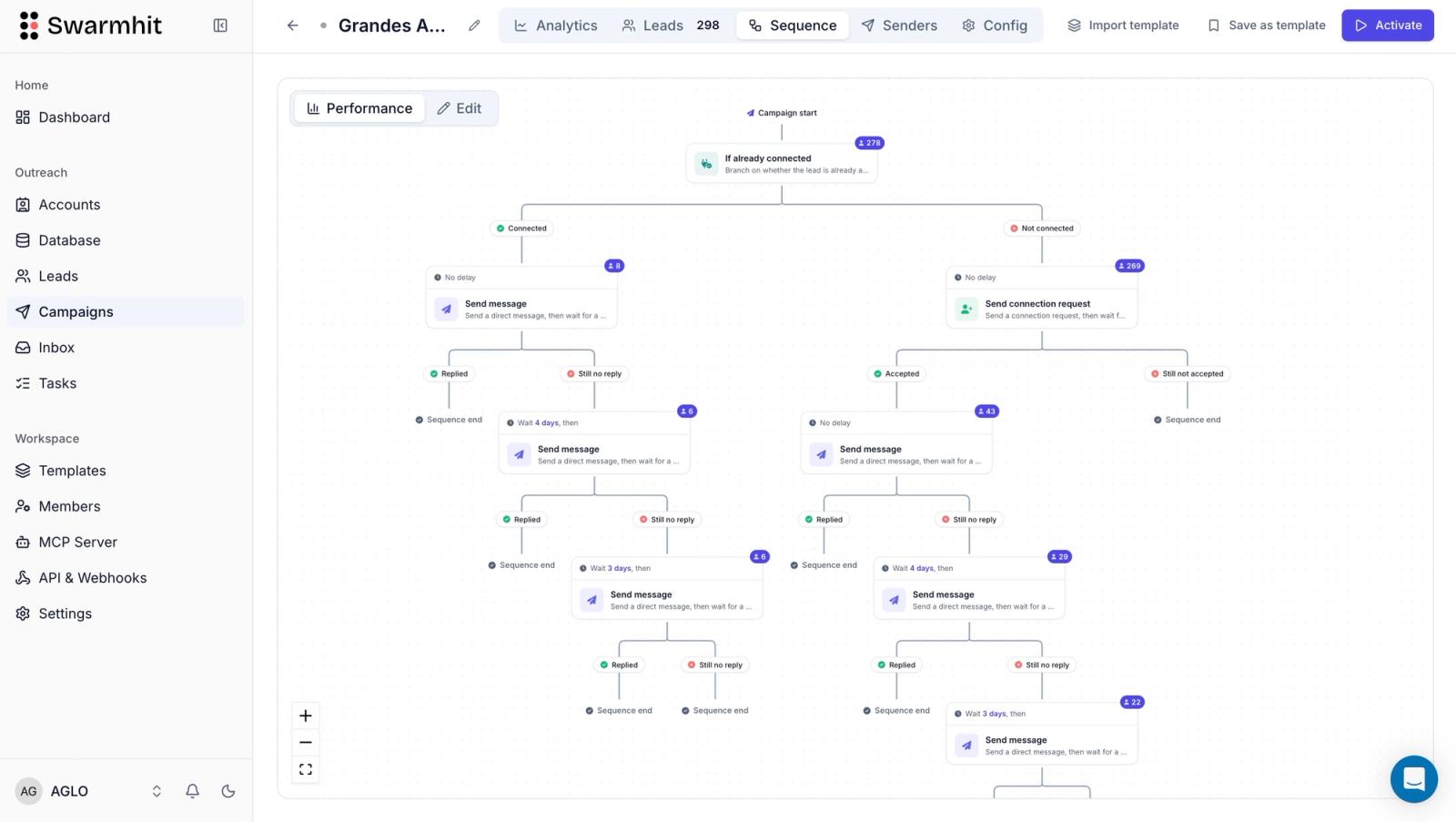
Swarmhit's infrastructure API belongs in this same account-based category, not the official partner program described above. It runs LinkedIn actions, connection requests, messages, voice notes, post comments and InMail, across LinkedIn accounts a customer connects themselves, rather than reaching them through r_1st_connections, the Invitations API, or any other LinkedIn-approved permission. Each sender gets a dedicated proxy, managed auto-warmup, health checks and one of 250+ safeguards monitored around the clock, and multiple senders can run inside a single campaign with rotation, landing replies in one unified inbox with AI interest tags. CRM connectivity runs through API and webhooks, so a reply or a new lead can trigger a workflow without polling. Swarmhit's pricing is public: LinkedIn is tiered per connected sender, from $16.90 a month for the first 50 down to $6.90 between 1,501 and 2,500 senders, and cold email starts at $59 a month for 50,000 sends.
None of that makes Swarmhit a replacement for LinkedIn's own program: it does not carry SNAP, Talent or Compliance permissions, and it does not turn an unapproved app into an approved partner. What it replaces is the manual work of building sender rotation, pacing and reply handling yourself on top of a raw, connected-account API. Our comparison of LinkedIn MCP versus the API covers the same account-based approach from the angle of wiring an AI agent into it instead of a traditional backend.
FAQ
Is a LinkedIn API key free?
A LinkedIn API key is free to create: registering an app in the Developer Portal costs nothing, and the Client ID and Client Secret it produces carry no fee on their own. What can cost money is the Product or Partner Program a given scope sits behind, since Sales, Talent and Marketing approvals are LinkedIn's call, not a tier you unlock by upgrading. Our guide to whether the LinkedIn API is free covers where costs show up once an app moves past Open Permissions.
Where do I find my LinkedIn API key?
A LinkedIn API key sits on the Auth tab of an app you have created in the Developer Portal, under My apps. That is where LinkedIn displays the Client ID (labeled Consumer key/API key in its own docs) next to the Client Secret, both generated automatically the moment the app is created, with no separate request needed to view them once the app exists.
What is the difference between a LinkedIn Client ID and Client Secret?
A LinkedIn Client ID and Client Secret belong to the same app but do different jobs. The Client ID identifies your application in every OAuth request, from the authorization redirect to the token exchange, and is safe to expose in a URL or client-side code. The Client Secret proves the app is really yours when it exchanges a code or requests a token, and LinkedIn states it must stay private and never be passed in a URL. Losing the Client Secret compromises the app; the Client ID alone does not.
What is a LinkedIn API key used for?
A LinkedIn API key identifies your application in every OAuth 2.0 request it sends to LinkedIn, from the initial authorization redirect through to exchanging a code for an access token. On its own it authorizes nothing: what the key can actually do is entirely determined by which Products, Open Permissions plus whatever LinkedIn has separately approved, are attached to the app it belongs to.
How long does a LinkedIn access token last?
A LinkedIn access token issued through the 3-legged OAuth flow lasts 60 days from issuance, expressed in the token response as an expires_in value of 5,184,000 seconds. There is no way to extend that lifespan beyond the 60 days; instead, an application refreshes access by sending the member through authorization again, or by using a refresh token, where LinkedIn issues one, to renew access without repeating that step.
Does LinkedIn issue refresh tokens?
Refresh tokens can accompany a LinkedIn access token in the OAuth 2.0 response, where LinkedIn issues one, giving the app a way to renew access without sending the member through authorization a second time. LinkedIn states that programmatic refresh tokens are available for a limited set of partners, so treat one as something your app's Products may unlock rather than a field every application gets on every exchange.
What happens if my LinkedIn Client Secret leaks?
A leaked Client Secret compromises the application's identity outright, since anyone holding both the Client ID and the Client Secret can request access tokens exactly as the real application would. LinkedIn's own warning is direct on this: never share the Client Secret and never pass it in a URL when making API calls. Treat a suspected leak as an incident requiring a new Client Secret and a review of every place the old one was stored, logged or deployed.
Can an API key send LinkedIn messages or connection requests?
An API key cannot send a message or a connection request by itself, because both actions run through the Invitations API and the messaging permissions LinkedIn restricts to approved partners, not through Open Permissions every developer gets automatically. Even an approved partner can only send invitations on behalf of the authenticated member, never on behalf of another account, which keeps the API from being used to contact people at scale on someone else's identity.
Can an API key access Sales Navigator data?
An API key cannot reach Sales Navigator data on its own: r_sales_nav_analytics, r_sales_nav_display, r_sales_nav_validation and r_sales_nav_profiles are all gated behind approval as a Sales Navigator Application Platform (SNAP) partner, entirely outside Open Permissions. An app has to apply through that program and be accepted before any Sales Navigator scope appears on its Auth tab alongside the Client ID and Client Secret it already has.
Conclusion
A LinkedIn API key is simpler than most tutorials make it sound, and more limited than most of them admit: it is the free Client ID an app gets on creation, and by itself it only opens sign-in and posting. Everything a developer actually wants from LinkedIn, connections, invitations, Sales Navigator data, talent products, runs through a separate LinkedIn-approved Product or Partner Program, each with its own review, its own permissions, and in Compliance's case, no review path at all.
Start with what the key already gives you for free, Open Permissions, before assuming you need an approval that may take a review cycle to land. And if the actual goal is outreach at scale, connection requests, messages and replies across more than one account, that gap sits outside LinkedIn's official program entirely, filled today by account-based providers whose safeguards and pricing structure matter as much as the endpoints they expose.


