

The LinkedIn Connections API lets an approved developer pull the list of a member's own first-degree connections through OAuth, and nothing more. LinkedIn restricts access to developers it has approved, the data returned covers only first-degree connections for the member who granted access, and there is no way to browse anyone else's network or reach second-degree contacts through it. Sending a connection request instead of just reading them runs through a separate, similarly restricted endpoint: the Invitations API.
This guide covers exactly who gets access to it, the permissions behind it (r_1st_connections, r_1st_connections_size and the closed r_compliance path), the request shapes for listing connections and sending invitations, what open permissions leave out, and what teams actually build when partner approval is not on the table.
What is the LinkedIn Connections API?
It is an OAuth-authenticated endpoint that returns a list of first-degree connections for a member who has granted an app access to their account. It sits on top of LinkedIn's broader developer platform, which runs on OAuth 2.0 for both user authorization and API authentication: most permissions and partner programs require explicit approval from LinkedIn, and only a small set of open permissions are available to every developer without special approval. Our LinkedIn API guide covers that wider surface, from the messaging endpoints to the marketing and talent products; the Connections API is one narrow slice of it.
That framing matters because a lot of write-ups treat "the LinkedIn API" as one product with one approval process. It is not. Connections and invitations sit in a category of their own, separate from the Sales Navigator Application Platform, the Advertising API and the Talent products, each gated behind its own permissions and its own review. The rest of this guide stays inside that one category: reading a member's own network, and sending invitations on their behalf.
Who can access the LinkedIn Connections API?
LinkedIn states the restriction plainly on its own developer documentation: usage of the Connections API "is restricted to those developers approved by LinkedIn." There is no self-service application form that guarantees access, and no review timeline appears on LinkedIn's developer documentation.
The permission structure underneath that gate is narrower than most developers expect. Two scopes open the door, and one path is closed entirely. The closed compliance path is documented on LinkedIn's developer page about getting access.
| Permission | What it grants | Access requirement |
|---|---|---|
| r_1st_connections | Read the authenticated member's own list of 1st-degree connections | Restricted to developers approved by LinkedIn |
| r_1st_connections_size | Return the count of the authenticated member's 1st-degree connections | Must apply and be accepted to one of LinkedIn's Partner Programs |
| r_compliance | Also covers Connections API access, for compliance-specific use cases | Access is closed and may not be requested |
The wider access picture explains why. LinkedIn organizes its developer permissions by business line, and each line has its own bar. The Advertising API requires approval on its own terms. Selling into Sales Navigator requires being accepted as a Sales Navigator Application Platform partner, with its own scopes (r_sales_nav_analytics, r_sales_nav_display, r_sales_nav_validation, r_sales_nav_profiles) separate from anything covered here. Talent products (Recruiter System Connect, Apply Connect, Apply with LinkedIn, Premium Job Posting) sit behind their own review, and Learning sits behind its own approval too. Connections and invitations are simply one more line in that list, not a shortcut around any of the others.
Build LinkedIn outreach on an API, not a partner application
Swarmhit runs campaigns, sender rotation, reply detection and safeguards behind one API with webhooks, on LinkedIn accounts your customers already connect.
Public pricing from $16.90 per sender. White-label available.
How do you get connections through the LinkedIn API?
Once r_1st_connections is granted, listing connections is a single authenticated GET request against the viewer's own account. Developers searching for a linkedin api get connections call are looking for exactly this endpoint, not a separate product.
GET https://api.linkedin.com/v2/connections?q=viewer&start=0&count=50
Authorization: Bearer {access_token}
By default the response returns Person URNs, the LinkedIn identifier format rather than readable names. Adding decoration parameters to the request pulls back id, first name and last name alongside the URN, which is the difference between a list of opaque identifiers and something your app can actually display. If your data pipeline stores a raw profile URL instead of a URN, our guide on how to get a LinkedIn ID covers converting between the two formats the Connections API and Invitations API both expect.
Pagination is capped, not unlimited. LinkedIn's own documentation recommends a maximum count of 50 per page, matching the count=50 shown in the sample request above.
50
Recommended maximum pagination count on the Connections API, per Microsoft Learn
A separate parameter answers a different question: not the list, but the total. Adding a projection for paging metadata to the same query returns the count without paging through every connection to add them up yourself.
GET https://api.linkedin.com/v2/connections?q=viewer&projection=(paging)
Authorization: Bearer {access_token}
Getting just the connection count
LinkedIn also exposes a dedicated endpoint for exactly this number, separate from the projection above and gated behind its own permission. The Connections Size API returns only a count, nothing else, and it requires r_1st_connections_size, a scope LinkedIn grants only to developers "accepted to one of LinkedIn's Partner Programs."
GET https://api.linkedin.com/v2/connections/urn:li:person:{Person ID}The Connections Size API works the same way as the main endpoint in one important respect: it is scoped to the authenticated member alone. There is no version of this call that returns the connection count of a prospect, a lead or anyone other than the person who granted OAuth access.
What can you not do with the LinkedIn Connections API?
It is built around one hard boundary: you cannot browse connections. LinkedIn's own documentation uses that exact phrase, and it is worth taking literally rather than as a soft limitation. The endpoint returns first-degree connections for the authenticated member and nobody else's network, ever.
Second-degree connections make that boundary concrete. LinkedIn's documentation states they "are not available from LinkedIn" through this API at all, not restricted, not paginated differently, simply absent. If a workflow needs to reach a prospect's connections rather than your own account's connections, the Connections API was never built to answer that question.
A third constraint sits underneath both of the above: every result is subject to each connection's own privacy settings. A member who has limited what their network can see about them limits what the Connections API returns about them too, regardless of what permission the requesting app holds. The API inherits LinkedIn's privacy controls rather than overriding them.
Is there a LinkedIn invitation API?
Yes, and it answers a narrower question than most developers expect: sending, not managing, an invitation on behalf of one already-authenticated member. LinkedIn documents it as the Invitations API, and the restriction mirrors the Connections API almost exactly. LinkedIn's own words: "Usage of this API is restricted to approved partners, subject to limitations via API agreement."
Sending an invitation is a single POST with an invitee reference and an optional message.
POST https://api.linkedin.com/v2/invitations
Authorization: Bearer {access_token}

{
  "invitee": "urn:li:person:{Person ID}",
  "message": {
    "com.linkedin.invitations.InvitationMessage": {
      "body": "Optional custom note"
    }
  }
}
The invitee field is not limited to a person URN. LinkedIn's documentation lists four accepted forms: a person URN, an email address, a phone account, or a raw email string. The message field is optional; omitting it sends LinkedIn's own default invitation text rather than a blank one. One constraint has no exception: you can only send invites on behalf of the authenticated user, never for an account your app does not directly hold a token for.
Once sent, an invitation is not a fire-and-forget call. LinkedIn's documentation describes retrieving an invitation by its URN to check whether it has been accepted or rejected, and separately retrieving the full sent and received lists for the authenticated member. Building a reliable integration on this endpoint means polling or storing those states, not assuming every invitation lands. For the exact request shapes and field definitions, see LinkedIn's own Invitations API documentation.
What do open permissions actually allow?
Open permissions are the one category on LinkedIn's developer platform that skips the approval process entirely. There are exactly two: Sign in with LinkedIn using OpenID Connect, and Share on LinkedIn.
Sign in with LinkedIn grants the profile scope (name, headline, photo) and the email scope (primary email address). Share on LinkedIn grants w_member_social, which lets an authenticated app post, comment and like on the member's own behalf. Both are added self-service from the Products tab of an app in the LinkedIn Developer Portal, no review queue, no partner program. Neither one touches connections or invitations in any way.
What the Client ID and Client Secret actually are
Every app created in the Developer Portal is assigned a unique Client ID and Client Secret, and the term "LinkedIn API key" that shows up in a lot of tutorials is simply the Client ID under a different name. LinkedIn's own documentation is direct about the Client Secret: "do not share your Client Secret value with anyone, and do not pass it in the URL when making API calls." Holding a Client ID and Client Secret grants nothing on its own beyond whichever products are enabled on that specific app; it does not unlock messaging, connection requests, search or profile lookups of other members under open permissions.
How long does an access token last?
For the standard three-legged flow, a member is redirected to an authorization URL carrying client_id, redirect_uri, state and scope, and the authorization code that comes back is short-lived by design: it "has a 30-minute lifespan and must be used immediately" to exchange for a token. LinkedIn's documentation tells the integrating application to check the returned state parameter against the one it sent, as the guard against cross-site request forgery, and to return a 401 Unauthorized response on a mismatch rather than failing silently.
60 days
Access token lifespan LinkedIn issues via OAuth 2.0, expires_in 5,184,000 seconds
The numbers that matter most sit together below.
| Limit | Value |
|---|---|
| Recommended max pagination count, Connections API | 50 |
| Authorization code lifespan | 30 minutes |
| Access token lifespan, all scopes including r_1st_connections | 60 days |
Once exchanged, the resulting access token carries a 60-day lifespan across the platform, an expires_in value of 5,184,000 seconds regardless of which scope the token was issued for. Refresh tokens are not automatic: LinkedIn only includes one in the response where it chooses to, so an integration should check for its presence rather than assume it exists. A separate, application-only flow exists using grant_type=client_credentials, but LinkedIn states plainly that "your application cannot access these APIs by default" through that flow, and it is explicitly unavailable for Marketing APIs. Our breakdown of LinkedIn API pricing covers what a working integration actually costs once a token is in hand, since the free access tier and the approved partner tiers land in very different places.
How do teams send connection requests programmatically without partner access?
Most LinkedIn outreach automation running in 2026 does not go through the Connections API or the Invitations API at all, because the approval bar on both is high and neither one supports the workflows most teams actually want: reaching prospects at scale, not just a member's own existing network. Instead, a category of account-based providers, Unipile, Linked API, Edges and Swarmhit's account-based API among them, operates through a LinkedIn member account the customer already owns and connects, rather than through LinkedIn's partner approval process.
That route sits outside LinkedIn's official developer program entirely. It is governed instead by the LinkedIn User Agreement's restrictions on automated access (section 8.2), not by an API agreement reviewed and signed with LinkedIn's developer team. The practical consequence is that account-safety controls, not a compliance form, become the real engineering problem: pacing, sending windows, session health and proxy setup decide whether the connected account keeps working. Our guide to LinkedIn connection limits covers what operators observe, and LinkedIn's own help page on invitations and restrictions confirms that limits exist without publishing a number.
Whether that trade-off is acceptable depends on what "safe" actually means for a given account and use case, which is a longer question than a single limit number can answer. Our guide on whether LinkedIn automation is safe covers what actually triggers a restriction beyond raw sending volume, since pacing and behavioral consistency matter as much as any single cap.
LinkedIn Connections API vs Invitations API vs an account-based outreach API: how do the routes compare?
Laid side by side, the three routes answer three different questions, and conflating them is where most confusion about "the LinkedIn API" starts.
| Connections API | Invitations API | Account-based outreach API | |
|---|---|---|---|
| Access | Restricted to developers approved by LinkedIn (r_1st_connections or r_compliance) | Restricted to approved partners under an API agreement | Operates through a LinkedIn account the customer already owns and connects, no partner approval from LinkedIn |
| What it does | Returns the authenticated member's own 1st-degree connections, or just the count | Sends a connection invitation on behalf of the authenticated member and reports its state | Sends connection requests, messages and other native actions from connected accounts, with campaign sequencing and reply handling |
| Who it is for | Apps built by developers LinkedIn has approved, that need a member's own network inside a feature | Approved partner apps sending invitations as part of a reviewed workflow | Teams and agencies running outreach at scale who are not going through LinkedIn's partner program |
Read that table as a decision tree rather than a ranking. If the product genuinely needs to show a user their own network inside an approved app, the official Connections API is the only route with LinkedIn's direct backing. If the goal is reaching prospects who are not already connections, at volume, across more than one seat, neither official endpoint was built to do that, which is exactly the gap the account-based category fills.
LinkedIn's official Connections and Invitations APIs at a glance
Pros
- Data comes straight from LinkedIn, with no third-party session to keep alive
- Access is governed by a written API agreement, not the User Agreement's general automation clause
- Built for exactly one job: reading or growing a member's own network inside an approved app
Cons
- Restricted to developers LinkedIn approves, with no published timeline or acceptance criteria beyond the partner programs listed
- Only ever touches the authenticated member's own 1st-degree connections, never a prospect's network or 2nd-degree reach
- No bulk sending: the Invitations API sends one invitation per call, on behalf of the authenticated user only
How is an account-based API different from LinkedIn's official developer program?
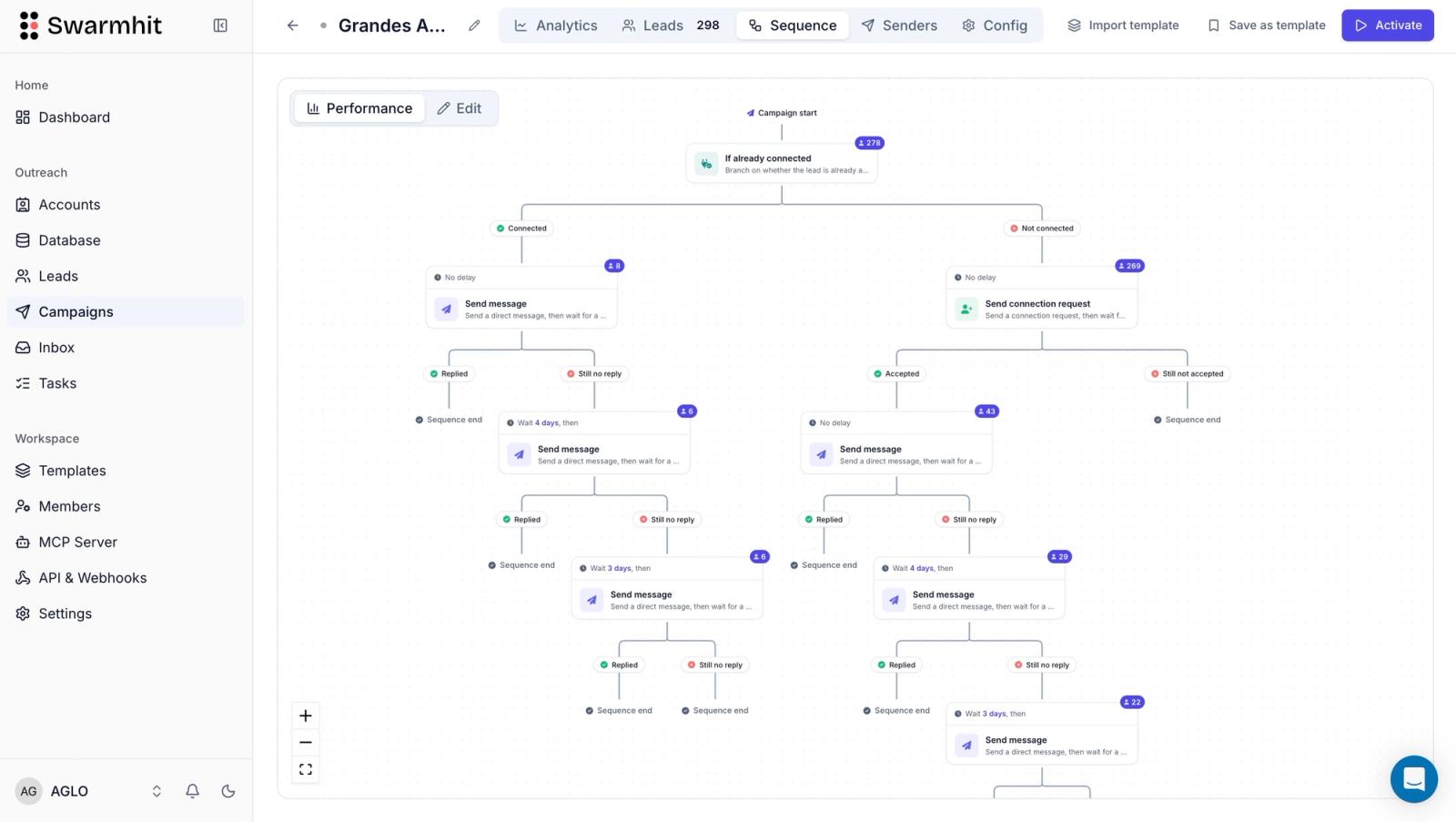
Swarmhit's category is the account-based one from the comparison above, and it is worth stating the difference honestly rather than folding it into the official program. Swarmhit does not hold LinkedIn partner approval for the Connections or Invitations APIs, and it does not claim to. Its API operates on LinkedIn accounts customers already own and connect, each running behind a dedicated proxy with managed auto-warmup, health checks and smart caps, monitored by 250+ safeguards around the clock.
What that API exposes is built for outreach rather than for reading a member's own network: multi-sender campaigns with automatic sender rotation, a unified inbox with AI interest tags, and AI personalization drawn from each prospect's profile, posts and company news. Native LinkedIn actions, including connection requests, voice notes, post comments and InMail, run through the same connected-account model our LinkedIn messaging API guide describes for sending messages once a connection exists. Sales Navigator searches can be imported directly rather than rebuilt by hand, and any account-based scraping only runs through accounts the customer owns and connects, capped at 2,500 profiles a day from Sales Navigator search and 1,000 a day from standard search, caps Swarmhit enforces on its own side rather than numbers LinkedIn publishes. There is no cookie-less scraping and no resale of the data collected. CRM connectivity runs through API and webhooks rather than a built-in sync, and agencies can run the same system under their own brand through the API, or talk to the sales team at Cadency, the outreach app built on Swarmhit, for a ready-made one.
None of that replaces the Connections or Invitations APIs, and it is not trying to. A team that genuinely needs LinkedIn's own partner-approved read access to a member's network should pursue r_1st_connections through the process described above. A team that needs to run outreach across prospects who are not yet connections, at a volume neither official endpoint supports, is the audience this category, Swarmhit included, actually serves. Our broader outreach API comparison covers how several account-based providers differ from each other on that same job, and our Unipile alternatives piece goes deeper on one specific comparison inside the category.
FAQ
Is the LinkedIn Connections API free to use?
Access itself carries no published price on LinkedIn's developer pages, but availability is the real constraint, not a fee. It is restricted to developers LinkedIn approves, so the practical cost is clearing that approval bar rather than paying a listed rate. Our guide on whether the LinkedIn API is free covers what actually gets billed once an app is inside an approved program.
What is the r_1st_connections permission?
r_1st_connections is the OAuth scope that unlocks the Connections API itself: it lets an approved app read the authenticated member's own list of first-degree connections, nothing wider. LinkedIn also accepts r_compliance for the same endpoint, though that permission is closed and cannot be requested by ordinary developers. Without one of these two scopes granted, the connections endpoint returns nothing at all.
What is the LinkedIn Connections Size API?
The Connections Size API is a narrower endpoint that returns only a number: the count of the authenticated member's first-degree connections, retrieved from a URL keyed to that member's person URN. It requires the r_1st_connections_size permission, which LinkedIn grants only to developers accepted into one of its Partner Programs, and it works for the authenticated member alone, never for looking up someone else's connection count.
Is there a LinkedIn connection request API?
Sending a connection request programmatically runs through the Invitations API, a separate endpoint from the one that reads existing connections. Usage is restricted to approved partners under an API agreement, the call posts an invitee reference and an optional message, and invitations can only be sent on behalf of the authenticated user. There is no separate consumer-facing endpoint outside this partner-only one.
Can you get a list of someone else's LinkedIn connections through the API?
The Connections API returns only the authenticated member's own network, by design. LinkedIn's documentation states plainly that you cannot browse connections: the endpoint returns first-degree connections for the person who granted OAuth access, second-degree connections are not available from LinkedIn at all, and every result is further limited by each connection's own privacy settings.
Do open permissions let you read a member's connections?
Open permissions cover two things only: Sign in with LinkedIn using OpenID Connect, which returns a member's name, headline, photo and email, and Share on LinkedIn, which lets an app post, comment or like on that member's behalf. Neither open permission touches connections or invitations. Reading or growing a network still requires the restricted r_1st_connections or invitations scopes, approved the same way as any other partner permission.
How long does a LinkedIn access token last?
LinkedIn issues OAuth 2.0 access tokens with a 60-day lifespan, an expires_in value of 5,184,000 seconds, regardless of which permission the token carries, including r_1st_connections. The authorization code exchanged for that token is far shorter-lived: it lasts 30 minutes and must be used immediately, and LinkedIn's documentation tells the integrating application to return a 401 Unauthorized error when the state parameter does not match, the recommended guard against cross-site request forgery.
What happens if you use an unofficial LinkedIn API instead?
Account-based APIs operate through a LinkedIn member account the customer already owns and connects, rather than through LinkedIn's partner approval process, which is how most LinkedIn outreach automation actually runs in 2026. That route sits outside LinkedIn's official program and is governed by the LinkedIn User Agreement's restrictions on automated access, so account-safety controls like pacing and sending limits become the real engineering problem, not a compliance form.
Is the LinkedIn Invitations API the same as the LinkedIn Connections API?
The Invitations API and the Connections API are two separate restricted endpoints, not one system. The Connections API reads a member's existing first-degree connections; the Invitations API sends new connection invitations and checks whether they were accepted or rejected. Each requires its own approval path, and having one does not grant access to the other.
Is the LinkedIn Connections API worth applying for in 2026?
Worth applying for depends entirely on what the app actually needs from a member's network. It is worth pursuing if a product genuinely needs to read a user's own first-degree connections inside an approved feature, since there is no substitute for official access to that data. It is the wrong tool for outreach at scale, list building, or reaching anyone beyond the authenticated member, which is why most teams building those use an account-based API instead.
Conclusion
The LinkedIn Connections API and its Invitations API counterpart do exactly one job each, and both are gated behind approval that most developers will not clear on the first try: reading a member's own first-degree network, and sending a new invitation on that member's behalf. Neither one was built for reaching prospects at scale.
The decision that actually matters is which job an integration needs done. Apply for r_1st_connections through LinkedIn's partner process if the goal is showing a user their own network inside an approved app. Look at the account-based category instead if the goal is outreach: connection requests, messages and sequencing across prospects who are not yet connections, running on accounts a team already owns.


